

Choosing the best CRM software is less about finding the most powerful tool than finding the one your team will actually update on a Friday afternoon. A CRM only pays for itself if the notes and next steps are current, and that depends on how little friction it puts in the way.
This round-up is for small and mid-sized teams choosing their first or second CRM: a founder moving off a spreadsheet, a five-person sales team outgrowing shared inboxes, an operations lead consolidating three tools into one.
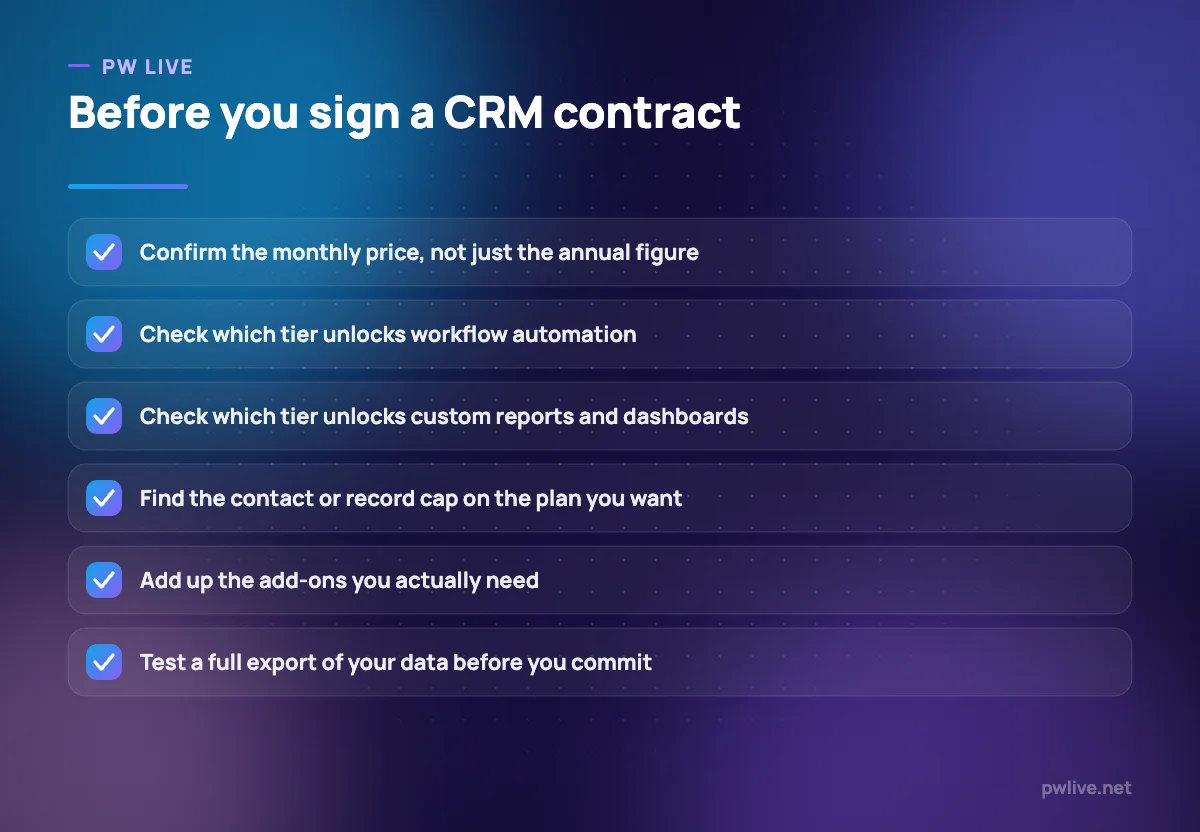
Read it with three traps in mind. The headline price is almost always per user per month billed annually, and monthly billing costs more. Automation and custom reporting are usually gated one or two tiers above the entry plan. And the largest editions are frequently quote-only, so the published list is not the whole price list.
How we chose these tools
Nobody at PW Live ran hands-on trials of these platforms, and this article does not claim otherwise. Every plan name, price, seat limit and record cap below was taken from each vendor’s own public pricing page, opened and read on 8 September 2026, and each entry links to the exact page we checked. Where a vendor publishes no number, we write “pricing on request” rather than estimating. Pricing changes often and several vendors localise it by country, so confirm current figures before you buy. No vendor paid for inclusion.
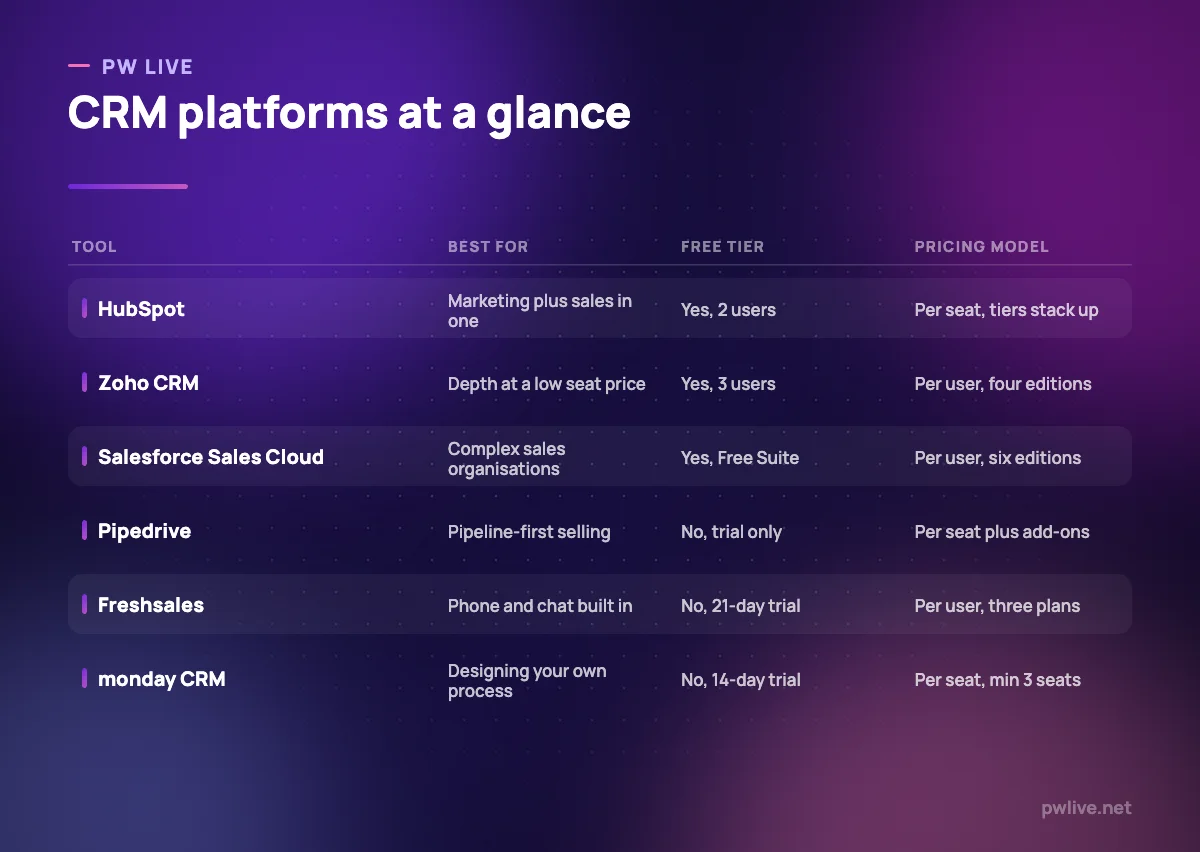
1. HubSpot – best for teams that want marketing and sales in one account
HubSpot is the usual answer to “we need a CRM but also email, forms and reporting”. The free tools give you contacts, deal pipelines and dashboards without a card, and paid tiers add marketing and service on the same contact database. If you are still building a list, our guide to email marketing basics will tell you whether you need that marketing side yet.
What it does well – Free tools are genuinely usable for up to two users and 1,000 contacts. – One contact record shared across sales, marketing and service tools. – Large integration catalogue and unusually thorough documentation. – Both annual and monthly per-seat prices are published clearly.
Where it falls short – Professional carries a $1,500 one-time onboarding fee, Enterprise $3,500. – The free tier caps you at two users and 1,000 contacts. – Costs compound quickly once seats span more than one hub.
Pricing: Free tools $0 for up to 2 users; Starter Customer Platform $7 per seat per month billed annually, $20 billed monthly. Sales Hub Professional $90 per seat per month billed annually ($100 monthly) plus $1,500 onboarding; Enterprise $150 billed annually plus $3,500 onboarding. Verified on the HubSpot CRM pricing page and Sales Hub pricing page, 8 September 2026.
2. Zoho CRM – best for feature depth at a low per-seat price
Zoho CRM gives you more configurable machinery per seat than almost anything here: custom modules, scoring rules, workflow automation and a scripting layer. The trade-off is interface density. Zoho rewards teams willing to learn its admin screens and frustrates those who want something minimal.
What it does well – A free edition for three users that is a real plan, not a trial. – Deep customisation available on mid-tier editions, not only enterprise ones. – Fits alongside Zoho Books, Desk and Campaigns without extra integration work. – Four editions, so you step up gradually instead of doubling the bill.
Where it falls short – Dense interface with a real setup curve; budget configuration time. – Prices are localised and taxes are added on top, making comparison awkward.
Pricing: Free edition for 3 users. On the India pricing page we opened, Standard Rs 800, Professional Rs 1,400, Enterprise Rs 2,400 and Ultimate Rs 2,600 per user per month, with local taxes charged in addition and a discount advertised for yearly billing. Verified on the Zoho CRM pricing page, 8 September 2026.
3. Salesforce Sales Cloud – best for large or complex sales organisations
Salesforce is the reference implementation of enterprise CRM: custom objects, forecasting and territory models, approval processes and an enormous partner ecosystem. For a ten-person team, most of that is overhead. It is also the clearest example of why you should read the vendor’s own page, because the editions and prices differ by country.
What it does well – The deepest customisation model here, including custom objects and processes. – Publishes per-user prices for most editions rather than hiding everything. – A Free Suite tier is listed at $0 with lead, contact and opportunity management. – The largest ecosystem of integrations and trained administrators.
Where it falls short – Mid and upper editions are expensive per seat and billed annually. – Real deployments need admin time or a partner, a cost the price page omits. – Edition names and prices vary by country page, so check your own region.
Pricing: On the US page: Free Suite $0; Starter Suite $25 per user per month billed monthly or annually; Pro Suite $100, Core $195, Advanced $395, Max $550 per user per month billed annually, with Max routed through a “contact us” button. Some add-ons are priced separately. Verified on the Salesforce Sales Cloud pricing page, 8 September 2026.
4. Pipedrive – best for pipeline-first selling without clutter
Pipedrive is built around one idea: every open deal should have a scheduled next activity. Reps understand the board in a morning. The thing to watch is the add-on model, because lead capture, campaigns and documents are separately priced, so a cheap Pipedrive quietly becomes an expensive one.
What it does well – The clearest activity-driven deal board in this comparison. – Automations and email sequences arrive at the second tier, not the top. – Publishes the annual per-seat total as well as the monthly rate. – Large integration catalogue for teams that already use other tools.
Where it falls short – No permanent free plan, only a trial. – Lead generation, campaigns and documents are paid add-ons on top of seats. – Reporting is adequate rather than analytical at the lower tiers.
Pricing: Lite $14, Growth $39, Premium $59, Ultimate $79 per seat per month billed annually (Lite is one payment of $168 per seat per year). Add-ons include LeadBooster from $32.50 and Web Visitors from $41 per month. Monthly billing is offered at a higher rate. Verified on the Pipedrive pricing page, 8 September 2026.
5. Freshsales – best for built-in phone and chat without add-ons
Freshsales bundles a dialler, email and chat into the CRM rather than selling them as modules, which matters for teams whose day is conversations. Its entry price is the lowest published paid tier here, though the free plan Freshworks once offered is not described on the current pricing page.
What it does well – Phone, email and chat are part of the product, not separate purchases. – The lowest published entry price here at $9 per user per month billed annually. – Contact timelines pull activity from several channels into one view.
Where it falls short – No permanent free plan described; only a 21-day trial. – Telephony usage is metered separately from the seat price. – Advanced automation and reporting sit on Pro and Enterprise.
Pricing: Growth $9, Pro $39, Enterprise $59 per user per month billed annually; the page states annual billing saves about 20% against monthly. Verified on the Freshsales pricing page, 8 September 2026.
6. monday CRM – best for teams that want to design their own process
monday CRM is a sales layer on monday’s board-and-automation engine. Instead of adopting someone else’s process, you build the columns, statuses and automation recipes that match yours. A blank board is not a methodology, though, and teams without a defined process tend to build something inconsistent.
What it does well – Boards, views and automations are genuinely configurable without code. – Publishes annual and monthly per-seat prices side by side. – Recipes are approachable for non-technical staff, much like the tools in our guide to automation for non-programmers.
Where it falls short – Minimum of three seats, which penalises very small teams. – No free plan on the CRM product, only a 14-day trial. – Ultimate is quote-only, so the top of the ladder has no published price.
Pricing: Basic $12, Standard $17, Pro $28 per seat per month billed annually, or $18, $25 and $41 billed monthly. Ultimate is pricing on request. Plans start from three users. Verified on the monday CRM pricing page, 8 September 2026.
7. Copper – best for teams that live inside Google Workspace
Copper runs as a side panel in Gmail and syncs with Google Calendar and Contacts, so logging a conversation is a click rather than a context switch. That Google dependency is the product: if your team is on Microsoft 365, most of the advantage disappears.
What it does well – Deep Gmail and Google Calendar integration with a working side panel. – Contact and activity capture happens from the inbox with little manual entry. – Clear published prices for annual and monthly billing at every tier.
Where it falls short – Basic caps you at 2,500 contacts and Professional at 15,000. – Workflow automation, bulk email and reporting start only at Professional.
Pricing: Basic $23, Professional $59, Business $99 per seat per month paid annually, or $29, $69 and $134 billed monthly, excluding tax. Verified on the Copper pricing page, 8 September 2026.
8. Insightly – best for selling and delivering projects in one system
Insightly is a CRM with project management attached, which suits businesses where winning the work is half the job: a closed opportunity becomes a project with milestones in the same system. It is also the clearest example here of record caps as a pricing lever, so data growth rather than headcount can force an upgrade.
What it does well – Opportunities convert into delivery projects without leaving the system. – Record limits are published per tier, so capacity planning is straightforward. – Marketing, service and integration modules available as one bundle.
Where it falls short – No permanent free plan, only a 14-day trial. – The entry plan starts at $29 per user per month, high for a first CRM. – The all-in-one bundle is priced at account level and starts far higher.
Pricing: Plus $29, Professional $49, Enterprise $99 per user per month billed annually, with record caps of 100,000, 250,000 and 500,000. The all-in-one bundle starts at $899 per month at the Professional tier. Verified on the Insightly pricing page, 8 September 2026.
9. Capsule – best for small teams that want a simple contact database
Capsule is the least demanding CRM here: a tidy contact and opportunity database with tags, custom fields and a simple pipeline, with no ambition to be a marketing platform. One note on transparency: when we fetched its pricing page, the plan structure and contact limits rendered but the per-seat figures did not, so we are not quoting numbers we could not see.
What it does well – A free plan that is a real plan: two users and 250 contacts. – Contact limits are published clearly for every paid tier. – A very short learning curve for teams new to CRM. – Optional marketing add-on from $11 per month if you later need campaigns.
Where it falls short – The 250-contact free ceiling is reached quickly by anyone doing outbound. – Ultimate is quote-based and aimed at teams of five or more.
Pricing: Free plan for 2 users and 250 contacts. Paid tiers are sold per user per month with contact caps of 30,000, 60,000 and 120,000; Ultimate is pricing on request. The numeric seat prices did not appear in the page text we captured, so we have not stated them. Verified on the Capsule pricing page, 8 September 2026.
10. Odoo CRM – best for running CRM next to accounting and inventory
Odoo is a modular business suite, and its One App Free plan lets you run the CRM app alone, with unlimited users, at no cost on Odoo’s hosting. Switch on a second app and you pay a per-user price covering everything, which is good value across several modules and poor value if you only ever wanted a CRM.
What it does well – One App Free covers the CRM app with unlimited users on Odoo Online. – Paid plans include all apps, so accounting, stock and CRM share one database. – Open-source lineage and a self-hosting route, a theme we cover in open source software explained.
Where it falls short – The free plan is strictly one app; a second triggers full per-user pricing. – The CRM module alone is less polished than dedicated tools like Pipedrive.
Pricing: One App Free $0 for a single app with unlimited users. Standard $24.90 per user per month billed annually ($38.90 monthly); Custom $49.00 billed annually ($76.20 monthly). Verified on the Odoo pricing page, 8 September 2026.
How to choose between them
Start with billing basis, not features. Take the plan you think you want, find its monthly-billing price, and assume you will pay that for a quarter while you decide whether the tool sticks. If the annual saving is what makes it affordable, it is the wrong tier.
Then check the two gates that catch most buyers: which tier turns on workflow automation, and which turns on custom reporting. On several platforms here both sit above the entry plan, and a CRM you cannot report from is an address book, as we argue in the marketing metrics that matter.
Finally, let your existing stack settle close calls. Google Workspace teams should look hard at Copper; Zoho or Freshworks customers should stay in-suite; anyone who will need invoicing and stock control within a year should consider Odoo before buying two systems. If you are still proving demand, spend the effort on validating the business idea and run a free tier. More guides sit in our business section and the digital marketing skill track.
Key takeaways
- Advertised CRM prices are per user per month billed annually; monthly billing costs more.
- Automation and custom reporting are commonly gated above the entry tier.
- Real free plans exist on HubSpot, Zoho CRM, Capsule, Salesforce’s Free Suite and Odoo’s One App Free, each with a hard user, contact or app limit.
- Record and contact caps, not seat counts, force the upgrade on Copper, Insightly and Capsule.
- Top editions are often quote-only, including monday’s Ultimate and Capsule’s Ultimate.
- The CRM your team updates daily is worth more than the one with the longer feature list.
Frequently asked questions
What is the best CRM software for a small business?
For most small businesses the shortlist is HubSpot’s free tools, Zoho CRM’s free edition or Pipedrive’s entry plan. Choose on whether you need marketing built in, deep configuration, or a simple pipeline.
Is free CRM software good enough to run a business on?
For a small contact list, yes. The free plans from HubSpot, Zoho CRM and Capsule all cover contacts, deals and basic reporting, but each caps users or contacts, so plan for the point at which you outgrow it.
Why is CRM pricing shown per user per month?
Cost scales with the number of people using the system. The published figure usually assumes annual billing, so check the monthly rate before comparing tools.
Do CRM vendors publish all their prices?
No. Top-tier editions are often quote-only, including monday CRM’s Ultimate plan and Capsule’s Ultimate tier, and add-ons such as lead capture, telephony minutes and onboarding fees are priced separately.
Pricing checked 2026-09-08. 9 of 10 prices in this article were read from the vendor’s own pricing page on that date; the rest publish no figure, so we describe the model instead. Vendors change prices without notice, so open the linked page before you commit.
Keep learning with PW Live
Browse every tool comparison, or follow the Digital Marketing track to learn the skills these tools support.





Leave a Reply