

Choosing the best digital marketing tools is harder for a team of three than for a team of thirty, because every subscription competes with something else you need. A big team grows into an all-in-one suite; a small team pays for seats it never fills.
This list is for teams of one to about ten people running marketing alongside other work. It deliberately mixes categories rather than lining up ten similar products: measurement, advertising, social, email, design, forms, a first CRM, a simple site builder and automation.
You are not meant to buy all twelve. Read each entry for the limit, not the feature list. What separates these products for a small team is where the entry plan stops.
How we chose these tools
This round-up is based on each vendor’s public documentation and pricing pages, read on 8 September 2026. Nobody at PW Live ran hands-on trials. Every price and plan limit below came from the vendor’s own page on that date; where a vendor publishes no price, we say so rather than guessing. Pricing changes often, so confirm current details before you buy. No vendor paid for inclusion.
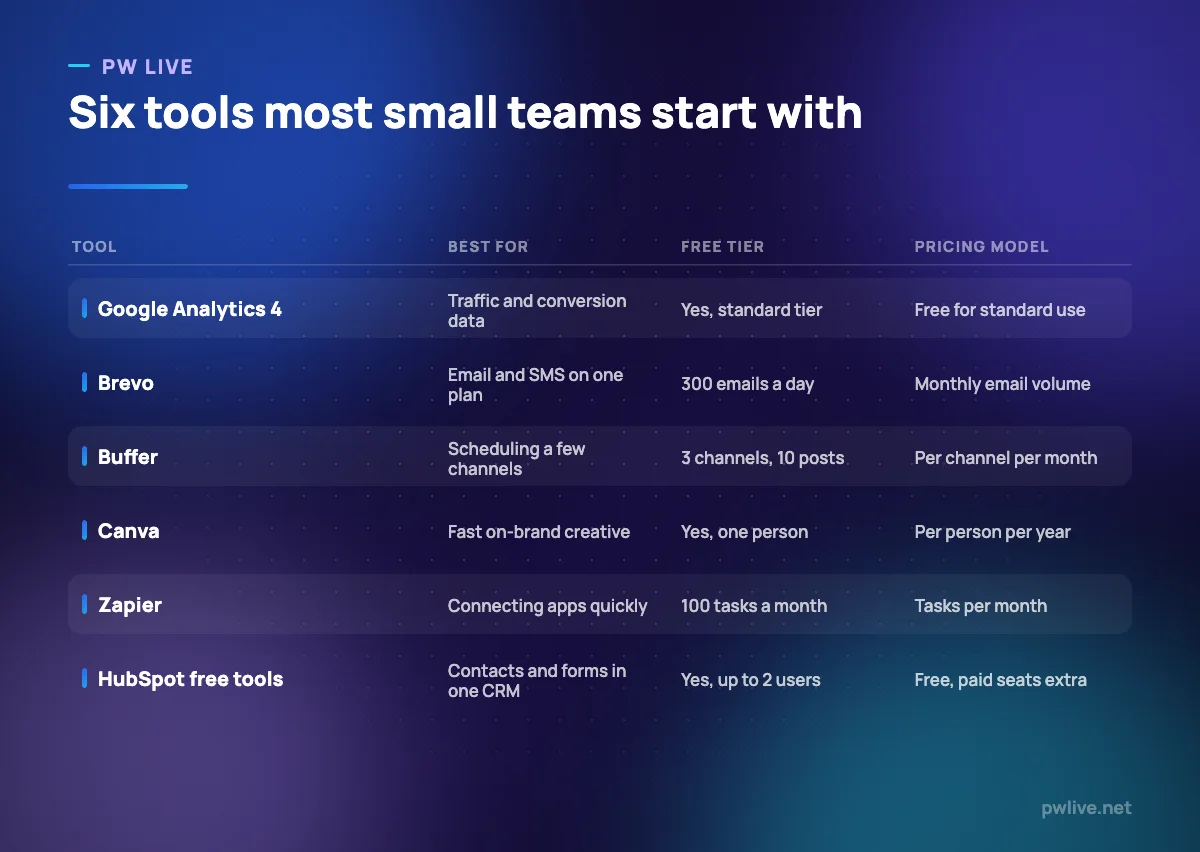
All prices below are as of 8 September 2026, in the currency the vendor lists.
1. Google Analytics 4 – best for seeing what visitors do
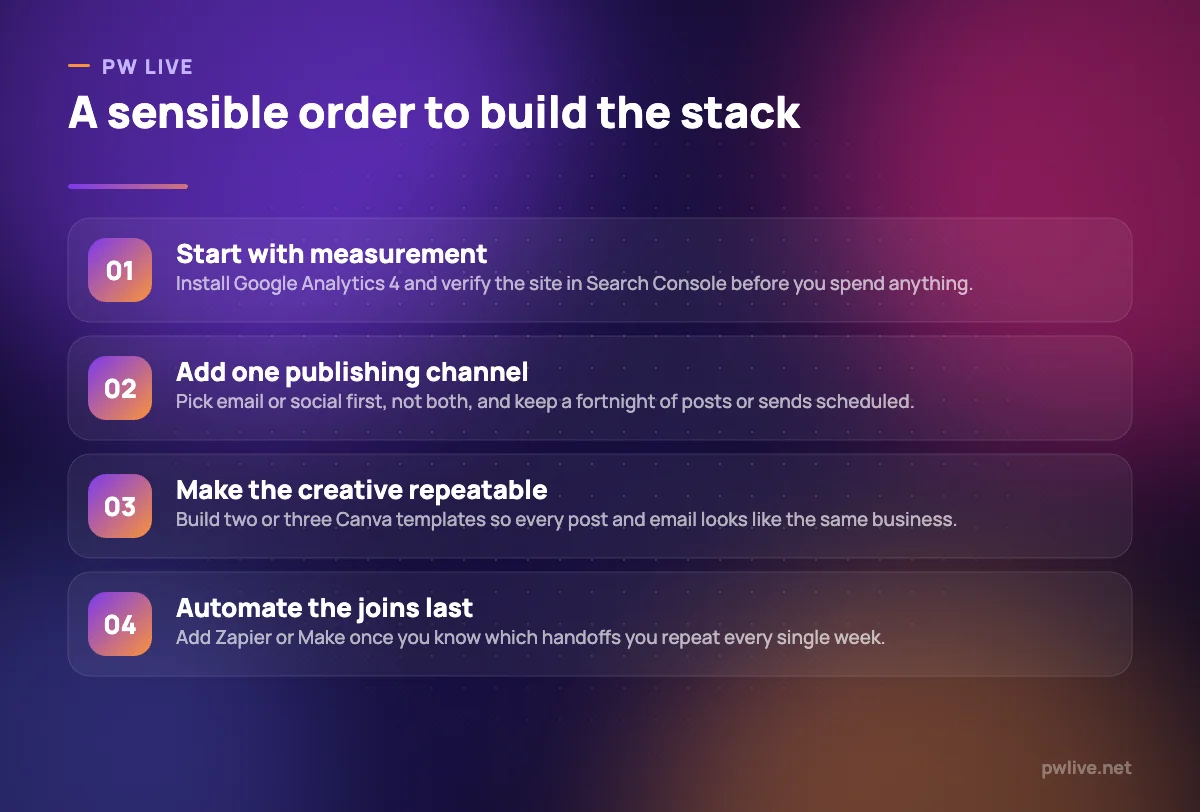
Analytics makes every other tool measurable. GA4 tracks sessions, sources and conversions across a site and app, and connects to Google Ads. If the numbers are new to you, start with our guide to the marketing metrics that matter.
What it does well – Free at the standard tier, with no seat limits to plan around. – Event-based tracking covering a website and mobile app in one property. – Direct links to Google Ads and Search Console.
Where it falls short – Standard properties retain user-level data for up to 14 months. – Standard limits include 25 event parameters per event, 30 key events and 100 audiences.
Pricing: Google states that Analytics is provided free of charge; Analytics 360 is the paid enterprise tier. Google Analytics
2. Google Search Console – best for search visibility
Search Console is the only place you see the actual queries that brought people to your site, plus impressions, clicks and position. It also flags indexing problems, usually the first thing to check when traffic drops. Pair it with our SEO for beginners guide.
What it does well – Free, with no plan tiers or seat charges. – Query-level data you cannot get from analytics alone. – Indexing checks, re-indexing requests and alerts when Google finds issues.
Where it falls short – Reports Google traffic only, not Bing or other engines. – Data appears with a delay, so it is poor for same-day decisions.
Pricing: Free. Google documents it as a free service for monitoring a site’s presence in Google Search. Search Console documentation
3. Google Ads – best for buying demand that exists
Search ads suit small teams because the intent is already there. The account costs nothing and you control spend with an average daily budget. If this is new, read our walkthrough on running a first paid campaign first.
What it does well – No subscription, platform fee or contract. – Budgets are set per campaign and editable at any time. – Conversion tracking ties spend to sign-ups rather than clicks alone.
Where it falls short – Costs are set by auction, so competitive categories price out small budgets. – Daily spend can exceed your daily budget; only the monthly total is capped.
Pricing: No platform fee. Your average daily budget is entirely up to you, and the monthly charging limit is 30.4 times that budget. Google Ads help
4. Meta Business Suite – best for Facebook and Instagram
If most of your audience is on Instagram or Facebook, the native tool is often enough. Business Suite centralises posting, stories, the shared inbox and insights for both apps, on desktop and mobile.
What it does well – Creates and schedules posts, stories and ads from one planner. – One inbox for Facebook, Instagram and Messenger. – No seat charge for adding a colleague to the business portfolio.
Where it falls short – Covers Meta apps only, so LinkedIn, X and YouTube need something else. – Approval workflows and client reporting are thin next to paid schedulers.
Pricing: No published price and no subscription; you pay only for ads you choose to run. Meta Business Suite
5. Buffer – best for scheduling a few channels
Buffer charges per channel, which is unusually fair for a small team: three accounts cost a third of what nine cost. The free plan is genuinely usable for a business posting a few times a week.
What it does well – Free plan connects 3 channels with 10 scheduled posts per channel. – Per-channel billing means you pay only for accounts you manage. – Essentials is among the cheapest entry points at $5 per channel a month.
Where it falls short – The 10-post cap per channel fills quickly if you batch a month at a time. – Costs scale with every account, so agencies pay more than on seat-based tools.
Pricing: Free for 3 channels; Essentials $5 per channel per month or $60 billed yearly; Team $10 per channel per month or $120 billed yearly. Buffer pricing
6. Canva – best for on-brand creative without a designer
Most small teams need a way to stop every asset looking different. Canva’s templates and Brand Kit do that, and the free tier is enough to publish social posts and simple documents. Our roundup of free design tools covers the alternatives.
What it does well – Free plan for one person includes templates, stock assets and 5GB storage. – Brand Kit keeps colours and fonts consistent across everyone’s exports. – Covers social sizes, presentations, documents and simple print in one place.
Where it falls short – The free Brand Kit allows three colours only. – Free AI usage is capped at 200 standard or 20 premium uses.
Pricing: Free for one person; Pro US$180 per year for one person; Business US$250 per year per person; Enterprise on request. Canva pricing
7. Brevo – best for email and SMS on one bill
Brevo prices on emails sent per month rather than contacts stored, which suits a team with a large but rarely mailed list. Transactional email is on every plan. If you are still building a list, start with our email marketing basics.
What it does well – Pricing follows send volume, so a dormant list costs nothing extra. – Free plan allows up to 300 emails a day once sending is approved. – Starter at $9 a month removes the Brevo logo and includes 5,000 emails.
Where it falls short – Free accounts carry a “Sent by Brevo” footer; removing it otherwise costs $10.80 a month. – Standard includes one landing page, and Professional jumps to $499 a month.
Pricing: Free with a 300 emails a day limit; Starter $9 a month billed monthly or $8.08 billed yearly; Standard $18 a month; Professional $499 a month. Brevo pricing
8. HubSpot free tools – best for a first CRM
Small teams outgrow a spreadsheet long before they can justify a CRM subscription. HubSpot’s free tools give you contact records, forms, email and live chat for up to two users, which is often enough for a year.
What it does well – Free for up to two users with no credit card required. – Forms, email and chat all write to the same contact record. – Starter is per seat from $7 a month with 1,000 marketing contacts.
Where it falls short – Free emails and live chat carry HubSpot branding. – Professional starts at $800 a month, so the middle tier is not a small-team price.
Pricing: Free tools $0 for up to 2 users; Starter from $7 per seat per month; Professional $800 a month with three seats; Enterprise $3,600 a month. HubSpot Marketing pricing
9. Typeform – best for surveys people finish
Typeform’s one-question-at-a-time format suits research, onboarding and lead qualification better than a wall of fields. It is a considered purchase rather than an obvious one, because the response allowances are modest.
What it does well – Conditional logic routes people through different questions. – Unlimited typeforms even on the entry plan. – Webhooks and integrations push responses into other tools.
Where it falls short – Basic includes only 100 responses a month and one user. – Removing Typeform branding requires the Plus plan.
Pricing: Basic 28 USD a month, Plus 56 USD, Business 91 USD, all on yearly billing with a 30% saving; the pricing page lists no free plan. Typeform pricing
10. Carrd – best for one-page sites at low cost
Carrd builds single-page sites: a launch page, a link hub, an event sign-up. For a team that needs a page live this afternoon without starting a website project, the annual cost is a rounding error.
What it does well – Pro Lite is $9 a year, billed annually rather than monthly. – Pro Standard at $19 a year covers 10 sites with custom domains. – Forms connect to email tools including Brevo, Mailchimp and MailerLite.
Where it falls short – Single-page sites only; there is no blog or multi-page structure. – Custom domains and removing Carrd branding both need a Pro tier.
Pricing: Pro Lite $9 a year for 3 sites; Pro Standard $19 a year for 10 sites; Pro Plus $49 a year for 25 sites. Carrd Pro
11. Zapier – best for connecting apps without code
Zapier is the shortest path from “this form should create that contact” to it happening. It supports more apps than any rival. Our guide to automation for non-programmers covers what to automate first.
What it does well – Free plan gives 100 tasks a month, enough to prove a workflow. – Multi-step paid workflows handle filters, formatting and branching. – Yearly billing is 33% cheaper than monthly.
Where it falls short – The free plan is limited to two-step Zaps. – Every step consumes a task, and overages move you to a higher per-task rate.
Pricing: Free with 100 tasks a month; Professional from $19.99 a month; Team from $69 a month for 25 users; Enterprise on request. Zapier pricing
12. Make – best for cheaper multi-step automation
Make does the same job as Zapier on a visual canvas and, at small-team volumes, usually for less. Scenarios are built as a diagram rather than a list, which is clearer once you pass three steps.
What it does well – Core is $12 a month, below Zapier’s entry paid tier. – The visual builder makes branching logic easy to follow. – Each module action counts as one credit, so costs are easy to estimate.
Where it falls short – Free allows only 2 active scenarios with a 15-minute minimum interval between runs. – Fewer supported apps than Zapier, so check your specific tools first.
Pricing: Free with 1,000 credits a month; Core $12 a month; Pro $21 a month; Teams $38 a month; annual billing saves 15% or more. Make pricing
How to choose between them
If your budget is effectively zero, four of these cost nothing to start: Analytics, Search Console, Meta Business Suite and HubSpot’s free tools, with Buffer, Canva, Brevo and Make offering usable free tiers on top. That covers measurement, publishing, design and a first CRM without a card on file.
If you have a small budget, spend it where the free limit bites first. A team sending weekly emails hits Brevo’s 300-a-day ceiling before Buffer’s channel cap; a team posting daily on five networks hits Buffer first. Upgrade what is blocking work this month, and check the seat maths, because per-channel, per-person and per-seat pricing scale very differently. The digital marketing skills track and our marketing category cover strategy once tooling is settled.
Key takeaways
- The best digital marketing tools for a small team match your actual volume, not your ambitions.
- Free tiers restrict volume, seats or branding; know which will stop you first.
- Per channel, per seat, per person, per send and per task all behave differently as you grow.
- Google’s measurement tools cost nothing and make paid tools easier to justify.
- Pay for automation only once you can name the weekly task it removes.
Frequently asked questions
How many marketing tools does a small team actually need?
Most teams under ten run comfortably on four or five: analytics, one publishing tool, an email platform and a design tool. Add automation only when you can point to a task you repeat weekly.
Is an all-in-one platform better than several specialist tools?
Suites reduce integration work but cost more at the middle tiers, as HubSpot’s jump from $7 per seat to $800 a month shows. Small teams usually pay less by combining specialist tools with a free tier or two.
Do free plans put the vendor’s branding on my work?
Often. Brevo adds a “Sent by Brevo” footer on free accounts, HubSpot brands free emails and live chat, and Typeform reserves branding removal for Plus. Check before you send anything to customers.
How often should I review the tools I pay for?
Once a quarter. Look for subscriptions where usage sits far below the plan limit, and tools nobody has opened in a month. Both are common in teams that bought software during a busy period.
Pricing checked 2026-09-08. 11 of 12 prices in this article were read from the vendor’s own pricing page on that date; the rest publish no figure, so we describe the model instead. Vendors change prices without notice, so open the linked page before you commit.
Keep learning with PW Live
Browse every tool comparison, or follow the Digital Marketing track to learn the skills these tools support.





Leave a Reply