

Most of the free SEO tools you find in listicles are demos: three searches, then a paywall. This list is narrower. Every tool below has a free tier you can use indefinitely for real work, and for each one we state exactly where that free tier stops.
It is for people running their own site on a small budget: a founder, a student building a portfolio project, or a business that cannot justify a subscription yet. Several are the same tools professionals use daily.
Read each entry for the limit, not the feature list. If SEO itself is new to you, start with our SEO for beginners guide and come back to the tooling afterwards.
How we chose these tools
Every tool here was assessed from the vendor’s own documentation and pricing pages, read on 8 September 2026. We have not run hands-on trials and nothing below is a test result. A tool qualified only if the vendor documents a free tier that does useful work with no trial clock attached; free trials of paid products were excluded. Free tiers change frequently, and usually downwards, so check the vendor’s page before relying on any limit quoted here. No vendor paid for inclusion and there are no affiliate links.
1. Google Search Console – best for your own search performance
Search Console is the only place you can see the queries that genuinely produced impressions and clicks for your pages. Everything else in SEO is modelled; this is measured. It also reports indexing status, which answers the question beginners most often get wrong: whether Google has your page at all.
What it does well
- Query, page, country and device data comes directly from Google.
- URL Inspection shows how a specific page was crawled, rendered and indexed.
- Sitemap submission, index coverage and email alerts sit in the same account.
Where it falls short
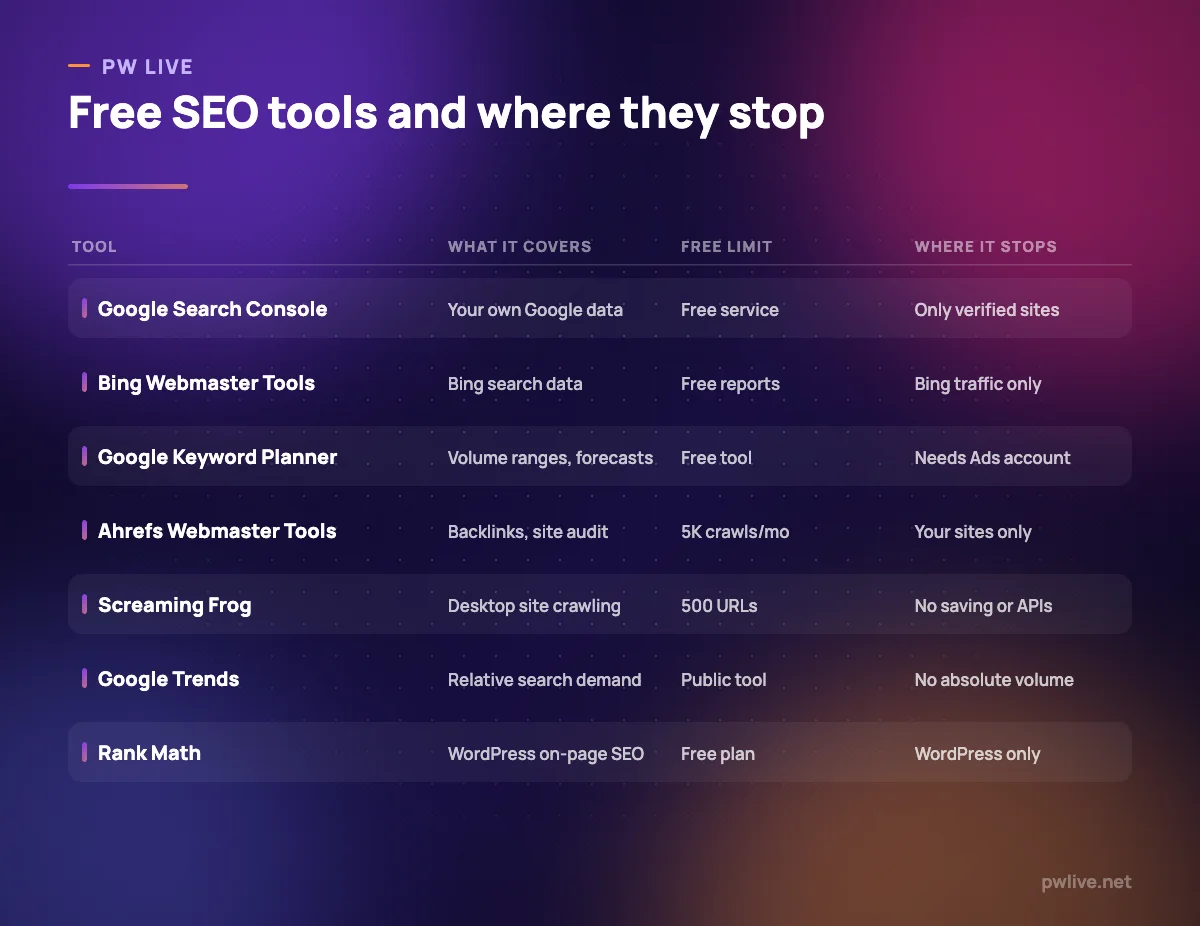
- It covers only sites you have verified, so there is no competitor view.
- The Performance report opens on the last three months by default; longer analysis needs exports.
- It reports symptoms rather than causes, so you still need a crawler.
Pricing: free. Google documents Search Console as a free service, checked 8 September 2026.
2. Bing Webmaster Tools – best for Bing and Copilot visibility
Bing is a smaller slice of search than Google in most markets, but it is not nothing, and its data increasingly feeds assistant answers. Microsoft publishes the equivalent of Search Console for it, free, and verifying a site you have already verified with Google takes minutes.
What it does well
- Free reports on how your pages perform in Bing search.
- Verification can be imported from an existing Search Console property.
- URL submission and inspection let new pages be pushed for crawling.
Where it falls short
- It only describes Bing traffic, a minority of most sites’ search visits.
- Its keyword data is a supplement, not a replacement for a research tool.
Pricing: free. Microsoft’s own overview describes it as giving access to free reports, tools and resources, checked 8 September 2026.
3. Google Keyword Planner – best for volume ranges and forecasts
Keyword Planner exists to help advertisers build search campaigns, which is why its numbers are useful: they come from the system that charges money for clicks. It is free, with one catch covered below.
What it does well
- Generates keyword ideas from a seed term, a website or a category.
- Gives average monthly search figures and cost estimates from Google’s own ad system.
- Forecast tool projects impressions and clicks for a keyword list.
Where it falls short
- Google documents that access requires a Google Ads account with a campaign created.
- Accounts that are not spending typically see broad volume ranges, not precise figures.
- It is built around ad intent, so it under-represents informational queries.
Pricing: free. Google describes it as a free keyword search tool available to anyone with a Google Ads account after they create a campaign, checked 8 September 2026.
4. Google Trends – best for seasonality and relative demand
Trends does not tell you how many people searched something. It tells you how a term’s popularity moved relative to itself and to other terms, scaled from 0 to 100. That is the right tool for timing a seasonal page, or judging which of two phrasings is gaining ground.
What it does well
- Compares several terms on one chart across time and geography.
- Data is described by Google as a largely unfiltered sample of real search requests.
- Regional breakdowns help decide which market to target first.
Where it falls short
- Every figure is normalised, so you never get an absolute search volume.
- Low-volume terms produce noisy, sometimes empty charts.
- It cannot tell you difficulty, competition or commercial value.
Pricing: free. Google documents Trends as a public tool built on anonymised, aggregated search data and publishes no paid tier, per its Trends documentation checked 8 September 2026.
5. PageSpeed Insights – best for Core Web Vitals and page speed
PageSpeed Insights combines two things people confuse. Field data comes from the Chrome User Experience Report, describing what real visitors experienced. Lab data comes from Lighthouse, which runs the page in a simulated environment so you can debug. Both appear in one free report.
What it does well
- Separates real-user field data from simulated lab diagnostics clearly.
- Covers performance, accessibility, best practices and SEO in one pass.
- Lighthouse also runs inside Chrome DevTools, so you can test before deploying.
Where it falls short
- It analyses one URL at a time, so site-wide work needs a crawler too.
- Field data only appears for pages with enough real traffic in the CrUX dataset.
- Lab scores fluctuate between runs, which invites chasing a number instead of a fix.
Pricing: free. Google’s PageSpeed Insights documentation describes the tool and its data sources and lists no paid tier, checked 8 September 2026.
6. Ahrefs Webmaster Tools – best for free backlink data and site audits
This is the most generous free tier in commercial SEO. Ahrefs lets you verify your own sites and then use Site Explorer, Site Audit and Web Analytics on them at no cost, and states the tools and data are the same as the paid product with lower allowances.
What it does well
- Site Audit scans for over 170 documented technical and on-page issues.
- Unlimited verified websites, which is unusual for a free tier.
- Web Analytics covers up to 1 million events per project.
Where it falls short
- Site Audit is capped at 5,000 crawl credits per month per project, so large sites will not finish.
- Site Explorer shows 1,000 backlinks and keywords at once, so deep analysis is truncated.
- You cannot analyse competing websites, which is the main reason people buy Ahrefs.
Pricing: free for verified sites, with the limits above, per the Ahrefs Webmaster Tools page checked 8 September 2026.
7. Screaming Frog SEO Spider (free version) – best for small desktop crawls
The free edition of the SEO Spider is a full desktop crawler with a hard ceiling. Five hundred URLs covers a brochure site, a small shop or a blog’s first couple of years, and it finds the same broken links, redirect chains and duplicate titles the paid version does.
What it does well
- Crawls run on your own machine, so there is no queue and no upload.
- Finds broken links, redirects, duplicate metadata and missing tags in one pass.
- Generates XML sitemaps and basic visualisations at no cost.
Where it falls short
- The crawl limit is 500 URLs, which most growing sites pass within a year or two.
- It cannot save and reopen crawls, so every session starts again.
- Scheduling, custom extraction, JavaScript rendering and the Google API integrations are paid-only.
Pricing: the free version is capped at 500 URLs; a licence costs $279 per year, per the Screaming Frog pricing page on 8 September 2026.
8. Rank Math – best for free on-page SEO in WordPress
If your site is on WordPress, an SEO plugin handles titles, meta descriptions, canonical tags, schema and sitemaps so you are not editing theme files. Rank Math’s free version covers that ground. For transparency, PW Live runs Rank Math; that is a choice about our own setup, not a claim that it beats the alternative below.
What it does well
- The free version includes schema generation, Search Console integration and per-post SEO analysis.
- A setup wizard configures sensible defaults without touching code.
- Redirect handling and sitemap generation are included at no cost.
Where it falls short
- WordPress only, so it is irrelevant on Shopify, Webflow or a custom stack.
- The module list is long, and beginners enable settings they do not understand.
- Paid tiers cap keyword tracking at 500 keywords on PRO.
Pricing: free version available; PRO is listed at EUR 7.99 per month billed annually, renewing at EUR 8.99, on the Rank Math pricing page as of 8 September 2026.
9. Yoast SEO – best for the other free WordPress SEO plugin
Yoast is the long-standing alternative and its free plugin covers the same core job. Choosing between the two is mostly about which interface you find clearer, and it is worth trying both on a test site first, because migrating settings later is tedious.
What it does well
- Free plugin handles titles, descriptions, canonicals and XML sitemaps.
- Readability analysis nudges writers towards shorter sentences and clearer structure.
- Long history means most themes and page builders are compatible with it.
Where it falls short
- Premium is licensed per site, so several sites means several subscriptions.
- Its writing suggestions are rules of thumb, and following them literally produces flat prose.
- Like any SEO plugin, it cannot fix a slow theme or a weak content plan.
Pricing: the free plugin is available from WordPress; Premium is listed at $118.80 per year excluding VAT for one site or domain on the Yoast SEO page, checked 8 September 2026.
10. Cloudflare Radar – best for internet-wide traffic and technology trends
Radar is the odd one out here. It publishes aggregated data from Cloudflare’s network and its public DNS resolver on internet traffic, attacks, and adoption of browsers, operating systems and protocols. For market research, it is a free primary source.
What it does well
- Free to browse and free to query through its API.
- Covers traffic patterns, outages and technology adoption by country.
- Data is published under a CC BY-NC 4.0 licence, so it can be cited and reused.
Where it falls short
- It says nothing about your own site’s rankings or keywords.
- Figures reflect traffic across Cloudflare’s network, not the whole internet.
- Reading it well takes background; our explainer on how search engines work is useful context.
Pricing: free, including API access, per the Cloudflare Radar documentation checked 8 September 2026.
How to choose between them
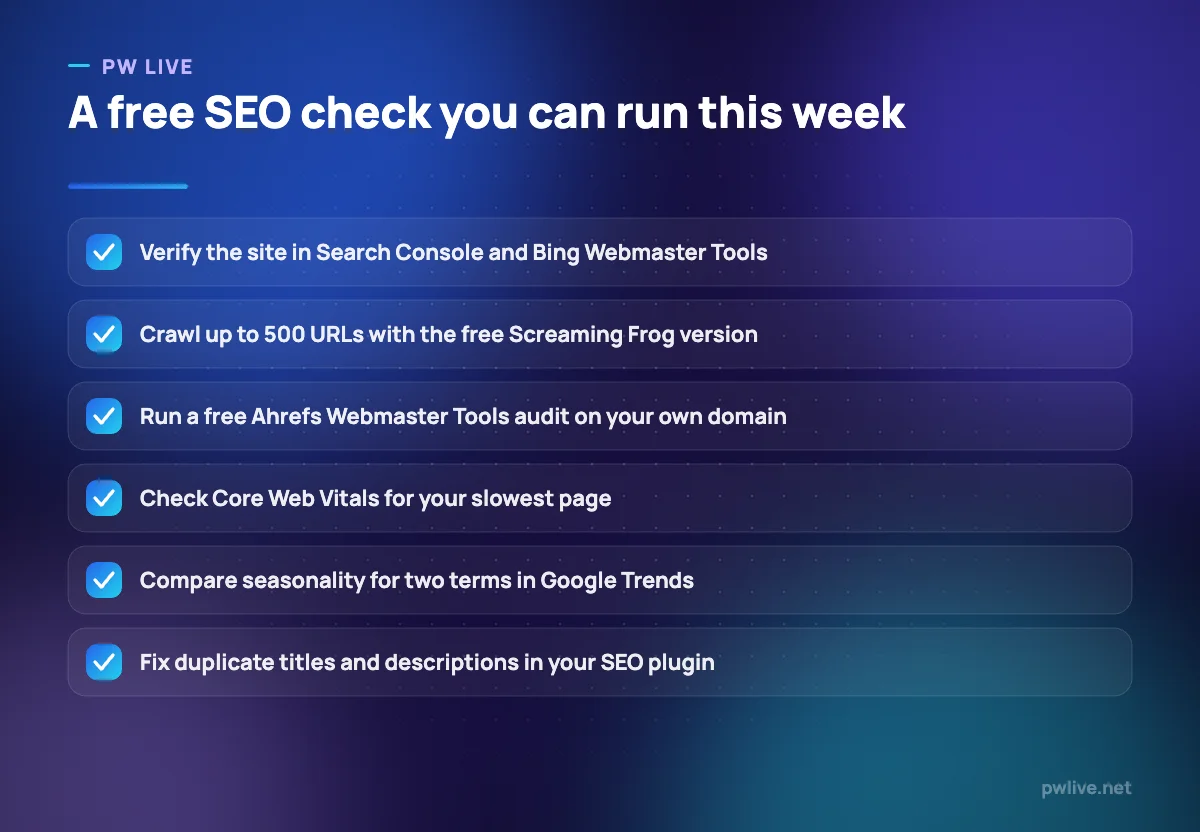
Order matters more than selection. Verify in Search Console and Bing Webmaster Tools first, because until you know what you already rank for, every other decision is guesswork. Then crawl once with the free Screaming Frog edition or Ahrefs Webmaster Tools to see what is broken.
Only then look at keywords. Keyword Planner gives ranges and forecasts, Trends gives direction and seasonality, and neither gives difficulty, so combine them with the manual methods in our guide to keyword research without expensive tools.
Size decides the rest: under 500 pages a free crawler is genuinely enough, and above that you either buy a licence or accept partial crawls. Free tools reward skill more than paid ones, because you are doing by hand what a subscription automates, so the digital marketing skill track is worth more than an upgrade at this stage. For free tools beyond search, see our round-up of free apps and tools and the apps and tools section.
Key takeaways
- The strongest free SEO tools are the first-party ones: Search Console and Bing Webmaster Tools describe your site, not a model of it.
- Ahrefs Webmaster Tools is the most generous commercial free tier, but only for sites you own.
- Screaming Frog’s free edition stops at 500 URLs, which decides how long you can stay on it.
- Keyword Planner is free but requires a Google Ads account with a campaign created.
- Google Trends never gives absolute volume, only relative interest scaled to 100.
Frequently asked questions
Can I do real SEO with only free tools?
For a small site, yes. Search Console, a free crawler, Keyword Planner and an SEO plugin surface most of what is wrong and most of what is worth writing. Paid tools mainly add competitor data and scale.
Why does Keyword Planner show ranges instead of exact numbers?
Google’s keyword data is built for advertisers, and accounts without meaningful ad spend see banded ranges. It is still useful for comparing the rough size of two topics.
Is a free SEO plugin enough for WordPress?
Usually. The free versions of Rank Math and Yoast handle titles, descriptions, canonicals, schema and sitemaps. Paid tiers add convenience and multi-site management, not anything a search engine requires.
Should I use both Google and Bing webmaster tools?
Yes, because they are free and setup takes minutes. Even if Bing sends a small share of traffic, its indexing information is a second opinion on problems Google may not surface clearly. Writing that earns links matters more than either, as our guide to content people actually read covers.
Pricing checked 2026-09-08. 10 of 10 prices in this article were read from the vendor’s own pricing page on that date; the rest publish no figure, so we describe the model instead. Vendors change prices without notice, so open the linked page before you commit.
Keep learning with PW Live
Browse every tool comparison, or follow the Digital Marketing track to learn the skills these tools support.





Leave a Reply