

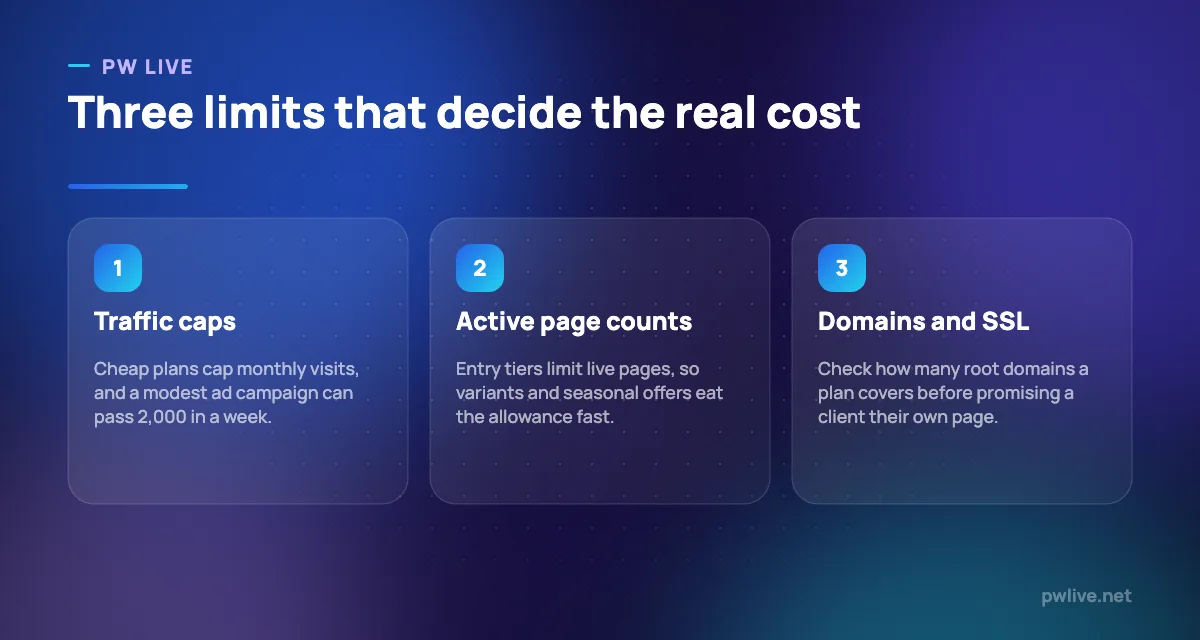
The best landing page builders are separated by three numbers that rarely appear in the marketing copy: how many pages you may publish, how much traffic those pages may receive, and how many domains you may use. Everything else, the editors and the template libraries, is broadly comparable.
This list is for small businesses, marketers and freelancers who need a page for a campaign, a lead magnet or a product launch without waiting on a developer. Prices here run from $9 a year to $159 a month, and the difference is mostly capacity and testing, not design quality.
If you are running ads to these pages, read our guide to running a first paid campaign alongside this one; a traffic cap that looks generous can be spent in a fortnight.
How we chose these tools
This round-up is based on each vendor’s public documentation and pricing pages, read on 8 September 2026. Nobody at PW Live ran hands-on trials or built test pages. Every price, page limit and traffic cap below came from the vendor’s own page on that date, and where a plan is quote-based we say so rather than guessing. Pricing changes often, so confirm current details before buying. No vendor paid for inclusion.
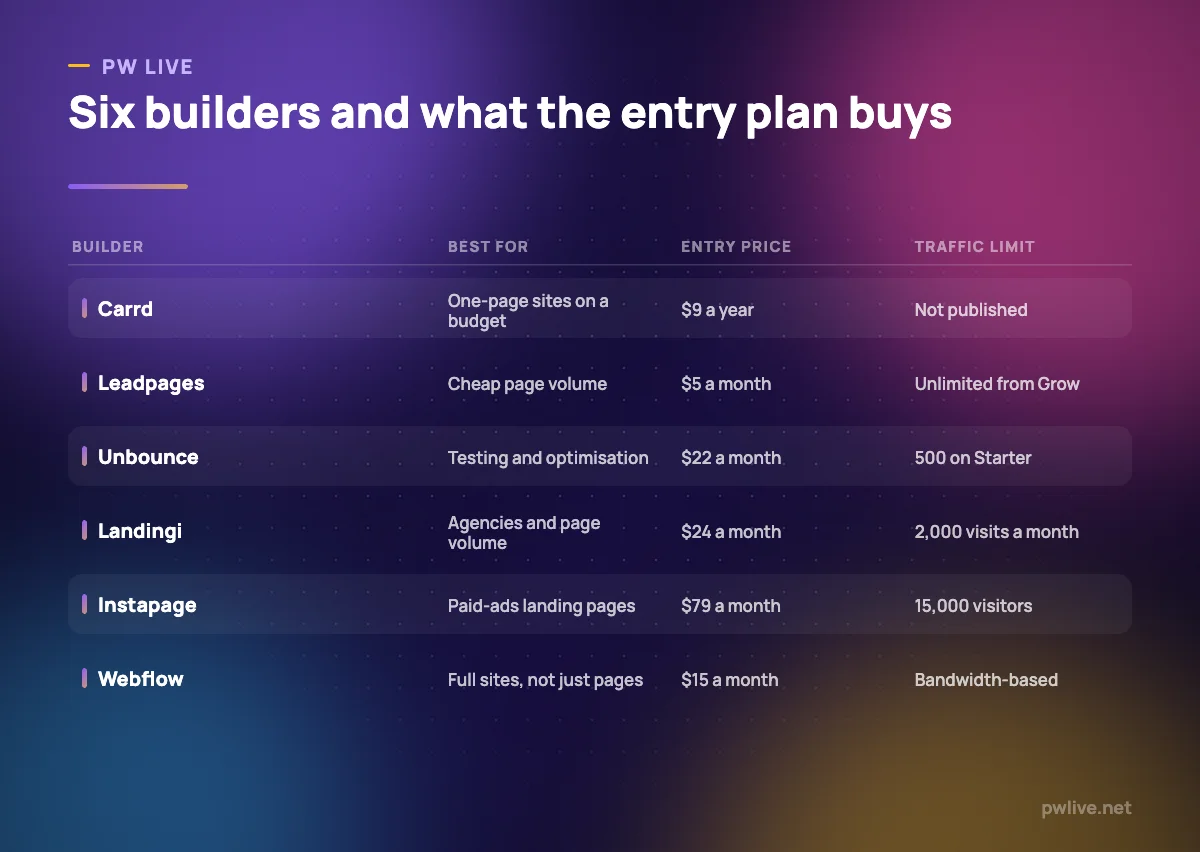
All prices below are as of 8 September 2026, in the currency the vendor lists.
1. Carrd – best for one-page sites at the lowest cost
Carrd builds single-page sites and charges by the year rather than the month, which puts it in a category of its own on cost. For a launch page, a link hub or a simple sign-up, it is hard to justify spending more.
What it does well – Pro Lite is $9 a year for 3 sites, less than one month of most rivals. – Pro Standard at $19 a year covers 10 sites with custom domain support. – Forms connect to email tools including Brevo, Mailchimp, MailerLite and Kit.
Where it falls short – Single-page sites only, with no blog or multi-page structure. – Custom domains and removing Carrd branding both require a Pro tier. – No built-in A/B testing, so it is not a conversion optimisation tool.
Pricing: Pro Lite $9 a year for 3 sites; Pro Standard $19 a year for 10 sites; Pro Plus $49 a year for 25 sites. Carrd Pro
2. Leadpages – best for publishing many pages cheaply
Leadpages now splits into a publishing tier and an optimisation tier, and the publishing side is unusually cheap for the page counts on offer. If you need volume rather than experiments, it is the value pick.
What it does well – Starter is $5 a month for 5 pages and a custom domain. – Pro at $15 a month covers 25 pages, a blog and 90 days of analytics. – Unlimited traffic and unlimited pages arrive at Grow, $50 a month.
Where it falls short – A/B testing only starts at the Grow tier, not the cheaper publishing plans. – Starter and Pro allow a single custom domain each. – There is no free plan, only a 7-day trial.
Pricing: Starter $5, Pro $15 and Business $25 a month on the publishing tier; Grow $50, Optimize $100 and Scale $200 on the optimisation tier, with 20% off annual billing. Leadpages pricing
3. MailerLite – best for pages bundled with your email tool
If the point of the page is to collect email addresses, using your email platform’s own builder removes an integration and a bill. MailerLite includes landing pages in its subscriber-based plans, including the free one.
What it does well – Free plan covers 250 subscribers, 2,500 monthly emails and two user seats. – Pages and signup forms feed the same list without a connector. – Comfort at $12 a month adds 5,000 monthly emails and a third seat.
Where it falls short – Removing the MailerLite logo is listed as a paid-plan feature. – Pricing scales with subscribers, so page traffic that does not convert still costs nothing but growth does. – Far fewer page-specific features than a dedicated builder, with no server-side testing.
Pricing: Free to 250 subscribers; at 500 subscribers Comfort is $12 a month ($129.60 billed yearly) and Power $25 ($270 yearly). MailerLite pricing
4. Landingi – best for many pages across many domains
Landingi is aimed at teams and agencies running numbers of pages rather than one flagship. Its plans are structured around active pages, monthly visits and custom domains, which makes capacity planning straightforward.
What it does well – Build at $24 a month billed annually covers 10 active pages and 1 domain. – Optimize raises that to 100 pages, 30,000 visits and 3 domains. – Scale supports unlimited pages with 10 domains for client work.
Where it falls short – Build allows only 2,000 visits a month, which a small ad budget will exceed. – No free plan; every tier starts with a 14-day trial. – Enterprise pricing starts from $1,199 a month, so the top end is not for small teams.
Pricing: Build $24 a month billed annually ($29 monthly); Optimize $119 billed annually; Scale from $229; Enterprise from $1,199. Landingi pricing
5. Unbounce – best for testing variants
Unbounce is a conversion tool first and a page builder second. Its plans are organised around traffic and experimentation rather than page counts, and the naming makes the intent obvious: Build, Experiment, Optimize.
What it does well – Conversions are unlimited on every plan, including Starter. – Starter is $22 a month billed annually, low for a testing-focused tool. – Higher tiers add root domains, so agencies can separate client sites.
Where it falls short – Starter allows only 500 traffic a month and a single root domain. – Real testing volumes need Build at $74 a month or above. – No free plan, only a 14-day trial.
Pricing: Starter $22 a month billed annually ($29 monthly); Build $74 ($99); Experiment $112 ($149); Optimize $187 ($249); Concierge and Agency plans are custom. Unbounce pricing
6. Swipe Pages – best for flat traffic allowances
Swipe Pages sells unlimited landing pages on every tier and differentiates on traffic and domains instead. For a campaign that will get real volume, the allowances are large relative to the price.
What it does well – Startup at $29 a month includes 20,000 traffic and unlimited landing pages. – Marketer at $69 covers 50,000 traffic, 5 domains and 5 client subaccounts. – Agency at $149 allows unlimited domains and 500,000 traffic.
Where it falls short – No free plan, only a 14-day trial without a card. – Client subaccounts and team members start at the Marketer tier. – The entry plan is a single domain, so it suits one brand rather than several.
Pricing: Startup $29, Marketer $69 and Agency $149 a month, with up to 40% off annual plans. Swipe Pages pricing
7. Instapage – best for paid-ads landing pages at scale
Instapage is built for advertisers who need a matching page for every ad group, with server-side testing and personalisation on the higher tier. It is priced for teams whose ad budget dwarfs the software cost.
What it does well – Unlimited pages, conversions and contacts on every plan. – Create includes 15,000 unique monthly visitors, 10 team members and 2 subdomains. – Optimize adds server-side A/B testing, traffic splitting and multi-step forms.
Where it falls short – Create is $79 a month, the highest entry price on this list. – Ad-to-page personalisation, heatmaps and root domain publishing are held back for the custom Convert plan. – The trial requires a credit card and converts automatically if you do nothing.
Pricing: Create $79 a month with 15,000 unique monthly visitors; Optimize $159 with 30,000; Convert is custom and quote-based. Annual billing saves up to 20%. Instapage plans
8. Webflow – best for a whole site rather than pages
Sometimes the honest answer is that you do not need a landing page tool, you need a website. Webflow’s free Starter site plan is enough to prototype, and its paid site plans add a custom domain and a CMS.
What it does well – Starter site plan is free on a webflow.io domain with 2 static pages and 50 form submissions. – Basic at $15 a month billed yearly adds a custom domain, 300 static pages and unlimited form submissions. – Premium at $25 a month adds the Webflow CMS for blogs and structured content.
Where it falls short – Site plans and Workspace seat plans are billed separately, so real costs are higher than the headline. – Additional full seats are $39 a month billed yearly. – The Team platform plan is $2,500 a month on an annual contract, a very large jump.
Pricing: Site plans from free on a webflow.io domain, Basic $15 and Premium $25 a month billed yearly; Workspace Core $19 and Growth $49 a month billed yearly. Webflow pricing
How to choose between them
Work out your monthly visitor number before you look at any feature list. If you expect a few hundred visits, Carrd, Leadpages Starter or MailerLite will cover it for the price of a coffee. If you are spending on ads, Unbounce Starter’s 500 traffic and Landingi Build’s 2,000 visits both disappear quickly, and the next tier up is the real price.
Then decide whether you are testing or publishing. Testing tools, Unbounce and Instapage, cost more because variants and traffic splitting are the product. Publishing tools, Carrd, Leadpages and Landingi, are cheaper per page. Buying a testing tool and never running a test is the most common waste here.
Finally, count domains. Agencies and anyone running several brands hit domain limits before traffic limits. If you are still deciding whether the offer itself works, validating the business idea matters more than the builder, and strong copywriting fundamentals or sharper product descriptions will lift conversion more than a template change. Our business category and the digital marketing skills track cover the rest.
Key takeaways
- The best landing page builders differ mainly on page counts, traffic caps and domain limits.
- Carrd is billed annually and costs less per year than most tools cost per month.
- Only Webflow and MailerLite here have permanent free tiers; the rest are trial-only.
- A/B testing is a paid upgrade almost everywhere, including at Leadpages and Unbounce.
- Instapage sells unlimited pages but starts at $79 a month, so it suits funded ad programmes.
Frequently asked questions
Do I need a landing page builder if I already have a website?
Often yes, because campaign pages need to be created quickly and tested independently. If your site already has a flexible CMS and you are not running experiments, another subscription may be unnecessary.
What happens if I exceed a plan’s traffic limit?
Vendors handle this differently, from upgrade prompts to overage charges, and the pricing pages are not always explicit. Check the terms for your chosen plan before running a campaign that could overshoot.
Are free landing page tools good enough for a business?
For collecting sign-ups, yes. MailerLite’s free plan and Webflow’s free Starter site plan both publish real pages, though Webflow’s is limited to two static pages on a webflow.io address and MailerLite carries its logo.
Which builder is cheapest for an agency with several clients?
Landingi’s Scale plan and Swipe Pages’ Agency plan both target multiple domains and client accounts, while Leadpages’ optimisation tier adds team seats. Compare on domain counts first, since that is usually the binding limit.
Pricing checked 2026-09-08. 8 of 8 prices in this article were read from the vendor’s own pricing page on that date; the rest publish no figure, so we describe the model instead. Vendors change prices without notice, so open the linked page before you commit.
Keep learning with PW Live
Browse every tool comparison, or follow the Digital Marketing track to learn the skills these tools support.





Leave a Reply