

Choosing the best AI tools for marketers is harder than it looks, because the category rewrites itself every few months. Plans get renamed, credits replace word counts, and the model behind a familiar button quietly changes. What does not change nearly as fast is the job you are hiring the tool to do: drafting, researching, editing, making visuals, or moving work between systems.
This list is for a marketer or small marketing team deciding where a limited budget should go. It covers twelve tools grouped by that job rather than by which model sits underneath, because the underlying models will have moved on long before your annual contract does.
Read it as a shortlist, not a ranking. The best tool for a two-person team already living in Google Docs is a poor fit for a fifteen-person team on Microsoft 365, and vice versa. If you are still building the foundations, our guide to digital marketing fundamentals is a better place to start than any subscription.
How we chose these tools
This round-up is based entirely on each vendor’s own public documentation and pricing pages, read on 8 September 2026. We did not run hands-on trials, and nothing here should be taken as a test result. Every price and plan limit below was checked on the vendor’s own page on that date and is linked so you can confirm it yourself. Prices, plan names and usage limits in this category change frequently, sometimes monthly, so treat every number as a starting point and verify before you buy. No vendor paid for inclusion, and there are no affiliate arrangements behind the order of this list.
Where a vendor does not publish a price, we say so rather than guessing. Where a plan carries a promotional rate with an end date, we note the end date.
1. ChatGPT – best for everyday drafting and analysis
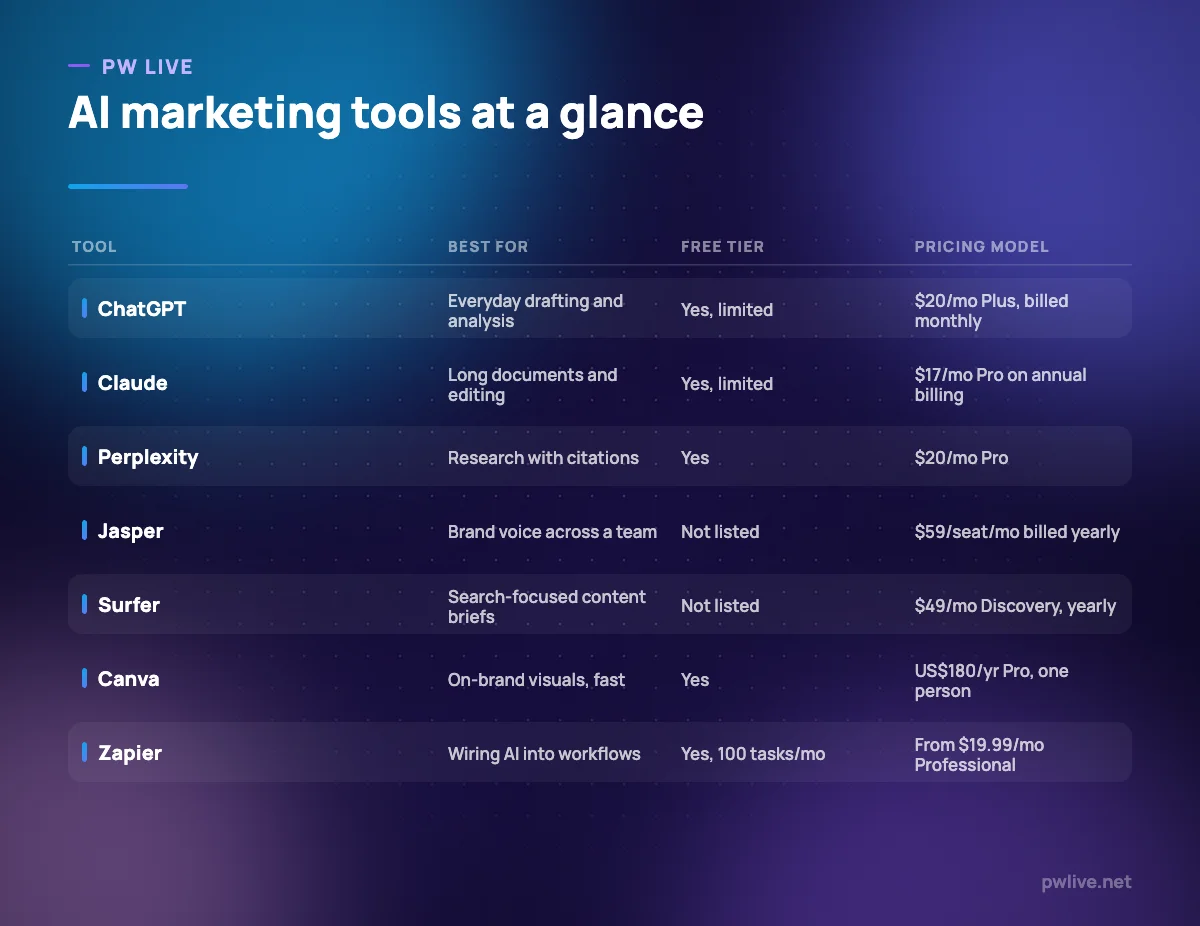
ChatGPT is the default general-purpose assistant for most marketing teams, and its breadth is the point: campaign concepts, first drafts, rewriting a landing page for a different audience, pulling structure out of a messy spreadsheet, summarising a call transcript. For most marketers it replaces the blank page rather than the whole job.
What it does well – Handles the widest range of everyday marketing tasks without needing a specialist tool for each one. – Custom instructions and projects let you store brand context once instead of re-explaining it each session. – File uploads make it usable for reviewing briefs, decks and exported analytics. – A usable free tier means a team can try it before anyone buys anything.
Where it falls short – The free tier is explicitly limited on uploads, image generation, voice chats and deep research. – The pricing page we checked did not display amounts for the Go, Pro or business tiers, so budgeting beyond Plus means contacting OpenAI. – It has no built-in brand voice governance, so consistency across a team depends on your own prompt discipline.
Pricing: Free tier available; OpenAI’s help centre lists ChatGPT Plus at $20/month billed monthly. See ChatGPT pricing. Checked 8 September 2026.
2. Claude – best for long documents and careful editing
Claude suits the parts of marketing that involve reading rather than generating: working through a long report, editing a 3,000-word article without losing the argument, or comparing several documents at once. If your team’s pain is polishing and structuring rather than producing volume, it is the more natural fit.
What it does well – Comfortable with long inputs, which makes it practical for editing existing content rather than only creating new content. – Projects keep source material and style notes attached to a body of work. – Annual billing is unusually clearly stated, with the monthly equivalent shown next to it. – Team plans exist at a modest step up from individual pricing.
Where it falls short – Usage limits apply on every tier including paid ones, which can interrupt a long working session. – There is no built-in SEO or content-brief tooling, so it does not replace a search tool. – The Max tier starts at $100 per month, a steep jump if Pro limits are not enough.
Pricing: Free at $0. Pro is $17 per month with an annual subscription ($200 billed up front), or $20 billed monthly. Team standard seats are $20 per seat per month billed annually, $25 monthly. See Claude pricing. Checked 8 September 2026.
3. Google Gemini – best for teams already in Google Workspace
If your marketing team writes in Google Docs and lives in Gmail, Gemini is the assistant with the shortest distance to your actual work. Google sells it through consumer AI plans that also bundle storage, and through Workspace, where Gemini features appear inside the apps themselves.
What it does well – Sits inside the tools where marketing documents already live, reducing copy-paste. – The free tier is genuinely usable for drafting and research. – Paid tiers bundle storage and other Google services, which can offset the cost if you were paying for storage anyway. – Google AI Plus at $4.99 per month is the cheapest paid entry point of anything on this list.
Where it falls short – Plan names and tiers have changed repeatedly, so what you bought last year may not be what is sold now. – Consumer AI plans and Workspace Gemini access are separate purchases with different feature sets, which is easy to get wrong. – Ultra pricing starts at $99.99 per month, which is enterprise-scale spend for an individual plan.
Pricing: Free at $0/month with a Google Account. Google AI Plus $4.99/month, Google AI Pro $19.99/month, Google AI Ultra from $99.99/month. See Google AI subscriptions. Checked 8 September 2026.
4. Microsoft 365 Copilot – best for teams standardised on Microsoft
Copilot’s argument is not that it writes better copy, it is that it writes inside Word, Excel, PowerPoint, Outlook and Teams where your team already works, with access to the files and mail those apps hold. For marketing teams in Microsoft-first companies, that context is worth more than raw capability.
What it does well – Works inside the Office apps rather than in a separate browser tab. – Draws on your organisation’s own documents and email for context. – Available either bundled into Microsoft 365 Business plans or as a standalone add-on. – Annual and monthly rates are both published clearly.
Where it falls short – The Copilot Business add-on requires a separate qualifying Microsoft 365 licence, so the headline price is not the whole cost. – The $18.00 rate is a promotion Microsoft states runs from 1 July 2026 to 31 December 2026, down from $21.00. – It is per-user licensing, so partial adoption across a team still means paying for whoever holds a licence.
Pricing: Microsoft 365 Copilot Business from $18.00 user/month paid yearly (promotional, from $21.00) or $25.20 user/month billed monthly; Microsoft 365 Business Standard with Copilot $23.50 user/month paid yearly. See Microsoft 365 Copilot pricing. Checked 8 September 2026.
5. Perplexity – best for research with citations
Perplexity answers questions with links to sources, which makes it the tool to reach for when you need to check a claim before it goes into a deck. For competitor scanning, category research and fact-checking a draft, the citations are the feature, not a nicety.
What it does well – Every answer carries sources you can open and judge for yourself. – The free tier allows search with citations, so verification work costs nothing to start. – Pro adds deep research and file uploads for working through your own documents. – Useful alongside, rather than instead of, a general assistant.
Where it falls short – It is a research tool, not a writing environment; there is no brand voice, template or workflow layer. – Citations tell you where a claim came from, not whether that source is any good, so it does not remove the need to read. – The Max tier at $200 per month is a very large step from Pro at $20.
Pricing: Free at $0/month; Pro $20/month; Max $200/month; Enterprise pricing is not listed. See Perplexity pricing. Checked 8 September 2026.
6. Jasper – best for keeping a team on brand voice
Jasper is built around brand voice and marketing workflows rather than open-ended chat. Its pitch is consistency: multiple people producing content that sounds like one organisation. That is a real problem in teams of five or more, and a non-problem for a solo marketer.
What it does well – Brand voice and style controls are first-class features rather than prompt tricks. – Aimed squarely at marketing use cases, so templates and workflows match the work. – Business tier adds custom agents, API access and dedicated account management. – Pricing for the entry tier is published openly, which is not true of every platform in this bracket.
Where it falls short – No free tier is listed, so evaluation means committing or arranging a trial with sales. – Pro includes a single seat and two brand voices, so any real team is pushed towards the quote-based Business plan. – Business pricing is custom on a 12-month commitment, which makes budgeting hard before a sales conversation.
Pricing: Pro is $59 per seat per month billed annually, or $69 per seat per month billed monthly, with 1 seat and 2 brand voices. Business is quote-based on a custom 12-month commitment. See Jasper pricing. Checked 8 September 2026.
7. Copy.ai – best for go-to-market workflows
Copy.ai has moved away from being a copy generator towards multi-step workflows that run across sales and marketing, with credits consumed per workflow run. Its cheapest tier is a chat product with several seats; the workflow tiers are priced for companies with a revenue team behind them.
What it does well – The Chat plan includes 5 seats, which is unusually generous at that price point. – Workflow credits let you automate repeatable go-to-market processes rather than one-off prompts. – Higher tiers include API access and integrations for pushing output into other systems. – Access to models from several providers is included on the Chat plan.
Where it falls short – The gap between Chat at $29/month and Growth at $1,000/month is enormous, with nothing in between. – Workflow credits, not words, are the limiting resource, which is harder to forecast before you start. – Growth and above are annual-only commitments.
Pricing: Chat $29/month, or $24/month billed annually at $288/year, with 5 seats. Growth $1,000/month billed annually at $12,000/year. Enterprise quote-based. See Copy.ai pricing. Checked 8 September 2026.
8. Surfer – best for search-focused content briefs
Surfer sits between your keyword research and your draft, producing briefs and on-page guidance so writers know what a page needs to cover. It is most valuable to teams publishing regularly enough that brief-writing is itself a bottleneck. If you are still learning the basics, read SEO for beginners before buying an optimisation tool.
What it does well – Turns a target query into a concrete content brief rather than a vague instruction. – Document allowances are stated plainly per plan, so you can match spend to publishing volume. – Higher tiers add AI prompt tracking, useful if you care how your brand appears in AI answers. – Team seats are included from the Standard plan upwards.
Where it falls short – No free tier is listed, so there is no way to try it without paying. – Discovery includes only one seat and 120 documents, which a small agency will exhaust quickly. – Prices shown are billed yearly; month-to-month costs more.
Pricing: Discovery $49 USD per month billed yearly (120 documents, 1 seat); Standard $99 USD per month billed yearly (360 documents, 3 seats). See Surfer pricing. Checked 8 September 2026.
9. Canva Magic Studio – best for on-brand visuals without a designer
Canva’s AI features live inside the design tool most small marketing teams already use, which is exactly why they get used. Magic Studio covers image generation, background removal, resizing a design across formats and drafting copy inside a layout. AI usage is metered as a shared monthly allowance.
What it does well – AI sits inside a design workflow, so output lands in a usable file rather than a chat window. – Brand kits keep colours, fonts and logos consistent across whoever is designing. – The free plan includes a real, if small, AI allowance. – Business plans scale the same allowance across a team on per-person pricing.
Where it falls short – AI use is capped by a shared monthly allowance, and higher-quality generations consume more of it. – An AI Pass add-on costs extra on top of the subscription if you exceed the allowance. – It is a design tool with AI attached, not a specialist image model, so control is coarser than dedicated generators.
Pricing: Free US$0/year for one person (up to 200 Standard AI uses or 20 Premium AI uses); Pro US$180/year for one person; Business US$250/year per person; Enterprise quote-based. See Canva pricing. Checked 8 September 2026.
10. Descript – best for repurposing video and podcasts
Descript transcribes your video or audio and lets you edit the media by editing the text. For marketers, the real value is repurposing: one webinar becomes a transcript, a set of clips, and the raw material for three written pieces. Our guide on how to write content people actually read pairs well with this workflow.
What it does well – Text-based editing removes most of the learning curve of a timeline editor. – Transcripts are a by-product, so written content comes free with the edit. – Watermark-free 1080p export starts at the lowest paid tier. – Business adds translation and dubbing across many languages.
Where it falls short – Free exports are 720p and watermarked, so the free tier is for evaluation only. – Media hours are capped monthly (10 hours on Hobbyist, 30 on Creator), which a video-heavy team will hit. – Team scaling is billed separately per person rather than included.
Pricing: Free tier with 60 minutes of media a month and watermarked 720p exports. Hobbyist $16 per person per month on annual billing ($24 month to month); Creator $24 per person per month annually ($35 monthly). See Descript pricing. Checked 8 September 2026.
11. HeyGen – best for avatar-led video without a studio
HeyGen generates presenter-style video from a script using AI avatars. The honest use case is internal explainers, product walkthroughs and localised versions of a video you would otherwise not have the budget to shoot. The honest limitation is that audiences increasingly recognise the format.
What it does well – Produces presenter video from a script without a camera, studio or scheduling. – Free tier lets you see the output quality before paying anything. – Credits-based plans map reasonably to how much video you actually publish. – Business plans allow multiple seats for teams producing at volume.
Where it falls short – Free videos are watermarked and capped at 3 per month of up to 1 minute. – Business pricing is $149/month plus $20 per seat, so team costs rise quickly. – Avatar video is a poor fit for brand storytelling where authenticity is the point.
Pricing: Free $0/month (3 videos a month, up to 1 minute, watermarked); Creator $29/month or $24/month annually; Pro $49/month; Business $149/month plus $20 per seat per month. See HeyGen pricing. Checked 8 September 2026.
12. Zapier – best for connecting AI into what you already run
Zapier is not an AI writing tool, it is the plumbing that lets an AI step sit inside a process you already have: a form submission that gets summarised, a new lead that gets enriched, a transcript that gets filed. It earns its place on this list because most AI value in marketing comes from removing handoffs, not from better prose. If that idea appeals, see our guide to automation for non-programmers.
What it does well – Connects AI steps to the tools your marketing stack already uses. – Free tier is enough to prove a single small automation works. – Separate Agents and Chatbots products are priced independently, so you only pay for what you use. – Team plans include shared connections and folders, which matters once more than one person owns automations.
Where it falls short – The free plan is 100 tasks a month and two-step Zaps only, which is quickly outgrown. – Task-based pricing makes costs unpredictable when a workflow fires more often than expected. – Enterprise pricing is not published.
Pricing: Free $0/month (100 tasks, two-step Zaps); Professional from $19.99/month; Team from $69/month with 25 users; Agents Pro $33.33/month billed annually at $400. See Zapier pricing. Checked 8 September 2026.
How to choose between them
Start with what you already pay for. If your company is on Microsoft 365, Copilot is the lowest-friction option and probably the cheapest once you account for the licence you already hold. If you are on Google Workspace, the same logic points at Gemini. Buying a third assistant on top of one you are already entitled to is the most common way marketing teams waste AI budget.
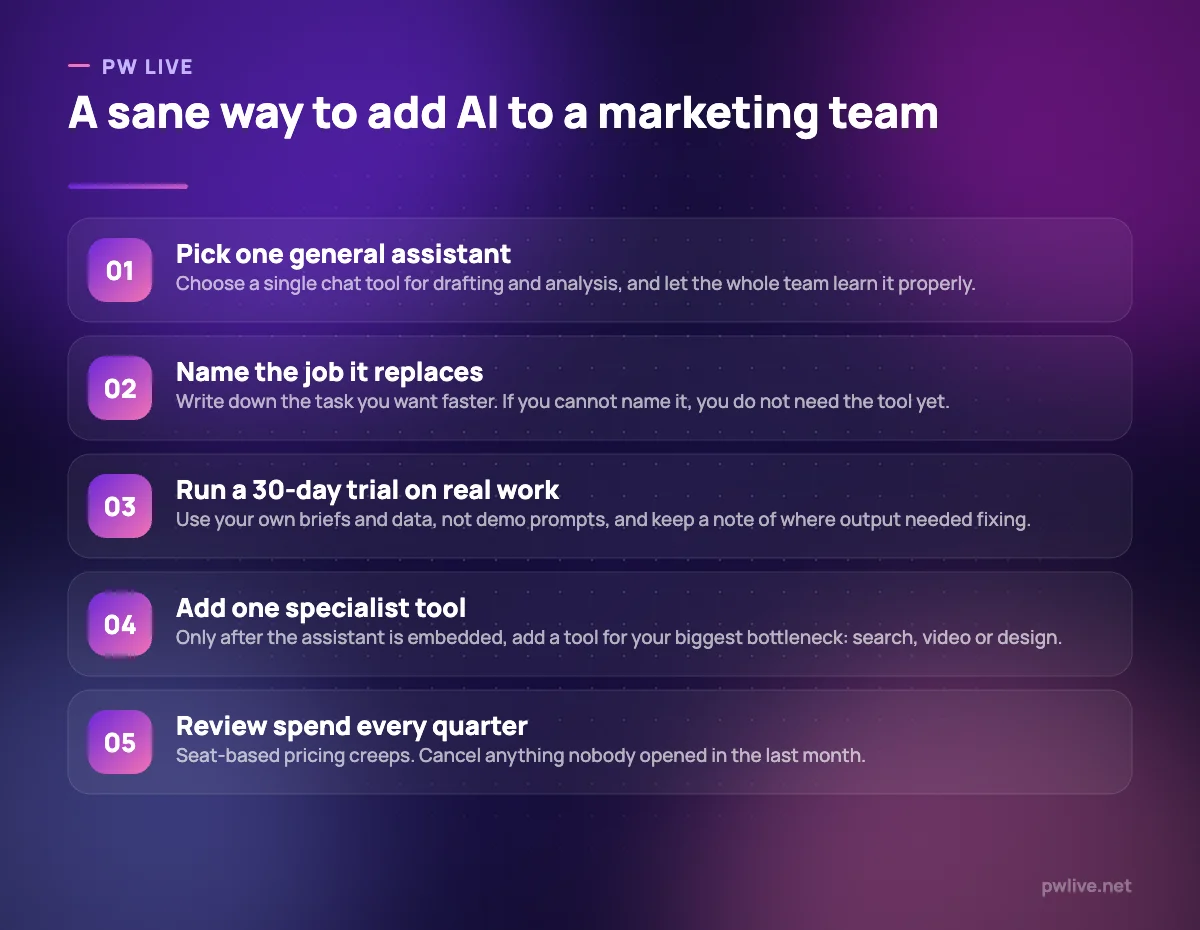
Then buy by bottleneck, not by category. If briefs are the bottleneck, Surfer earns its cost. If visuals are, Canva does. If nobody can find time to edit the webinar recording, Descript does. A general assistant plus one specialist tool covers most small teams; three specialist tools usually means two of them go unopened.
Watch the seat maths. Jasper, Copy.ai, Surfer and Copilot all price per seat or per user, and a five-person team on a $59 seat is a $3,540 annual commitment before anyone writes a word. Before you sign an annual contract, work out the cost per published piece and compare it with what you currently spend, using the approach in our guide to marketing metrics that matter. If you are building the underlying capability rather than buying it, the digital marketing skill track and the wider marketing section cover the fundamentals these tools accelerate.
Key takeaways
- Buy the job, not the model. Model names change far faster than the tasks you need done.
- Check what your existing subscriptions already include before adding another assistant.
- Free tiers in this category are for evaluation, not production: watermarks, caps and limited features are the norm.
- Per-seat pricing compounds. Multiply by headcount and by twelve before you agree to an annual plan.
- Credits and task limits, not word counts, are now the usual constraint, and they are harder to forecast.
- Verify every price on the vendor’s page before purchase; several plans here carry promotional rates with end dates.
Frequently asked questions
Do I need more than one AI tool for marketing?
Most small teams do not. One general assistant plus one specialist tool for your biggest bottleneck covers the majority of the work. Add more only when you can name the specific task the extra subscription removes.
Are the free tiers good enough to start with?
For evaluation, yes. ChatGPT, Claude, Gemini, Perplexity, Canva, Descript, HeyGen and Zapier all publish free tiers. For production work they are usually limited by watermarks, export quality or monthly caps, as noted in each entry above.
Will AI tools replace marketing staff?
Nothing in this list does strategy, judgement or accountability. These tools shorten drafting, research and production time. Deciding what to say, to whom, and whether it worked remains a human job.
How often does pricing in this category change?
Often enough that you should never trust a price you read in an article, including this one. Plan names, credit allowances and promotional rates shift several times a year. Every figure here was checked on 8 September 2026 and linked so you can confirm it before you buy.
Pricing checked 2026-09-08. 12 of 12 prices in this article were read from the vendor’s own pricing page on that date; the rest publish no figure, so we describe the model instead. Vendors change prices without notice, so open the linked page before you commit.
Keep learning with PW Live
Browse every tool comparison, or follow the Digital Marketing track to learn the skills these tools support.





Leave a Reply