
The right CRM for sales teams is judged on one thing: does it make the next action obvious? Storage is not the problem any more. The problem is that a rep with forty open deals cannot tell you which three need a call today.
This list is for teams of roughly three to fifty sellers, and it pays particular attention to where each platform puts the features sales teams actually need: sequences, diallers, workflow automation and forecasting.
Three pricing habits matter more here than anywhere else. Headline prices are per user per month billed annually, and the monthly rate is higher, which stings when you hire mid-year. Sales automation is almost always gated one or two tiers above the entry plan, so the plan you compare is rarely the plan you buy. And the top edition is often quote-only.
How we chose these tools
We have not run these products with a live sales team, and this round-up makes no hands-on claims. Every plan name, price, seat minimum and feature gate below was read from the vendor’s own public pricing page on 8 September 2026, and the exact page is linked in each entry. Where a vendor publishes no number we write “pricing on request” instead of guessing, and where a price appears only in local currency we say which page it came from. Prices and plan contents change regularly, so verify before you sign. No vendor paid for a place on this list.
1. Close – best for high-volume calling and outbound teams
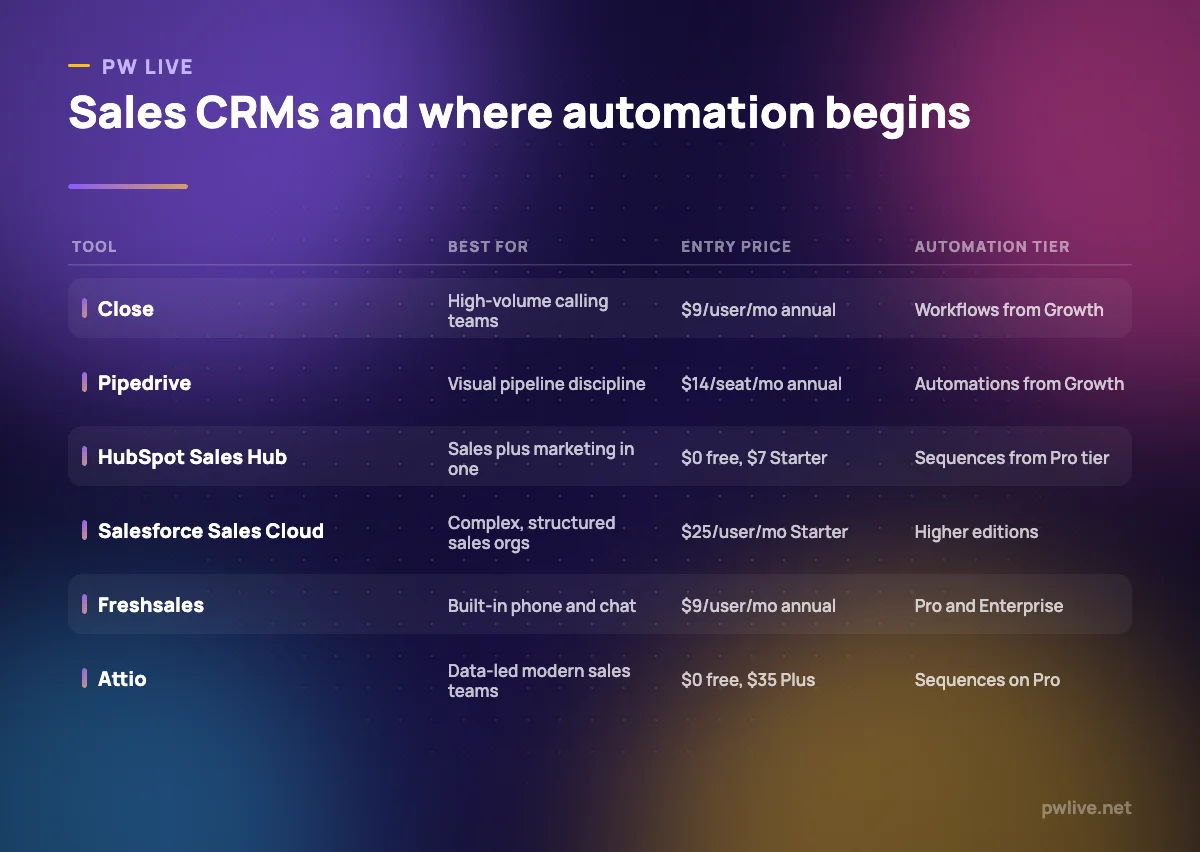
Close is built for teams whose day is calls and emails rather than account management. The dialler, sequencing and reporting are part of the core product, and it is the only CRM here with a plan designed for one person: Solo, capped at a single user and 10,000 leads. The limitation to plan for is that workflows are not included on Solo or Essentials, so automation begins at Growth.
What it does well – Power dialler on Growth and predictive dialler on Scale, included in the seat price. – Annual and monthly prices published side by side for all four tiers. – Solo gives a single rep a real CRM at $9 per user per month billed annually. – Built around calling and sequencing, which suits the outbound work in how to find your first ten customers.
Where it falls short – Automated workflows are not included on Solo or Essentials. – Solo is capped at one user and 10,000 leads, so it is a starting point only. – Growth at $99 per user per month billed annually is expensive for a large team.
Pricing: Solo $9, Essentials $35, Growth $99 and Scale $139 per user per month billed annually; $19, $49, $109 and $149 billed monthly. Verified on the Close pricing page, 8 September 2026.
2. Pipedrive – best for activity-based pipeline discipline
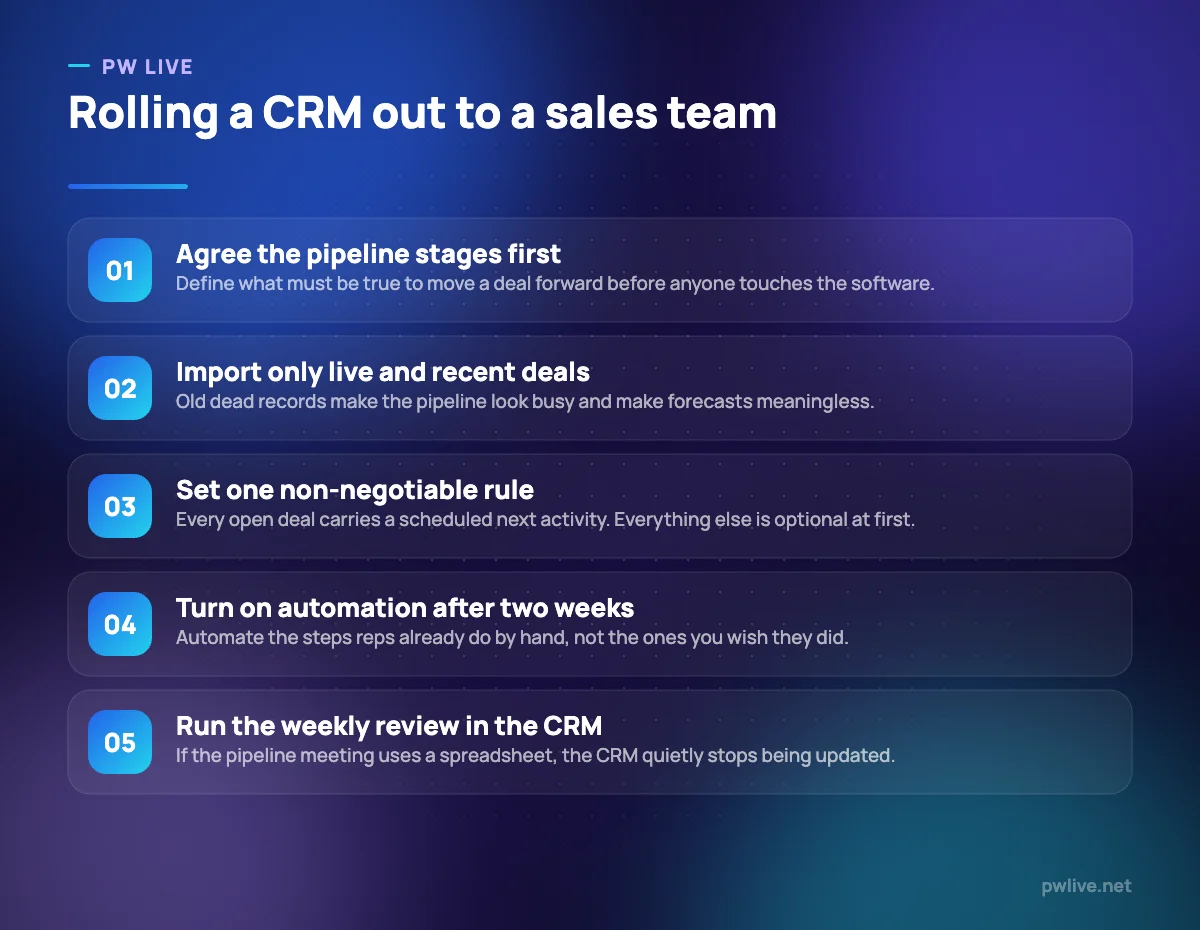
Pipedrive’s design principle is that every open deal should have a scheduled next activity, and the interface keeps reminding you when one does not. The pricing model needs attention, though: lead capture, campaigns, web visitor tracking and documents are separately priced add-ons, so the real monthly cost is the seat price plus whatever modules your process depends on.
What it does well – The clearest activity-driven pipeline view in this comparison. – Automations, sequences and full email sync arrive at the second tier. – Publishes the annual per-seat total as well as the monthly figure.
Where it falls short – Lead generation, campaigns and documents are paid add-ons on top of seats. – No permanent free plan, only a trial. – Forecasting and analytics are thinner than Salesforce or Zoho at similar spend.
Pricing: Lite $14, Growth $39, Premium $59 and Ultimate $79 per seat per month billed annually (Lite is one payment of $168 per seat per year). Add-ons include LeadBooster from $32.50, Projects from $16, Campaigns from $13.33, Web Visitors from $41 and Smart Docs from $32.50 per month. Monthly billing is offered at a higher rate. Verified on the Pipedrive pricing page, 8 September 2026.
3. HubSpot Sales Hub – best for sales teams sitting next to a marketing team
Sales Hub makes most sense when marketing is already in HubSpot: the lead a campaign generated and the deal a rep works are the same record. The economics are the issue. Free tools and Starter are cheap, but sequences, forecasting and the automation that makes Sales Hub worth having sit on Professional, which also carries a one-time onboarding fee. If your emails are the weak link rather than the software, our copywriting fundamentals guide is the cheaper fix.
What it does well – Shared records with HubSpot marketing tools, so lead history is visible to reps. – Free tools for two users let you evaluate the interface at no cost. – Sequences, meeting links and deal automation are mature and well documented.
Where it falls short – Professional requires a $1,500 one-time onboarding fee, Enterprise $3,500. – The useful automation sits on Professional at $90 per seat per month billed annually. – Free tools cap you at two users and 1,000 contacts.
Pricing: Free tools $0 for up to 2 users; Starter $7 per seat per month billed annually ($20 monthly); Professional $90 billed annually ($100 monthly) plus $1,500 onboarding; Enterprise $150 billed annually plus $3,500 onboarding. Verified on the HubSpot Sales Hub pricing page, 8 September 2026.
4. Salesforce Sales Cloud – best for structured, multi-team sales organisations
If your sales organisation has territories, quotas, approval steps and more than one selling motion, Salesforce is designed for that shape. It is also the best illustration of why to read the vendor’s own page: the US page we checked lists Starter Suite, Pro Suite, Core, Advanced and Max, while the India page lists a different set of names and figures for the upper tiers.
What it does well – Publishes per-user prices for most editions rather than routing everything through sales. – A Free Suite is listed at $0 with lead, account, contact and opportunity management. – The most complete forecasting and territory modelling here.
Where it falls short – Mid and upper editions are expensive per seat and billed annually. – Real deployments need administrator time or a partner. – Edition names and prices vary by regional page, so check your own country.
Pricing: On the US page, Free Suite $0; Starter Suite $25 per user per month billed monthly or annually; Pro Suite $100, Core $195, Advanced $395 and Max $550 per user per month billed annually, with Max routed through a “contact us” button. Some AI capabilities and add-ons are priced separately. Verified on the Salesforce Sales Cloud pricing page, 8 September 2026.
5. Freshsales – best for inside sales teams that need phone and chat included
Freshsales bundles telephony, email and chat into the CRM instead of selling them as modules, and activity from all three lands on the same contact timeline. At $9 per user per month billed annually, Growth is the cheapest published paid entry point here. Just be clear that call minutes are metered separately, and that Freshworks does not describe a permanent free plan on the current pricing page.
What it does well – Phone, email and chat are part of the product rather than separate purchases. – Lowest published entry price here for a paid sales CRM. – Unified contact timeline across channels, which shortens handovers.
Where it falls short – Telephony usage is charged on top of the seat price. – No permanent free plan is described; only a 21-day trial. – Advanced automation, workflows and reporting sit on Pro and Enterprise.
Pricing: Growth $9, Pro $39 and Enterprise $59 per user per month billed annually; the page states annual billing saves about 20% against monthly. Verified on the Freshsales pricing page, 8 September 2026.
6. Zoho CRM – best for sales operations that need heavy customisation
Zoho CRM is the choice when your process does not fit a template: custom modules, scoring rules, layered automation, approval processes and a scripting layer, at a low per-seat price. The cost is complexity, and Zoho rewards a dedicated owner. If you are about to make a first sales operations hire, read it alongside our guide to hiring your first employee.
What it does well – Deep customisation on mid-tier editions rather than only at enterprise level. – Four paid editions plus a free edition for three users, so the ladder is gradual. – Integrates naturally with Zoho Books, Desk, Campaigns and the wider suite.
Where it falls short – Dense interface and significant configuration effort. – Feature placement across four editions needs checking item by item. – Pricing is localised, shown in local currency with taxes on top.
Pricing: Free edition for 3 users. On the India pricing page we opened, Standard Rs 800, Professional Rs 1,400, Enterprise Rs 2,400 and Ultimate Rs 2,600 per user per month, with local taxes charged in addition and a discount advertised for yearly billing. Verified on the Zoho CRM pricing page, 8 September 2026.
7. Attio – best for modern teams that want to shape their own data model
Attio treats the CRM as a flexible database rather than fixed contact and deal screens: you define objects, attributes and relationships, then build list views and reports on top. Its free plan, up to three seats and 50,000 records, makes evaluation easy. Plan for the fact that sequences and call intelligence are Pro-tier, and that Plus is capped at ten seats.
What it does well – Free plan covers up to 3 seats and 50,000 records with real-time contact syncing. – Custom objects and attributes without a scripting layer or certification. – Pro adds call intelligence, sequences, permission controls and advanced reporting.
Where it falls short – Sequences and call intelligence require Pro at $79 per user per month billed annually. – Plus is capped at 10 seats, forcing an upgrade rather than gradual growth. – Enterprise is pricing on request and billed annually only.
Pricing: Free $0 for up to 3 seats and 50,000 records; Plus $35 per user per month billed annually or $44 monthly, up to 10 seats; Pro $79 annually or $99 monthly with unlimited seats and 1,000,000 records; Enterprise on request. Verified on the Attio pricing page, 8 September 2026.
8. monday CRM – best for sales managers who want to design the process themselves
monday CRM puts a sales layer on monday’s board and automation engine, so a manager builds the stages, fields, views and recipes that match how the team works. That is powerful with an opinionated manager and unhelpful without one. There is also a three-seat minimum, no free plan, and a quote-only Ultimate tier.
What it does well – Boards, views and automation recipes are configurable without code. – Publishes annual and monthly per-seat prices side by side for three tiers. – Reporting views are easy to rearrange for a weekly pipeline meeting, which pairs with our guide to the marketing metrics that matter.
Where it falls short – Minimum of three seats, so very small teams overpay. – No free plan on the CRM product, only a 14-day trial. – Ultimate is pricing on request, so the top of the range has no published figure.
Pricing: Basic $12, Standard $17 and Pro $28 per seat per month billed annually, or $18, $25 and $41 billed monthly. Ultimate is pricing on request. Plans start from three users. Verified on the monday CRM pricing page, 8 September 2026.
How to choose between them
Start with the selling motion. If the job is volume calling, Close and Freshsales put the dialler in the seat price. If it is managed, considered deals with a defined stage gate, Pipedrive and monday CRM fit. If it spans several teams with forecasting and approvals, Salesforce will not run out of room.
Then price the tier that includes automation, not the entry tier. Close puts workflows on Growth, HubSpot puts sequences on Professional, Pipedrive puts automations on the second tier and Attio puts sequences on Pro. Multiply that by headcount for twelve months at the monthly rate, then decide whether the annual commitment is affordable. Read alongside our guide to unit economics to see whether the tool is proportionate to your deal size.
Finally, weigh what you already own. Marketing in HubSpot points to Sales Hub; existing Zoho or Freshworks subscriptions point to their CRMs; and every team should test the email integration properly, because that is where rep adoption is won or lost. Our technology section covers integration decisions, and the digital marketing skill track covers the lead generation that feeds any of these pipelines.
Key takeaways
- Judge a sales CRM on which tier unlocks automation, not on its entry price.
- Close and Freshsales include telephony; Pipedrive and HubSpot mostly sell adjacent capability separately.
- Pipedrive’s add-ons can exceed the seat price, so budget the total.
- HubSpot Sales Hub Professional and Enterprise carry one-time onboarding fees of $1,500 and $3,500.
- monday CRM has a three-seat minimum and a quote-only Ultimate tier; Attio’s Plus tier caps at 10 seats.
- Salesforce publishes prices for most editions, but names and figures differ by country page.
Frequently asked questions
What is the cheapest CRM for a small sales team?
Freshsales Growth and Close Solo both start at $9 per user per month billed annually, and Pipedrive Lite is $14 per seat per month billed annually. Check what automation each includes before treating them as equivalent.
Which CRM has a built-in dialler?
Close includes a power dialler on Growth and a predictive dialler on Scale, and Freshsales includes phone as part of the product. Elsewhere, calling is usually an integration or a paid add-on, with minutes metered separately.
Do sales CRMs charge extra for automation?
Usually, in the sense that automation sits on a higher tier rather than a separate invoice. Close puts workflows on Growth, HubSpot puts sequences on Professional and Attio puts sequences on Pro.
Is a per-user CRM price always billed annually?
Not always, but the advertised figure normally assumes it. Close, monday CRM, HubSpot and Attio all publish a higher monthly rate alongside the annual one, and Salesforce bills most editions annually with only Starter Suite offered monthly or annually.
Pricing checked 2026-09-08. 8 of 8 prices in this article were read from the vendor’s own pricing page on that date; the rest publish no figure, so we describe the model instead. Vendors change prices without notice, so open the linked page before you commit.
Keep learning with PW Live
Browse every tool comparison, or follow the Digital Marketing track to learn the skills these tools support.





Leave a Reply