

Choosing between the best web analytics tools is less about features than about what you will do with the numbers. Most sites need three things: where visitors came from, what they did, and which pages lead to a sale or a signup. Almost every tool here answers those questions. They differ in what they cost, how much data they collect, and how much work they leave on your desk.
This list is for people running a business site, a shop or a content site who want one measurement tool that fits their budget and their appetite for data collection. It covers general site analytics, privacy-first alternatives, behaviour tools and product analytics, because most teams eventually need more than one.
Read it as a shortlist, not a ranking. Start with the section that matches your situation, check the pricing link, and ignore the rest. If you are still working out which numbers matter, our guide to the marketing metrics that matter is a better first stop than any tool.
How we chose these tools
This round-up is based on each vendor’s own public documentation and pricing pages, checked on 8 September 2026. We did not run hands-on trials, and nobody at PW Live has tested these products in a live account. Every price below was read from the vendor’s page on that date, and where a vendor does not publish a price we say so instead of guessing. Prices change, so confirm current details on the vendor’s site before you buy. No vendor paid for inclusion and there are no affiliate arrangements behind this list.
One more note on privacy. We describe cookie use, data residency and GDPR positioning only as each vendor documents it on its own site. Nothing here is legal advice. Whether a given setup is lawful for you depends on your jurisdiction, your consent mechanism and what you collect, so take your own advice before relying on any vendor’s compliance claims. Our digital privacy guide explains the general shape of the problem.
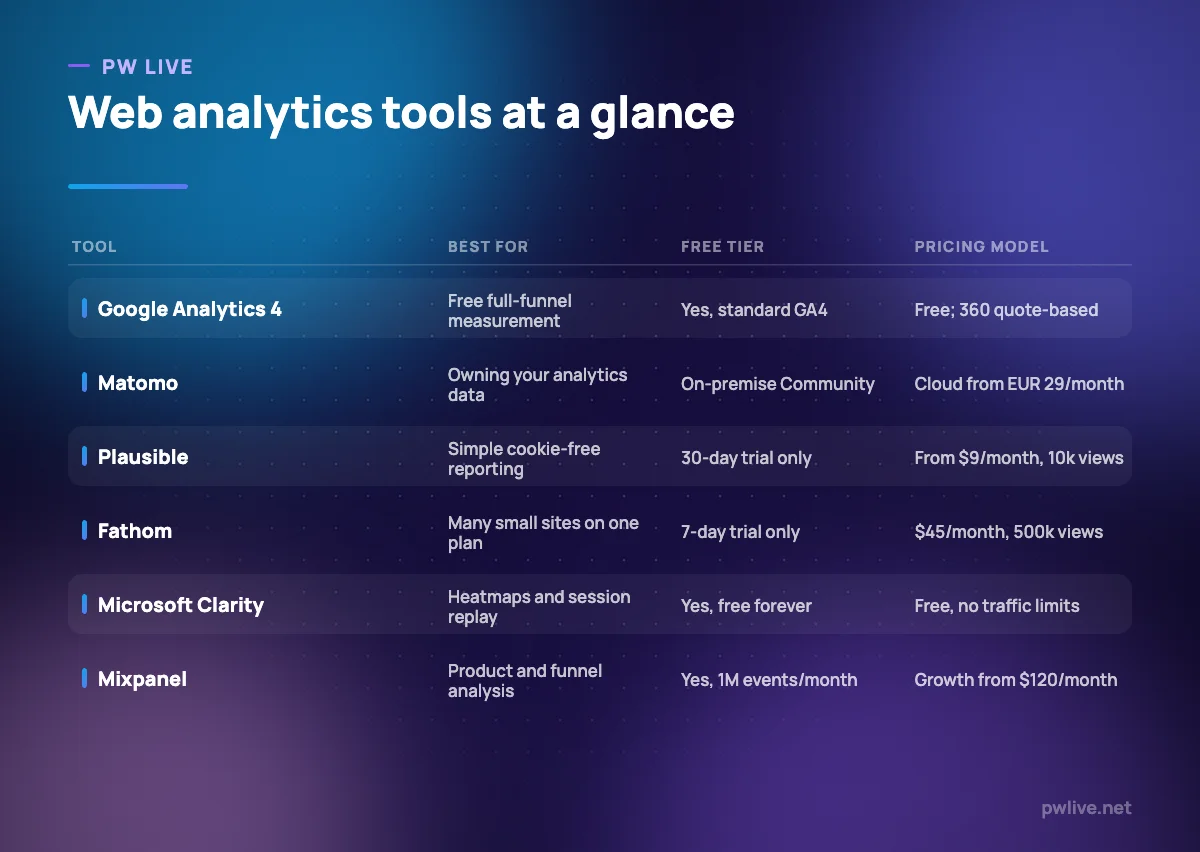
1. Google Analytics 4 — best for free full-funnel measurement
Google Analytics 4 is the default for a reason: it costs nothing at the standard tier, connects to Google Ads and Search Console, and handles web and app data in one property. It is an event-based model, so instead of pageviews and sessions you configure the events you care about and build reports from those.
The trade-off is complexity. GA4 rewards people who set up conversions and audiences deliberately and frustrates people who expected the old dashboard. Google documents that Analytics uses first-party cookies, prohibits sending personally identifiable data, and offers data-sharing, retention and deletion controls; standard properties keep event data for up to 14 months.
What it does well – Free at the standard tier, with no traffic ceiling published for normal use – Tight integration with Google Ads, Search Console and BigQuery export – Web and app data in a single property – Audience, retention and funnel exploration built in
Where it falls short – Standard properties cap data retention at 14 months, against up to 50 months on 360 – Standard BigQuery export is limited to 1M events a day – Cookie-based collection usually means a consent banner in the EU and UK – The interface assumes you know what an event parameter is
Pricing: Standard GA4 is free. Google does not publish a price for Analytics 360; upgrades go through sales or a Google Sales Partner. Standard vs 360 comparison
2. Matomo — best for owning your data outright
Matomo is the main open-source alternative to Google Analytics, and it comes in two forms: a hosted cloud service and a self-installed On-Premise version. The reporting is deliberately familiar, with visits, referrers, goals and a visits log, plus heatmaps and session recording as add-ons.
Matomo states that Cloud data is stored in Frankfurt, Germany, that all hosting options give you full data ownership, and that it ships a GDPR Manager feature and a data processing agreement for Cloud. If your objection to other tools is that a third party keeps your visitor data, self-hosting removes that objection entirely, at the cost of running a server. Our explainer on open source software is useful background if that route is new to you.
What it does well – A free, unlimited On-Premise Community edition you can host yourself – Cloud data stored in Germany, with a documented DPA – Familiar reporting plus goals, ecommerce and a raw visits log – No sampling of your reports on either hosting option
Where it falls short – Self-hosting means you own updates, backups and database growth – Cloud pricing is metered by hits, so busy sites move up tiers quickly – Paid On-Premise tiers cap user seats, from four users on the Team plan
Pricing: Cloud from EUR 29 per month, with two months free on annual billing. On-Premise Community is free; paid On-Premise starts at EUR 275 per year for up to four users and 5M hits. Matomo pricing
3. Plausible Analytics — best for a simple, cookie-free dashboard
Plausible is the opposite of GA4 by design: one page, a handful of numbers, no configuration ritual. It reports top sources, top pages, countries, devices and goal conversions, and that is close to the whole product.
Plausible says it uses no cookies and no persistent identifiers, that it does no cross-site or cross-device tracking, and that it is made and hosted in the EU with data that does not leave the EU. It also publishes its source code and supports self-hosting. For a marketing site or a blog where you mainly want to know what is working, it is enough. For anything that needs user-level investigation, it is not.
What it does well – A single dashboard that a non-specialist can read in a minute – No cookies and no persistent identifiers, per the vendor – EU hosting, open source code, self-hosting available – 30-day trial with no card required
Where it falls short – No free tier after the trial ends – The lowest tier covers one site and 10,000 monthly pageviews – No session recording, and no user-level journey analysis
Pricing: Starter from $9 per month at 10,000 monthly pageviews and one site; Growth $14 and Business $19 at the same volume with more sites, seats and retention. Two months free on yearly billing. Plausible pricing
4. Fathom Analytics — best for many small sites on one plan
Fathom sits in the same privacy-first category as Plausible but prices differently: one pageview allowance shared across a generous number of sites. If you run a dozen client sites or several small projects, that is the cheaper shape.
Fathom describes itself as privacy-first analytics that works under GDPR without consent popups, says no cookie banners are required, and states 100% data ownership with no sale of data. It includes event tracking, UTM campaign tracking, ecommerce tracking and API access on all plans, and keeps your data for as long as you are a customer.
What it does well – The base plan covers 50 sites, with extra packs of 50 for $10 a month – Ecommerce, events, UTM tracking and API access on every plan – Data retained for as long as you stay a customer – Simple enough to hand to a client without training
Where it falls short – Entry price is high for one small site compared with rivals – Only a 7-day trial, and no permanent free tier – Reporting depth is limited by design; no funnels or cohorts
Pricing: $45 per month for up to 500,000 pageviews, with higher tiers listed for 2M, 10M and 25M+. Pay yearly for two months free. Fathom pricing
5. Umami — best for self-hosting on a small budget
Umami is an open-source, privacy-first analytics platform released under the MIT licence. You can run it on your own server or a small cloud instance, or use Umami Cloud if you would rather not. Its own description is blunt: traffic, campaigns, behaviour, conversions and revenue in one place, no cookies, no surveillance.
It suits developers and technical marketers who are comfortable with Docker or a Node deployment and want a clean dashboard without a subscription. If nobody on your team wants to own a database, pick one of the hosted options above instead.
What it does well – MIT-licensed and free to self-host, with Docker and source installs documented – No cookies, per the project’s own description – Clean, fast dashboard with events and campaign tracking – Cloud option available if you later stop wanting to self-host
Where it falls short – Self-hosting means you carry updates, backups and uptime – The published cloud pricing table did not render for us, so budget only after checking it – Smaller ecosystem of integrations than Matomo or GA4
Pricing: Self-hosting is free under the MIT licence. Umami Cloud is usage-based with a free signup and a documented 14-day trial on subscriptions; we could not read the tier prices at the time of checking, so confirm them on the page. Umami pricing
6. Microsoft Clarity — best for free heatmaps and session recordings
Microsoft Clarity answers a different question from the tools above. Instead of counting visits, it shows you what people did: click and scroll heatmaps, recordings of individual sessions, and flags for rage clicks and dead clicks. It is free, and Microsoft states there are no limits on traffic.
The obvious use is diagnosis. When a landing page converts badly, twenty recordings usually tell you more than a month of traffic charts. Pair it with one of the counting tools rather than treating it as a replacement, and read our notes on running your first paid ad campaign before you spend money sending traffic to a page you have not watched anyone use.
What it does well – Free forever with no published traffic limits – Session recordings, click and scroll heatmaps in one place – Rage-click and dead-click detection to surface broken interactions – Microsoft describes it as GDPR and CCPA ready, with a published privacy page
Where it falls short – Not a substitute for traffic and conversion reporting – Recording real sessions raises consent and masking questions you must handle yourself – Reporting depth and segmentation are thin compared with paid tools
Pricing: Free, with no paid tier listed. Microsoft Clarity
7. Mixpanel — best for product and funnel analysis
Mixpanel is built for teams that measure a product, not a brochure site: signups, activation, feature use and retention. You define events, then build funnels, cohorts and retention curves on top of them. The free plan is unusually generous at up to 1M events a month, which is enough for a small SaaS or app to run on for a long time.
It also offers US or EU data residency, which matters if your data protection assessment cares where events land. The cost of the model is discipline: if your event naming is sloppy, the reports will be too.
What it does well – Free plan up to 1M events a month – Strong funnel, cohort and retention reporting – US or EU data residency across plans – Startup programme offering a first year free for qualifying early-stage companies
Where it falls short – Weak fit for a content or brochure site – The jump from free to Growth is $120 per month billed annually – Requires a deliberate event taxonomy before the reports are useful
Pricing: Free up to 1M events a month; Growth from $120 per month billed annually, or $140 billed monthly, for up to 20M events; Enterprise is quote-based. Mixpanel pricing
8. Amplitude — best for behavioural analytics with a large free tier
Amplitude competes directly with Mixpanel and leads with volume: 2M events a month on the free plan, with unlimited seats. Its paid tiers price on event volume rather than per user, so growth in headcount does not increase the bill.
Amplitude is the more analyst-oriented of the two, with behavioural cohorts, session replay and experimentation in the platform. That breadth is useful if a product team, a growth team and a marketing team all need the same event stream. It is overkill for a five-page site. If analysis is the part you want to get better at, our data science and AI skill track covers the underlying reasoning.
What it does well – 2M events a month free, with unlimited seats on every plan – Behavioural cohorts, alerts and heatmaps on the Plus tier – Pricing scales on events, not seats, so whole teams can have access – Session replay and experimentation available in the same platform
Where it falls short – Growth and Enterprise pricing is quote-based, so budgeting needs a sales call – Session replay volumes are capped by plan – Like Mixpanel, it needs clean event design to be worth the effort
Pricing: Free plan with 2M events a month; Plus is event-based and scales to 70M events a month; Growth and Enterprise are quote-based. Amplitude pricing
How to choose between them
If you have no budget and a normal marketing site, run GA4 for acquisition and Clarity for behaviour. The pair costs nothing and answers most questions a small team asks in its first year.
If your objection is data collection rather than cost, the decision is between hosted privacy tools and self-hosting. Plausible and Fathom are the least work; Matomo Cloud keeps data in Germany with a DPA; Matomo On-Premise and Umami give you the database. Fathom is the cheaper shape when you run many sites, Plausible when you run one or two.
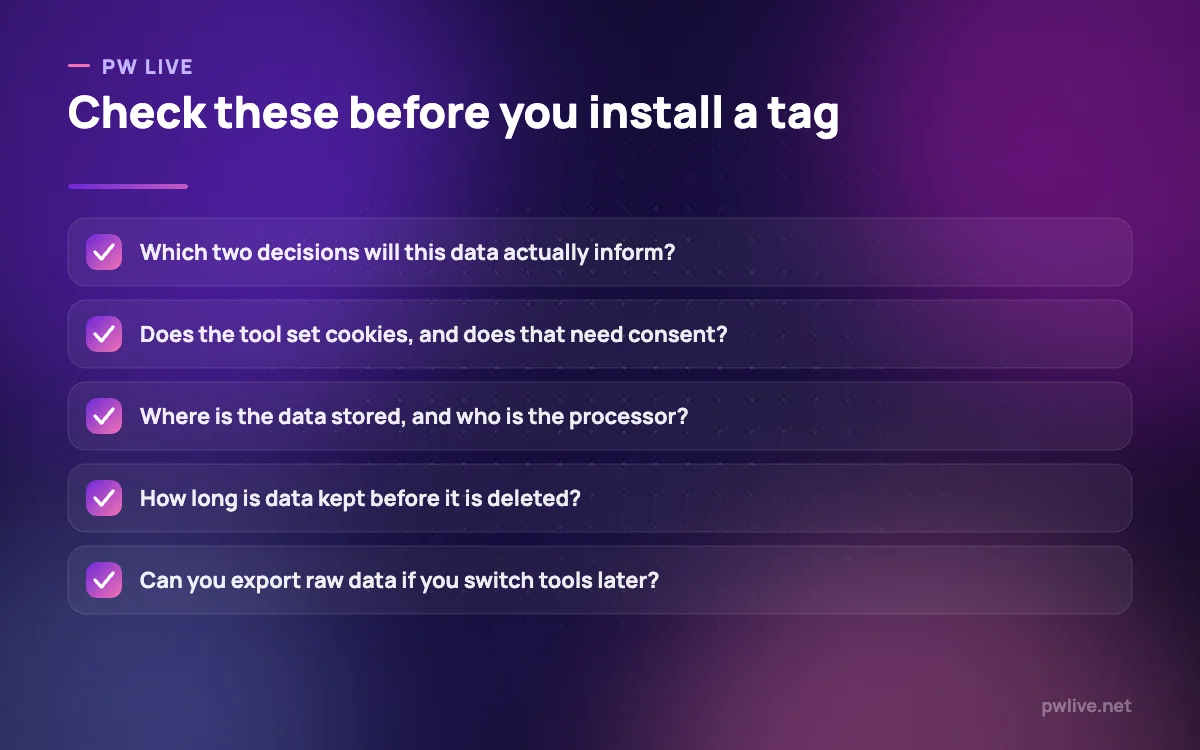
If you are measuring a product rather than a site, go to Mixpanel or Amplitude and budget the setup time. Both free tiers are large enough to prove the value before you pay. Whatever you pick, agree the two or three decisions the data must inform first; the reasoning in our digital marketing fundamentals guide applies directly, and if organic traffic is the focus, pair it with SEO for beginners. More tools from across our marketing coverage are listed by category.
Key takeaways
- GA4 is free and well integrated, but its retention and export limits are lower than most people assume
- Privacy-first tools differ mainly in shape: Fathom prices for many sites, Plausible for one or two
- Matomo and Umami let you hold the data yourself, at the cost of running the infrastructure
- Microsoft Clarity is free and answers “why”, not “how many” — use it alongside a counting tool
- Mixpanel and Amplitude both have large free tiers, but only pay off with disciplined event naming
- Compliance is your responsibility, not the vendor’s marketing copy; take your own advice
Frequently asked questions
Do I need a cookie banner with these tools?
It depends on what the tool collects and where your visitors are. GA4 uses first-party cookies. Plausible, Fathom, Umami and Matomo’s cookie-free configuration are positioned as not requiring consent banners by their vendors. Confirm with your own legal adviser rather than relying on a marketing page.
Can I run two analytics tools at once?
Yes, and many teams do — typically one counting tool plus one behaviour tool such as Clarity. Expect the numbers to disagree slightly, because each tool defines sessions and filters bots differently. Pick one as the source of truth for reporting.
Is Google Analytics 4 really free?
The standard tier is free to use, with limits on data retention, BigQuery export volume and API quotas. Analytics 360 lifts those limits, but Google does not publish its price; you go through sales or a Google Sales Partner.
What happens to my historical data if I switch tools?
Most tools let you export, but you cannot backfill a new tool with old visits, so your history restarts. Run the new tool alongside the old one for a month before switching, and keep an export of the old reports.
Pricing checked 2026-09-08. 7 of 8 prices in this article were read from the vendor’s own pricing page on that date; the rest publish no figure, so we describe the model instead. Vendors change prices without notice, so open the linked page before you commit.
Keep learning with PW Live
Browse every tool comparison, or follow the Digital Marketing track to learn the skills these tools support.





Leave a Reply