
The best email marketing platforms differ less in what they can send than in how they charge you for sending it. Two products with almost identical editors can produce very different invoices, because one bills on the size of your list and the other bills on the number of emails you push out.
This comparison is for small businesses, creators and marketing teams choosing their first or second platform. Each entry states the pricing basis plainly, because that single fact predicts your bill better than any feature table. It also flags the free plans that require the vendor’s badge on your emails, which matters if you are mailing customers.
If you are still building the list itself, our guide to email marketing basics covers that groundwork first.
How we chose these tools
This round-up is based on each vendor’s public documentation and pricing pages, read on 8 September 2026. Nobody at PW Live ran hands-on trials. Every price, plan limit and branding rule below came from the vendor’s own page on that date, and where a vendor publishes no list price we say so rather than guessing. Pricing changes often, so confirm current details before buying. No vendor paid for inclusion.
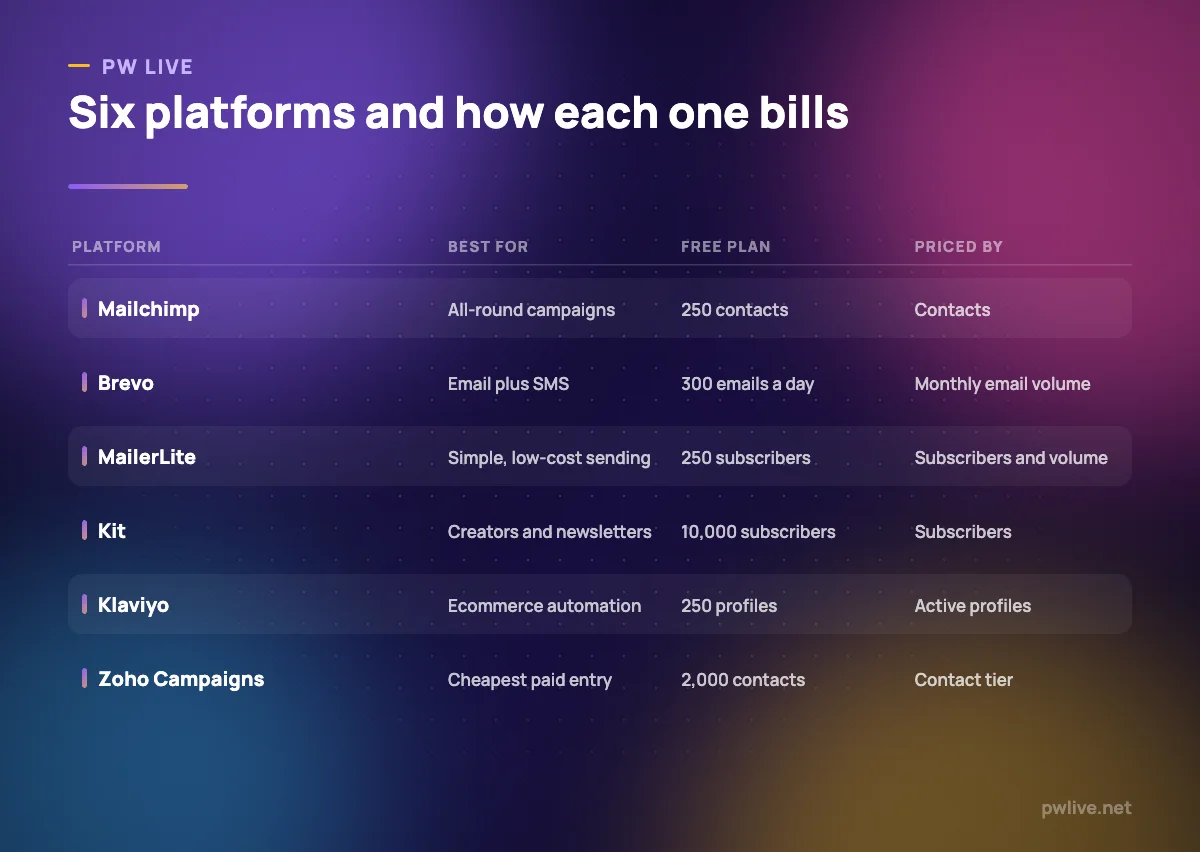
All prices below are as of 8 September 2026, in the currency the vendor lists.
1. Mailchimp – best for all-round campaigns
Mailchimp remains the default first choice, and its editor and reporting are easy to hand to someone non-technical. Pricing is based on contacts: the tier you choose sets both your contact limit and your sending limit.
What it does well – Familiar interface that most freelancers and agencies already know. – Free plan lets you test a real send before paying anything. – Standard and Premium allow you to remove Mailchimp branding.
Where it falls short – The free plan is capped at 250 contacts, 500 sends a month and 250 a day. – Exceeding the free contact limit puts a hold on sending until you upgrade. – Headline prices apply for the first 12 months, after which the rate varies by contact tier.
Pricing: Priced by contacts. Free for 250 contacts; Essentials $13, Standard $20 and Premium $350 a month for 12 months. Mailchimp pricing
2. Brevo – best for send-based billing
Brevo is the clearest example of volume pricing on this list: you buy a monthly email allowance, not a contact tier. If you hold thousands of contacts but mail them once a quarter, this is usually the cheaper model.
What it does well – Bills on monthly email volume, so a dormant list costs nothing to store. – Starter at $9 a month includes 5,000 emails and removes the Brevo logo. – Marketing automation, A/B testing and landing pages arrive at Standard, $18 a month.
Where it falls short – Free accounts carry a “Sent by Brevo” footer; removing it otherwise is a $10.80 a month add-on. – The free plan is limited to 300 emails a day. – Professional jumps to $499 a month from 150,000 emails.
Pricing: Priced by monthly email volume. Free with 300 emails a day; Starter $9 a month, $8.08 billed yearly; Standard $18; Professional $499. Brevo pricing
3. MailerLite – best for simple, low-cost sending
MailerLite is the quiet pick for people who want a clean editor and a small bill. It bills on subscribers and includes a send allowance with each tier, so both numbers matter.
What it does well – Free plan covers 250 subscribers, 2,500 monthly emails and two user seats. – At 500 subscribers, Comfort is $12 a month with 5,000 monthly emails and three seats. – Power removes the send ceiling entirely with unlimited monthly emails.
Where it falls short – Removing the MailerLite logo is a paid-plan feature, so free emails carry it. – Comfort caps monthly emails, so heavy senders are pushed to Power. – Support on free is community only.
Pricing: Priced by subscribers and send volume. Free to 250 subscribers; at 500 subscribers Comfort is $12 a month ($129.60 billed yearly) and Power $25 ($270 yearly). MailerLite pricing
4. Kit – best for creators and newsletters
Kit, formerly ConvertKit, is built around writers and creators rather than campaigns. Its free tier is unusually generous on list size, which makes it attractive if your audience grows faster than your revenue. Pair it with our notes on writing content people actually read.
What it does well – Free up to 10,000 subscribers, far above most rivals. – Visual automations and sequences on paid plans suit multi-email onboarding. – Yearly billing saves about 17% over monthly.
Where it falls short – The free plan excludes automated sequences, integrations and advanced analytics. – Kit branding stays on free emails until you upgrade. – Prices scale with subscriber count, so a large free list becomes expensive to activate.
Pricing: Priced by subscribers. Free to 10,000 subscribers; at 1,000 subscribers Creator is $33 a month or $390 yearly, Pro $66 or $790 yearly. Kit pricing
5. Constant Contact – best for frequent senders on a small list
Constant Contact charges by contacts but is more generous than most on how much you may send: the allowance is a multiple of your contact count, rising with the plan.
What it does well – Send allowances of 10x contacts on Lite, 12x on Standard and 24x on Premium. – Annual billing lowers Lite to $10.20 a month. – A 30-day money-back guarantee on new plans.
Where it falls short – There is no free plan at all, only a trial. – Sends beyond your allowance are charged at $0.002 each. – Premium at $80 a month is steep for a very small list.
Pricing: Priced by contacts. Lite $12 a month or $10.20 billed annually; Standard $35 or $29.75; Premium $80 or $68. Constant Contact pricing
6. Klaviyo – best for ecommerce automation
Klaviyo is built around store data: orders, browsing and product history drive the segments and flows. If your revenue depends on repeat purchase sequences, it is the reference point, and it pairs naturally with work on reducing cart abandonment.
What it does well – Free plan includes 250 profiles, 500 email sends a month and $5 of mobile messages. – Email, SMS and a customer self-service hub sit in one account. – Built-in reporting attributes revenue to campaigns without extra setup.
Where it falls short – Pricing is based on active profiles, so inactive contacts still cost money. – The pricing page publishes no list price for paid tiers; you build an estimate on the page. – Email support on the free plan is limited to the first 60 days.
Pricing: Priced by active profiles. Free for 250 profiles and 500 email sends a month; paid tiers are quoted through Klaviyo’s on-page estimator rather than a published price. Klaviyo pricing
7. Omnisend – best for smaller stores
Omnisend covers similar ground to Klaviyo for stores that are not yet at Klaviyo’s scale, with email, SMS and web push in one contact-based plan.
What it does well – Free plan includes 250 contacts, 500 emails and 500 web push notifications a month. – Prebuilt ecommerce automations rather than blank canvases. – SMS is charged separately, so you are not paying for it if you do not use it.
Where it falls short – Free newsletters carry a “Powered by Omnisend” badge, listed as required rather than optional. – Billing counts subscribers and non-subscribers who receive automated messages. – Headline prices reflect a 30% discount for paying three months upfront.
Pricing: Priced by contacts. Free for 250 contacts; at 251-500 contacts Standard is $16 a month and Pro $59, shown as $11.20 and $41.30 with the three-month upfront discount. Omnisend pricing
8. ActiveCampaign – best for deeper automation
ActiveCampaign is the step up for teams whose email is driven by behaviour rather than a calendar. Automation is the product, and the entry plan is deliberately limited to make that clear.
What it does well – Automation, segmentation and a CRM view in one account. – Send allowances scale from 10x your contact limit to 15x on Enterprise. – Landing pages are included from the Starter plan.
Where it falls short – Starter allows only 5 actions per automation and one user. – There is no free plan, only a 14-day trial. – Multi-user access starts at Pro, which is $79 a month billed annually.
Pricing: Priced by contacts. Starter from $15 a month billed annually, Plus $49, Pro $79 with three users, Enterprise $145 with five. ActiveCampaign pricing
9. Zoho Campaigns – best for the lowest paid entry
Zoho Campaigns is the cheapest credible paid option here, and its free tier is the most generous on contacts. It makes obvious sense if you already use other Zoho products.
What it does well – Forever Free covers up to 2,000 contacts, 6,000 emails a month and five users. – Paid plans at the smallest tier cost US$3 to US$4.50 a month billed annually. – Paid plans lift the send cap to unlimited emails.
Where it falls short – The free plan works out at roughly three campaigns to a full list per month. – Prices are only visible after choosing a contact tier on the page. – Deliverability tooling and reporting are plainer than at Klaviyo or ActiveCampaign.
Pricing: Priced by contact tier. Forever Free to 2,000 contacts; at 0-500 contacts Standard is US$3 a month and Professional US$4.50, billed annually. Zoho Campaigns pricing
10. HubSpot Marketing Hub – best for email tied to a CRM
HubSpot’s appeal is not the email tool itself but the contact record behind it. Every form fill, chat and send lands in the same place, which suits teams where sales and marketing are the same two people.
What it does well – Free tools give email, forms, chat and CRM for up to two users. – Starter is per seat from $7 a month with 1,000 marketing contacts included. – Personalisation draws on CRM fields rather than list fields alone.
Where it falls short – Free emails and live chat carry HubSpot branding until you upgrade. – Professional starts at $800 a month with three seats, a large step from Starter. – Marketing contacts are billed separately from stored contacts, which complicates forecasting.
Pricing: Free tools $0 for up to 2 users; Starter from $7 per seat per month; Professional $800 a month; Enterprise $3,600 a month. HubSpot Marketing pricing
How to choose between them
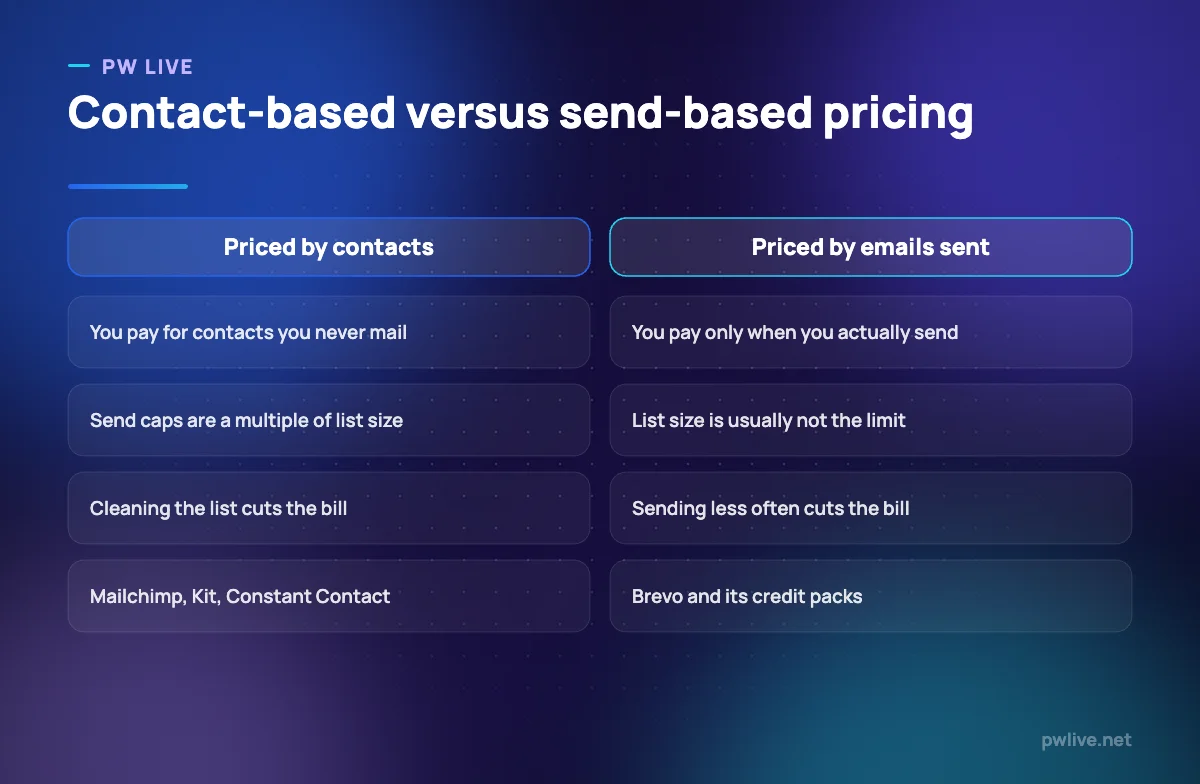
Start with the shape of your list. If it is large and you mail it rarely, send-based pricing such as Brevo’s will almost always cost less. If it is small and you mail it constantly, contact-based pricing with a high send multiple, such as Constant Contact’s, works in your favour.
Then check the free plan for the thing that will actually stop you: contacts at Mailchimp, daily sends at Brevo, automations at Kit, or the required badge at Omnisend. A free plan that forces a vendor logo onto customer emails is fine for a hobby project and awkward for a business.
Finally, weigh what you already run. A Zoho or HubSpot account tilts the decision, and a store on Shopify or WooCommerce tilts it towards Klaviyo or Omnisend. Our apps and tools category and the digital marketing skills track cover the wider stack, while copywriting fundamentals will do more for your open rates than any platform switch.
Key takeaways
- The best email marketing platforms are separated by billing basis: contacts, subscribers, active profiles or emails sent.
- Contact-based pricing punishes large dormant lists; send-based pricing punishes frequent mailing.
- Free plans from Brevo, Kit, MailerLite, Omnisend and HubSpot carry vendor branding until you upgrade.
- Constant Contact and ActiveCampaign have no free tier at all, only trials.
- Klaviyo publishes no list price for paid plans, so budget from its estimator before committing.
Frequently asked questions
Is it cheaper to be billed by contacts or by emails sent?
It depends on how often you mail. A 10,000-contact list mailed monthly is usually cheaper on send-based pricing like Brevo’s; a 500-contact list mailed three times a week is usually cheaper on a contact plan with a high send multiple.
Which platforms put their branding on free emails?
Brevo adds a “Sent by Brevo” footer, Omnisend requires a “Powered by Omnisend” badge on free newsletters, MailerLite and Kit list logo removal as paid features, and HubSpot brands free emails and chat.
Do I need a separate tool for ecommerce automation?
Not necessarily, but Klaviyo and Omnisend are built around store data and prebuilt flows, whereas general platforms need more configuration to achieve the same abandoned cart and post-purchase sequences.
How much should a small business budget for email?
At the smallest tiers, a paid plan costs between US$3 and about $20 a month across most of this list. Budget for the tier above your current list size, because contact and send limits are the usual reason people upgrade mid-year.
Pricing checked 2026-09-08. 9 of 10 prices in this article were read from the vendor’s own pricing page on that date; the rest publish no figure, so we describe the model instead. Vendors change prices without notice, so open the linked page before you commit.
Keep learning with PW Live
Browse every tool comparison, or follow the Digital Marketing track to learn the skills these tools support.





Leave a Reply