

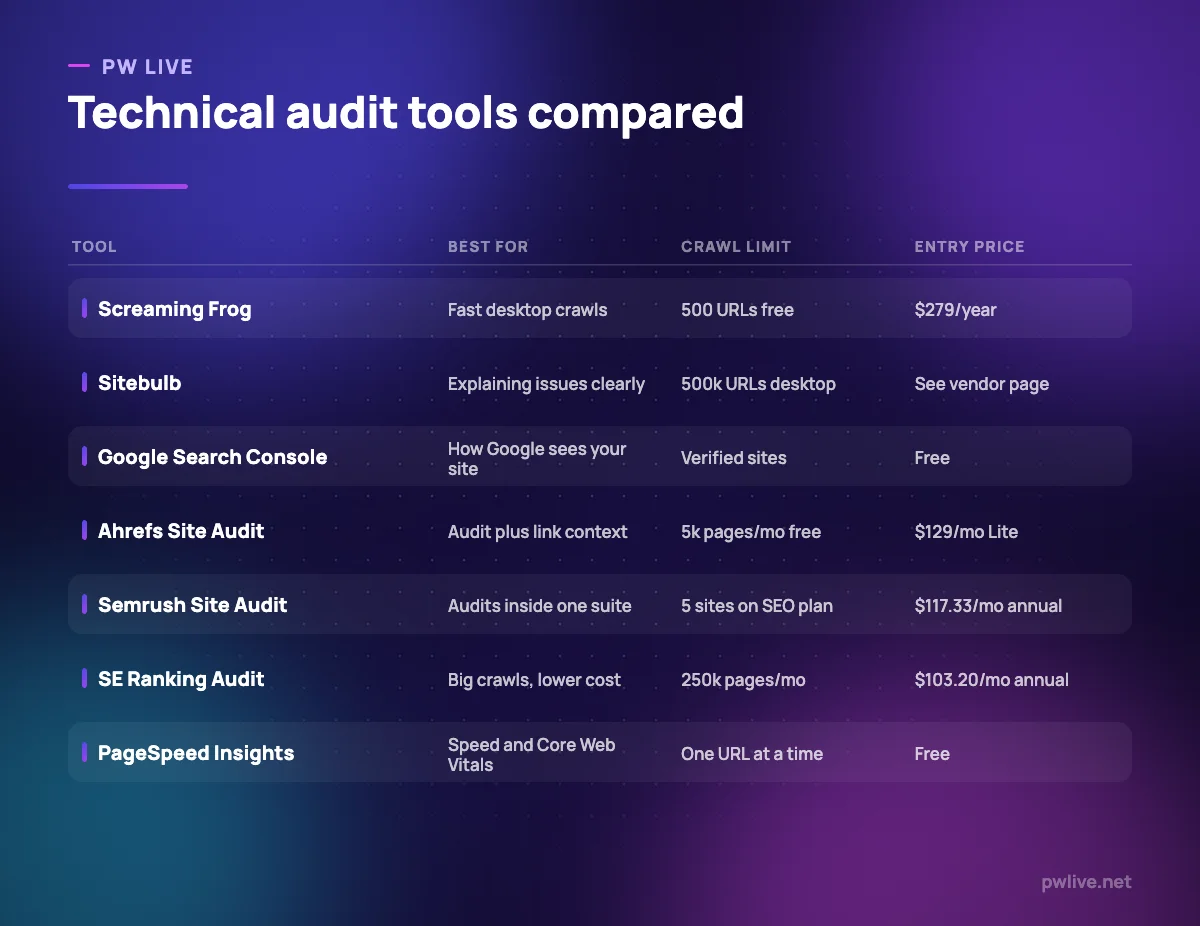
Technical SEO audit tools all do the same basic thing: they walk your site the way a search engine would and tell you where it disagrees with what you intended. The differences that matter are how many pages they will crawl, how well they explain what they found, and how much of that costs money.
This comparison is for whoever ends up owning site health: a developer who inherited the SEO backlog, a marketer handing a fix list to engineering, or a founder wondering why half their pages are not indexed.
Match each entry to your site size first and your budget second, because crawl allowance is the constraint that bites earliest. Our explainer on how search engines work is worth reading alongside this if crawling and indexing are still fuzzy concepts.
How we chose these tools
Everything below comes from each vendor’s own public documentation and pricing pages, read on 8 September 2026. We did not run hands-on trials, and no figure here is a benchmark result. One vendor, Sitebulb, renders prices in a way we could not read, so we describe the model and quote no number. Crawl allowances and prices change, so confirm current details on the vendor’s page before you commit. No vendor paid for inclusion and there are no affiliate links.
1. Screaming Frog SEO Spider – best for fast desktop crawls
The SEO Spider is the default crawler for most technical SEOs, and it earns that by being quick and unfussy. It runs on your own machine, walks the site, and produces tabs of raw findings: response codes, page titles, meta descriptions, canonicals, hreflang, redirect chains and orphan pages. Screaming Frog documents it as auditing over 300 SEO issues.
What it does well
- Crawls run locally, so nothing queues behind other customers and nothing is uploaded.
- Connects to Search Console, Analytics and PageSpeed Insights on the paid licence to enrich a crawl with real data.
- Custom extraction pulls any element from a page, which handles unusual one-off audits.
- An annual licence costs less than a month of most platform subscriptions.
Where it falls short
- The free version is capped at 500 URLs and cannot save crawls, schedule them or use the API integrations.
- Crawl size is bounded by your machine’s memory and storage rather than by a plan.
- It reports issues in tables and leaves prioritising and explaining entirely to you.
Pricing: $279 per licence per year, dropping to $265, $249 and $235 per licence at 5, 10 and 20 licences, with licences lasting one year, as of 8 September 2026 on the Screaming Frog pricing page.
2. Sitebulb – best for explaining and prioritising issues
Sitebulb crawls the same things as its competitors but presents findings as prioritised, categorised “Hints”, each with an explanation of why it matters. If you have to hand an audit to a developer or a client who does not do SEO, that framing is worth paying for. It runs as desktop software on Windows and Mac, or in the browser as a cloud product.
What it does well
- Issues arrive explained and prioritised rather than as a raw table.
- Renders JavaScript using an evergreen Chromium engine, so app-style sites crawl properly.
- Audit comparison tracks whether issues are actually being fixed over time.
- Integrates with Google Sheets, GA4 and Search Console, and generates customisable PDF reports.
Where it falls short
- The Lite desktop tier is limited to 10,000 URLs per audit and one user.
- The vendor’s pricing page did not render figures for us, so cost could not be confirmed.
- Cloud plans require a minimum of two users, which rules them out for a solo consultant.
Pricing: desktop and cloud tiers billed monthly or yearly, with yearly billing discounted 15%, additional desktop users listed from a small monthly fee, and a 14-day trial. The Sitebulb pricing page did not render figures for us on 8 September 2026, so check it directly before budgeting.
3. Google Search Console – best for how Google actually sees your site
Crawlers tell you what is on your site. Search Console tells you what Google did with it. That difference is the whole reason it belongs in a technical audit: a page can be perfect in a crawl report and still be excluded from the index, and only Google will tell you why.
What it does well
- Index coverage reporting names the specific reason a URL was not indexed.
- URL Inspection shows the crawled HTML, the rendered page and the canonical Google chose.
- Core Web Vitals and rich results reports are grouped by issue across the whole site.
- Free, with alerts by email when Google detects a new problem.
Where it falls short
- It only covers verified properties, so you cannot audit anyone else’s site.
- Reports update on Google’s schedule, so a fix may take days to show as resolved.
- It surfaces problems without diagnosing causes, which is exactly what a crawler is for.
Pricing: free. Google documents Search Console as a free service, checked 8 September 2026. Understanding what it reports is closer to a developer skill than a marketing one, which is why our coding and programming skill track is a reasonable companion to it.
4. Ahrefs Site Audit – best for auditing with link context attached
Ahrefs documents Site Audit as identifying more than 170 SEO issues, covering speed, Core Web Vitals, titles, headings, duplicates, indexability, redirects, images, structured data and robots directives. What sets it apart is that the audit sits next to the backlink index, so you can see whether a broken page you are about to delete has links pointing at it.
What it does well
- Over 170 documented issue types with clear categorisation.
- Link data in the same account means redirect decisions are informed rather than blind.
- Crawl allowances are generous at higher tiers, reaching 1.5 million credits a month on Advanced.
- The free Webmaster Tools tier audits your own verified sites at up to 5,000 pages a month.
Where it falls short
- Lite is limited to 100,000 crawl credits a month and 5 verified projects.
- Only one user is included on every plan, with seats charged from $40 per month upwards.
- The audit is not sold separately, so you buy the whole platform to get it.
Pricing: included on Ahrefs plans, with Lite at $129 per month, Standard $249 and Advanced $449, and annual billing saving up to 17%, as of 8 September 2026 on the Ahrefs pricing page.
5. Semrush Site Audit – best for audits inside a wider platform
Semrush’s audit is the one you use because everything else is already there. Errors, warnings and notices are grouped with fix guidance, and the findings sit beside keyword, competitor and rank data, which makes it straightforward to connect a technical problem to a traffic drop in the same session.
What it does well
- Findings are grouped into errors, warnings and notices with remediation notes attached.
- Sits alongside rank tracking and keyword data, so cause and effect are easier to join up.
- Reporting is built for handing something to a client or a manager.
Where it falls short
- The entry SEO plan covers 5 websites, which an agency clears quickly.
- Semrush’s own Site Audit feature page does not state per-plan crawl page limits, so check them inside the product before relying on a large crawl.
- Extra users start at $45 per month, so the real cost for a team is above the headline price.
Pricing: included on Semrush plans, with the SEO plan listed at $117.33 per month billed annually or $139 billed monthly, Pro+ at $248.17 annually and Advanced at $455.67 annually, as of 8 September 2026 on the Semrush pricing page.
6. SE Ranking Website Audit – best for large crawls at a lower price
SE Ranking’s audit allowance is the standout number in this list relative to price. Its entry plan covers a quarter of a million audited pages a month, which is more than most mid-sized sites need and considerably more than similarly priced competitors offer.
What it does well
- Core includes 250,000 audited pages a month; Growth raises that to 2,000,000.
- Annual billing is 20% cheaper, and a 14-day trial does not require a card.
- Ten projects on the entry plan suits agencies handling several small clients.
- White-label reporting is available as an add-on rather than an enterprise-only feature.
Where it falls short
- Core includes only one manager seat, so a second auditor means moving up a tier.
- Useful extras including the agency pack, AI search features and API access are priced separately.
- Issue explanations are competent but less instructive than Sitebulb’s.
Pricing: Core is listed at $129 per month billed monthly or $103.20 billed annually, Growth at $279 or $223.20, and Enterprise is quote-based, as of 8 September 2026 on the SE Ranking pricing page.
7. PageSpeed Insights and Lighthouse – best for page speed and Core Web Vitals
Speed is where technical SEO meets engineering, and this is the free tool both sides will accept. PageSpeed Insights reports field data from the Chrome User Experience Report, describing what real visitors experienced, alongside lab data from Lighthouse, which runs the page in a simulated environment for debugging. Google’s own documentation is clear that the two answer different questions.
What it does well
- Separates real-user field data from simulated lab diagnostics rather than blending them.
- Covers performance, accessibility, best practices and SEO in a single run.
- Lighthouse also runs inside Chrome DevTools, so developers can test before deploying.
- Free, with no account, licence or spend required.
Where it falls short
- It analyses one URL at a time, so site-wide speed work still needs a crawler.
- Field data only appears for pages with enough real traffic in the CrUX dataset.
- Lab scores vary between runs, which tempts teams to chase a number instead of a fix.
Pricing: free. Google’s PageSpeed Insights documentation describes the tool and its data sources and lists no paid tier, checked 8 September 2026.
How to choose between them
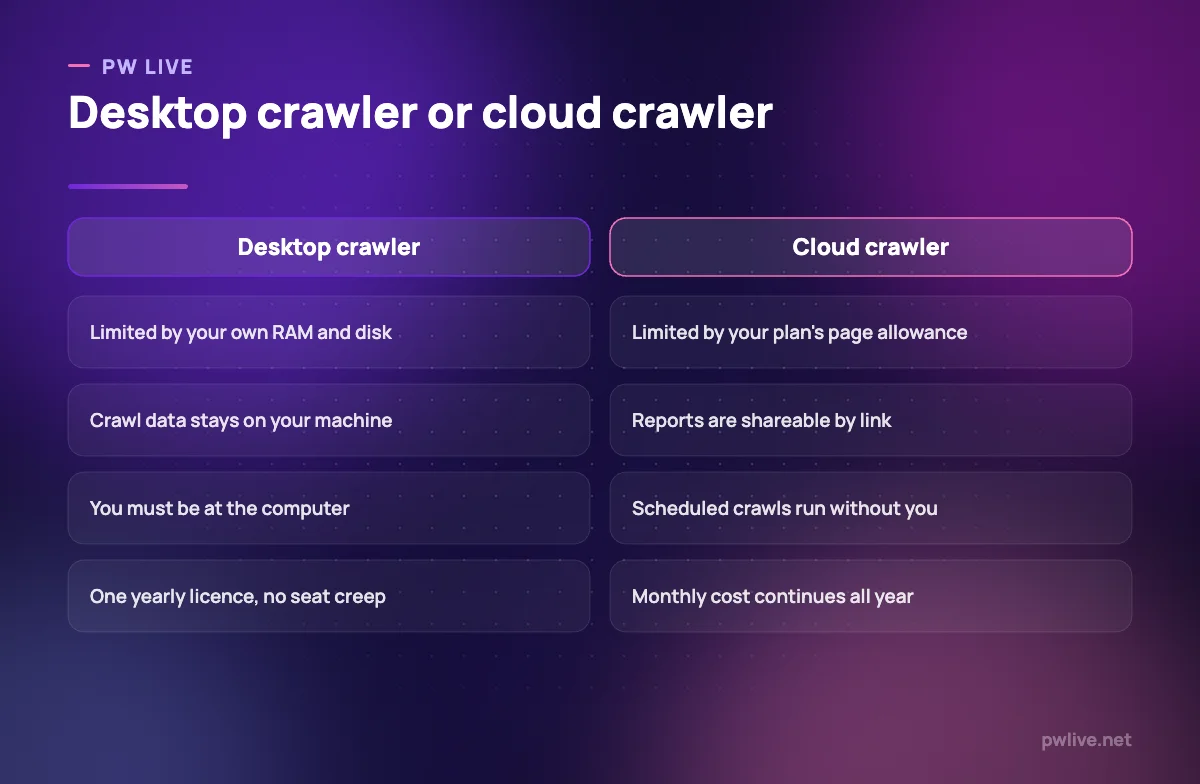
Start with site size. Under 500 pages, the free Screaming Frog edition plus Search Console will find nearly everything, and paying for a crawler is premature. Between 500 and a few tens of thousands of pages, a Screaming Frog licence is the cheapest serious option at $279 a year. Above that, or when crawls need to run on a schedule without you, a cloud audit becomes worth the monthly cost.
Then ask who reads the report. If you are fixing things yourself, raw tables are fine and Screaming Frog is quicker. If you are persuading a developer or a client, Sitebulb’s explanations or Semrush’s grouped reporting save arguments. That is a communication problem as much as a technical one.
Finally, check what you already pay for. If Ahrefs or Semrush is already in the budget for keyword work, its audit is included and adding a second tool is hard to justify. Layering these onto a hosting or cloud setup you do not control has its own constraints, and if you are automating audits, most of these publish an API, which our plain-English explanation of APIs covers. Whatever you pick, connect its findings to outcomes rather than scores, as our guide to marketing metrics that matter argues, and see the wider technology section for related ground.
Key takeaways
- Crawl allowance, not price, is usually the constraint that decides which tool you can use.
- Search Console is the only source for how Google actually indexed a page, and it is free.
- A desktop licence at $279 a year is cheaper than any monthly cloud audit for a mid-sized site.
- If someone else has to act on the report, pay for explanation and prioritisation rather than raw output.
- Site audits are bundled into Ahrefs, Semrush and SE Ranking, so check what you already own first.
- Page speed needs both field data and lab data, and PageSpeed Insights gives you both at no cost.
Frequently asked questions
How often should I run a technical audit?
Monthly for an active site, and always after a migration, redesign or template change. Search Console will flag urgent problems between audits, which is why verifying there matters more than the audit schedule itself.
Is a free crawler enough for a small site?
For a site under 500 URLs, yes. The free Screaming Frog edition finds the same broken links, redirect chains and duplicate metadata as the paid one; it simply cannot save the crawl or connect to the Google APIs.
Do I need both a crawler and Search Console?
Yes, because they answer different questions. A crawler shows what exists on your site; Search Console shows what Google did with it. Most confusing indexing problems only make sense when you read both.
What should I fix first in an audit report?
Anything blocking indexing, then broken internal links and redirect chains, then duplicate titles and descriptions, then speed. Fixing low-severity notices before indexing problems is the most common way an audit produces no measurable result. If the underlying concepts are unfamiliar, our SEO for beginners guide covers them first.
Pricing checked 2026-09-08. 6 of 7 prices in this article were read from the vendor’s own pricing page on that date; the rest publish no figure, so we describe the model instead. Vendors change prices without notice, so open the linked page before you commit.
Keep learning with PW Live
Browse every tool comparison, or follow the Digital Marketing track to learn the skills these tools support.





Leave a Reply