
Marketing automation platforms all promise the same thing: the right message to the right person without you sending it by hand. The differences that matter when you are choosing between the best marketing automation platforms are duller than the demos suggest — how they charge, whether the CRM is built in, and how much setup work sits between signing up and the first useful flow.
This list is for small and mid-sized teams picking their first or second platform, plus ecommerce sellers who need email and SMS in one place. It covers all-in-one suites, ecommerce specialists, developer-friendly messaging tools and one enterprise system, so you can rule out the wrong category quickly.
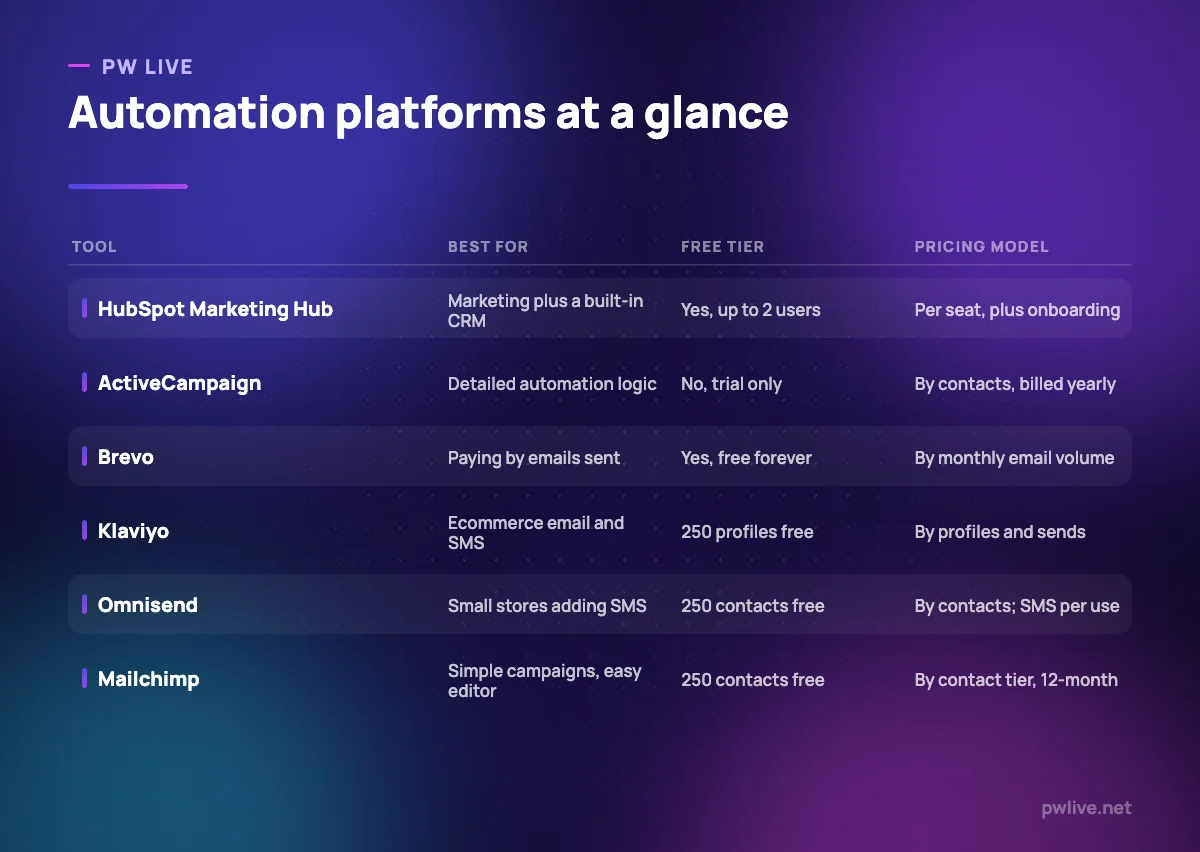
Read the pricing lines carefully. Some vendors charge per contact stored, some per email sent, some per seat, and the same list can cost very different amounts on different models. If you are still building the list itself, start with our email marketing basics guide first.
How we chose these tools
This round-up is based on each vendor’s own public documentation and pricing pages, checked on 8 September 2026. We did not run hands-on trials and nobody at PW Live has tested these platforms in a live account. Where a vendor publishes a figure we quote it with its billing basis; where a pricing table would not load or a vendor sells only by quote, we say that plainly rather than guessing. Prices and plan limits change often in this category, so confirm current details on the vendor’s site before buying. No vendor paid for inclusion.
1. HubSpot Marketing Hub — best for marketing with a built-in CRM
HubSpot Marketing Hub is the option to consider when the real problem is that marketing and sales keep different records. Contacts, deals, forms, email, landing pages and workflows sit on one database, which removes a whole class of sync problems. The free tier is genuinely usable for two people, and the Starter tier is cheap enough for a solo marketer.
The jump to Professional is where it gets serious: that is the tier with the full workflow tooling, and it carries a required one-time onboarding fee. Budget for that fee, not just the subscription.
What it does well – Free tier for up to two users, with a real CRM underneath – Marketing contacts, forms and workflows in one system – Clear upgrade path from solo marketer to a full team – Extensive documentation and a large partner ecosystem
Where it falls short – Professional carries a required $3,000 one-time onboarding fee, Enterprise $7,000 – Starter includes only 1,000 marketing contacts before you pay more – Additional core seats are charged on top from $45 per month on Professional
Pricing: Free for up to 2 users; Starter from $7 per seat per month on an annual commitment ($20 at the standard rate) with 1,000 marketing contacts; Professional $800-$890 per month plus $3,000 onboarding; Enterprise from $3,600 per month plus $7,000 onboarding. HubSpot pricing
2. ActiveCampaign — best for detailed automation logic
ActiveCampaign has long been the pick for people who want branching, conditional automations without enterprise pricing. Its own plan documentation sets out the ladder clearly: Starter for email and automation essentials, Plus for multichannel and landing pages, Professional for full omnichannel work, Enterprise for SSO, custom reporting and premium CRM integrations.
Two limits are worth noting from that documentation. Starter allows a maximum of 25,000 contacts and caps automations at five actions each, and seats are tight lower down — one seat on Starter and Plus, three on Professional.
What it does well – A visual automation builder that handles genuinely complex logic – Clear tier structure documented in the vendor’s help centre – WhatsApp and email bundles for teams that message on both – Enterprise tier adds SSO, HIPAA support and Salesforce or Dynamics integration
Where it falls short – The pricing page showed placeholder dashes rather than figures when we checked – Starter caps automations at five actions and 25,000 contacts – Plans are billed annually, and extra seats cost extra on every tier
Pricing: Four tiers priced by contact volume and billed annually; we could not read published figures on the page, so build a quote in the on-page configurator. ActiveCampaign pricing
3. Brevo — best for paying by emails sent
Brevo charges on monthly email volume rather than contacts stored, which changes the maths completely if you keep a large list and mail it rarely. That model suits newsletters with long tails, membership organisations and anyone who imported years of contacts and does not want to pay rent on them.
The platform covers email, SMS, automation, forms and basic reporting, and the free tier lets you remove Brevo branding, which many free plans do not. Professional adds higher volumes and includes ten seats.
What it does well – Priced by emails sent, so a big dormant list does not inflate the bill – Free forever tier that includes automation and segmentation features – Email and SMS in one platform, with multilingual support – Ten seats included on the Professional tier
Where it falls short – The pricing table did not render figures for us; budget from the live calculator – Volume-based pricing punishes high-frequency senders with small lists – Deeper CRM and reporting are thinner than in HubSpot
Pricing: Free forever tier, then Starter, Standard and Professional priced by monthly email volume, with 10% off on yearly billing and a custom Enterprise price. Brevo pricing
4. Klaviyo — best for ecommerce email and SMS
Klaviyo is built around a store’s data: products, orders, browsing and checkout events drive the segments and the flows. If your revenue depends on abandoned cart, browse abandonment and post-purchase sequences, this is the category leader for a reason, and its reporting attributes revenue to individual flows.
Its billing deserves attention. An active profile is any profile that can be emailed, regardless of consent status, so list hygiene directly controls your bill. Our guide to reducing cart abandonment pairs well with the flows you would build here.
What it does well – Ecommerce events, segments and revenue attribution built in – Email, SMS, MMS, WhatsApp and RCS from one subscription – Free plan documented at 250 profiles and 500 emails a month – $5 of mobile messaging spend included free every month
Where it falls short – Plans scale on active profiles and sends together, so costs climb on both axes – Any emailable profile counts, consented or not, so untidy lists cost money – Overkill for a business that does not sell products online
Pricing: Free up to 250 profiles and 500 emails a month; paid plans tiered by active profiles and monthly sends; mobile messaging billed in dollars with $5 included monthly. Klaviyo pricing
5. Customer.io — best for behaviour-triggered messaging
Customer.io is aimed at product and lifecycle teams rather than campaign marketers. You pipe in events from your app, then build journeys that react to what people do or fail to do. It is the most developer-shaped tool on this list, and the most precise once your event data is clean.
Pricing is by profiles, with published overage rates, which makes forecasting easier than most competitors here. The entry point is high for a small marketing list, and that is deliberate.
What it does well – Event-driven journeys with fine-grained conditions and delays – Published overage rates: $0.009 per extra profile, $0.12 per 1,000 extra emails – Handles product messaging, not just marketing campaigns – Essentials is available on monthly billing without an annual term
Where it falls short – Essentials starts at $100 per month for 5,000 profiles, so it is not a starter tool – Premium jumps to $1,000 per month billed yearly – Needs engineering help to send the right events in the first place
Pricing: Essentials from $100 per month billed monthly for 5,000 profiles; Premium from $1,000 per month billed yearly; Enterprise quote-based. Customer.io pricing
6. Omnisend — best for small stores adding SMS
Omnisend targets small ecommerce sellers who want prebuilt store automations without Klaviyo’s price curve. Cart recovery, browse abandonment, welcome and post-purchase flows come as templates, and web push is included even on the free plan.
SMS is pay-per-use on top of the subscription, with rates that fall as your spend rises. That is honest, but it means your monthly total is two numbers, not one.
What it does well – Free plan with 250 contacts, 500 emails and 500 web push notifications a month – Prebuilt ecommerce automations that work without configuration – Unlimited monthly emails on the Pro tier – SMS rates published openly by spend band
Where it falls short – Contact-based pricing, so a dormant list still costs money – SMS is billed separately from the subscription – Above 150,000 contacts you are into custom pricing
Pricing: Free for 250 contacts and 500 emails a month; Standard listed at $11.20 per month for 500 contacts and Pro at $41.30 per month for 2,500 contacts, both shown at a 30% promotional rate when checked; SMS from $0.007 per message. Omnisend pricing
7. Mailchimp — best for simple campaigns and a familiar editor
Mailchimp remains the easiest place to send a decent-looking campaign to a modest list. The editor is forgiving, the templates are fine, and the customer journey builder covers the common flows. For a small business that mainly sends a monthly newsletter and two automations, it is enough.
The free plan is much tighter than people remember, and paid prices move with your contact tier, so check the figure at your list size rather than the headline.
What it does well – The gentlest learning curve of anything on this list – Journey builder covers welcome, abandonment and follow-up flows – Prices published openly with 14-day trials on Essentials and Standard – Wide integration support with website and store platforms
Where it falls short – Free plan is capped at 250 contacts and 500 emails a month, or 250 a day – Standard is limited to 6,000 emails a month at the entry contact tier – Automation logic is simpler than ActiveCampaign or Customer.io
Pricing: Free for 250 contacts; Essentials from $13.00 per month and Standard from $20.00 per month on a 12-month term; Premium from $350.00 per month with up to 150,000 emails a month. Prices rise with contact tier. Mailchimp pricing
8. Adobe Marketo Engage — best for enterprise B2B demand generation
Adobe Marketo Engage belongs to a different buying process. Adobe sells four packages — Growth, Select, Prime and Ultimate — covering email and automation at the low end and account-based marketing, journey analytics and premium attribution at the top. It suits B2B organisations with long sales cycles, a sales team using a major CRM, and someone whose job is running the platform.
No price is published. Adobe directs buyers to a contact form for customised pricing, so treat any figure you read elsewhere as unverified.
What it does well – Four defined packages from core email up to advanced attribution – Lead and account-based marketing in one system – Fits organisations already committed to Adobe’s wider stack – Journey analytics and AI personalisation on the higher packages
Where it falls short – No published pricing; every quote comes through sales – Needs a dedicated administrator to run well – Far too heavy for a small team, whatever the quote turns out to be
Pricing: Quote-based. Adobe publishes packages but no prices. Marketo Engage pricing
How to choose between them
Start with your data shape. If you sell products online, the ecommerce specialists win: Klaviyo when revenue justifies the profile-based bill, Omnisend when it does not. If you sell services with a sales conversation at the end, HubSpot’s built-in CRM saves you a second system. If your messages should be triggered by what people do inside a product, Customer.io is the right shape.
Then check how each vendor counts. A 40,000-contact list that gets one email a month is cheap on Brevo’s volume model and expensive on contact-based pricing; the reverse is true for a small list you mail daily. Work out your real send volume before you compare headline prices.
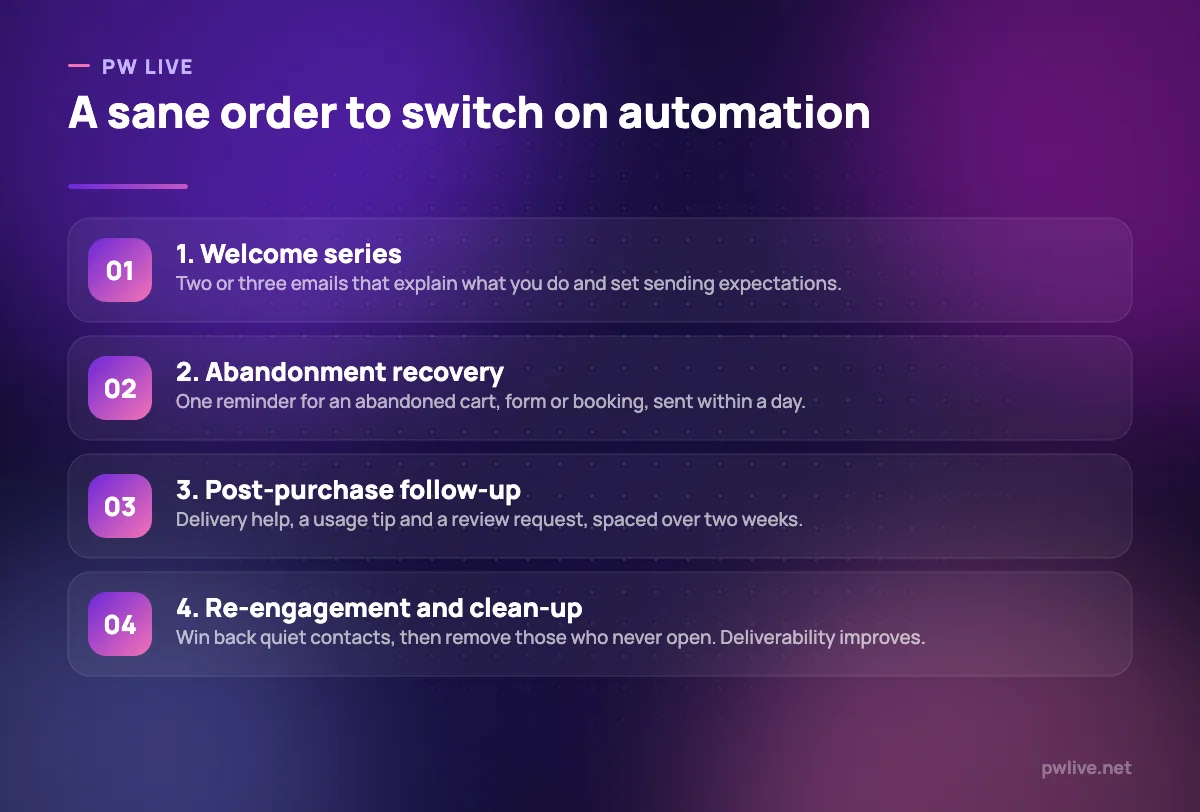
Finally, be honest about time. Every platform here can run four automations well; almost none of them will be used to a tenth of their capability in year one. Our guide to automation for non-programmers covers the habit side, and the digital marketing skill track walks through campaign fundamentals. You will find more comparisons across our marketing section.
Key takeaways
- The pricing model matters more than the headline price: per contact, per email or per seat
- HubSpot’s Professional and Enterprise tiers carry required one-time onboarding fees
- Klaviyo counts any emailable profile, so list hygiene directly reduces your bill
- Brevo suits large, infrequently mailed lists; contact-based tools punish them
- Customer.io and Marketo assume technical or administrative help you may not have
- Free tiers on Mailchimp, Omnisend and Klaviyo are all capped near 250 contacts
Frequently asked questions
What is the difference between email marketing and marketing automation?
Email marketing is sending a campaign to a list. Marketing automation adds triggers and conditions, so messages fire from behaviour — a signup, an abandoned cart, a lapsed subscription — without anyone pressing send. Most tools here do both.
Do I need a CRM as well as an automation platform?
Not always. HubSpot includes one, and the ecommerce tools read your store as their record of truth. If you have a separate sales team using its own CRM, check the integration quality before you commit, because syncing two contact databases is a recurring cost.
How many contacts do I need before paying is worth it?
Less than you think, if the list converts. The clearer signal is need, not size: once you want two or three behaviour-triggered flows running unattended, a free plan capped at 250 contacts or 500 emails a month will block you.
Can I move my list to another platform later?
Yes, contacts and consent records export from all of these. What rarely transfers is your automation logic, your templates and your historical engagement data, so switching costs a rebuild. Test with a small segment before migrating everything.
Pricing checked 2026-09-08. 6 of 8 prices in this article were read from the vendor’s own pricing page on that date; the rest publish no figure, so we describe the model instead. Vendors change prices without notice, so open the linked page before you commit.
Keep learning with PW Live
Browse every tool comparison, or follow the Digital Marketing track to learn the skills these tools support.





Leave a Reply