

The best social media scheduling tools all do the obvious thing well: they let you write posts once and publish them later. Where they differ is the unit they charge for, and that is what decides whether a tool costs you $5 a month or $200.
This list is for small teams, freelancers and in-house marketers managing somewhere between three and thirty accounts. Four of the nine have a genuine free plan, three are trial-only, and the pricing models split into four types: per channel, per brand, per social set and per seat.
Read the pricing model first and the feature list second. A tool that suits a solo founder with four accounts is usually the wrong shape for an agency with ten clients, even when the interfaces look identical. Our guide to social media strategy on a small budget covers what to post once the tool is chosen.
How we chose these tools
This round-up is based on each vendor’s public documentation and pricing pages, read on 8 September 2026. Nobody at PW Live ran hands-on trials. Every price, channel limit and free-plan restriction below came from the vendor’s own page on that date, and where a vendor publishes no price we say so rather than guessing. Pricing changes often, so confirm current details before buying. No vendor paid for inclusion.
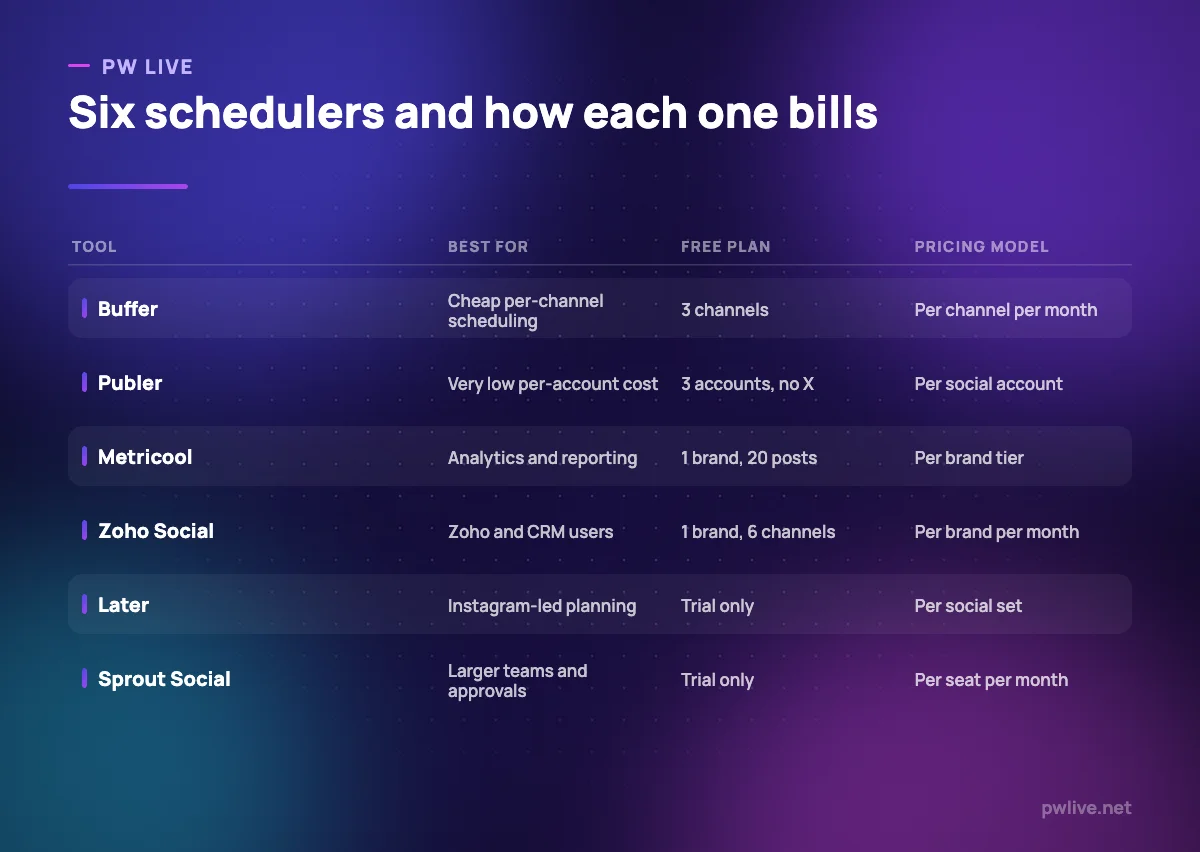
All prices below are as of 8 September 2026, in the currency the vendor lists.
1. Buffer – best for a small number of channels
Buffer’s per-channel billing is the fairest model on this list for anyone running three or four accounts, because you are not paying for capacity you do not use. The queue metaphor is also the easiest to hand to a colleague.
What it does well – Free plan connects 3 channels with 10 scheduled posts per channel. – Essentials is $5 per channel a month, among the lowest paid entry points. – Yearly billing saves the equivalent of two months.
Where it falls short – The 10-post cap per channel fills fast if you batch a month ahead. – Costs rise with every account, so agencies pay more than on seat-based tools. – Reporting is lighter than Metricool or Sprout Social.
Pricing: Free for 3 channels; Essentials $5 per channel per month or $60 billed yearly; Team $10 per channel per month or $120 billed yearly. Buffer pricing
2. Publer – best for the lowest cost per account
Publer prices per social account like Buffer, but lower, and it bundles workspaces and unlimited scheduling into the paid tiers. It is the value option for someone with many accounts and a small budget.
What it does well – Professional is $4 per account a month on yearly billing, $5 monthly. – Paid plans include unlimited scheduling, drafts, media storage and workspaces. – Free plan allows 3 accounts, 1 workspace and 25 saved drafts.
Where it falls short – X is excluded from the free plan’s 3 accounts, and X integration begins at Professional. – Free accounts keep only 24 hours of post history and 10 scheduled posts each. – Analytics and competitor tools sit on the Business tier at $8 per account.
Pricing: Free for 3 accounts excluding X; Professional $4 per account a month billed yearly ($5 monthly); Business $8 ($10 monthly); Enterprise on request. Publer pricing
3. Metricool – best for analytics and reporting
Metricool is a scheduler with a reporting tool bolted firmly to the front. If you produce monthly performance summaries for a client or a manager, it saves more time than the scheduling itself does. It works well alongside our guide to the marketing metrics that matter.
What it does well – Billing is per brand rather than per channel, so a brand with eight networks costs the same as one with two. – Starter covers up to 10 brands from $20 a month on annual billing. – Advanced adds team and client management, role management and post approvals.
Where it falls short – The free plan excludes LinkedIn and X entirely. – Free is limited to 1 brand, 20 posts a month and 30 days of analytics history. – Team features only appear at Advanced, from $53 a month.
Pricing: Free for 1 brand; Starter from $20 a month and Advanced from $53 a month on annual billing, with monthly billing higher; Custom on request. Metricool pricing
4. Zoho Social – best for teams already using Zoho
Zoho Social bills per brand, includes a usable free tier and connects to Zoho CRM, which makes it an easy internal decision for businesses already running Zoho software.
What it does well – Free plan covers 1 brand with 6 channels and 1 team member, with no time limit. – Standard is US$10 a month billed annually for 1 brand with 12 channels. – Premium adds 3 team members and 14 channels for US$40 a month.
Where it falls short – Standard and Professional include only one team member each. – Additional brands are add-ons until you move to the Agency plans. – The free tier is a single brand, so it does not suit freelancers with several clients.
Pricing: Free for 1 brand and 1 team member; Standard US$10, Professional US$30 and Premium US$40 per month billed annually; Agency plans priced separately. Zoho Social pricing
5. Later – best for visual, Instagram-led planning
Later grew up around Instagram and still thinks in grids and visual previews. If your planning starts with images rather than copy, it fits the way you already work.
What it does well – Visual planning tools designed for feed-led brands. – Starter includes a social set of 8 profiles, which is generous at the entry price. – Growth and Scale add more sets and users for multi-brand work.
Where it falls short – There is no free plan, only a 14-day trial. – Starter allows just one user, so collaboration means upgrading. – Profiles are sold in fixed sets rather than individually.
Pricing: Starter $18.75 USD a month billed yearly for 1 social set of 8 profiles and 1 user; Growth $37.50 for 2 sets and 2 users; Scale $82.50 for 6 sets and 4 users. Later pricing
6. SocialBee – best for recycling evergreen content
SocialBee organises posts into categories and cycles them, which suits businesses with a library of evergreen material rather than a daily news feed. It is a different mental model from a queue, and better for consistency.
What it does well – Category-based scheduling keeps a varied mix without manual planning. – Bootstrap covers 5 profiles at $24.20 a month billed annually. – Pro adds 5 workspaces and 3 users for agencies with a few clients.
Where it falls short – No free plan, only a 14-day trial with a 30-day money-back guarantee. – Bootstrap and Accelerate are single-user plans. – Profile counts are fixed per tier, so one extra account can force a full upgrade.
Pricing: Bootstrap $29 a month or $24.20 billed annually; Accelerate $49 or $40.80; Pro $99 or $82.50; agency tiers from $179 a month. SocialBee pricing
7. Hootsuite – best for many profiles under one login
Hootsuite is the long-standing enterprise option, with monitoring streams alongside publishing. It is priced accordingly, and small teams should look hard at whether they need it.
What it does well – Professional and Advanced allow unlimited social accounts per user. – Streams let you monitor mentions and conversations next to your queue. – A 14-day trial requires no credit card.
Where it falls short – Standard is $99 per user a month billed annually, the highest entry price here. – Standard is capped at 10 social accounts. – There is no free plan, which removed a lot of its old small-business appeal.
Pricing: Standard $99, Professional $199 and Advanced $399 per user per month, billed annually; Enterprise custom. Hootsuite plans
8. Sprout Social – best for approvals and reporting
Sprout is built for teams where posts need sign-off and results need presenting. That is a real problem for larger organisations and an expensive luxury for a team of two.
What it does well – Reporting is presentation-ready without exporting to a spreadsheet. – Professional and Advanced allow unlimited social profiles per seat. – A 30-day trial, longer than most rivals, with no card required.
Where it falls short – Essentials is $79 per seat a month billed annually and covers only 5 profiles. – Every additional collaborator is another full seat. – No free plan at any tier.
Pricing: Essentials $79 per seat per month billed annually ($99 monthly); Standard $199; Professional $299; Advanced $399; Enterprise custom. Sprout Social pricing
9. Meta Business Suite – best for Facebook and Instagram only
If everything you publish goes to Facebook and Instagram, a third-party scheduler may be solving a problem you do not have. Business Suite schedules posts, stories and ads, and puts messages from both apps in one inbox.
What it does well – Costs nothing to use with a Page and an Instagram professional account. – Planner handles posts and stories, with insights in the same place. – No seat charge for adding colleagues to the business portfolio.
Where it falls short – Meta apps only, so LinkedIn, X, YouTube and Pinterest are out of scope. For those, our LinkedIn personal branding playbook is a better starting point. – No cross-network reporting or client approval workflow. – Meta publishes no pricing page, so there are no commitments either way.
Pricing: No published price and no subscription; you pay only for ads you choose to run. Meta Business Suite
How to choose between them
Count your accounts first. Under about five, per-channel pricing at Buffer or Publer will be cheapest, and both have free plans that let you test properly. Between five and fifteen, per-brand pricing at Metricool or Zoho Social usually wins because networks stop being charged individually.
Count your people second. Later, SocialBee’s lower tiers and two of Zoho Social’s plans are single-user, and Hootsuite and Sprout Social charge per user or per seat, so a second person can double the bill. If approvals matter more than cost, that is when Sprout’s price starts to look reasonable.
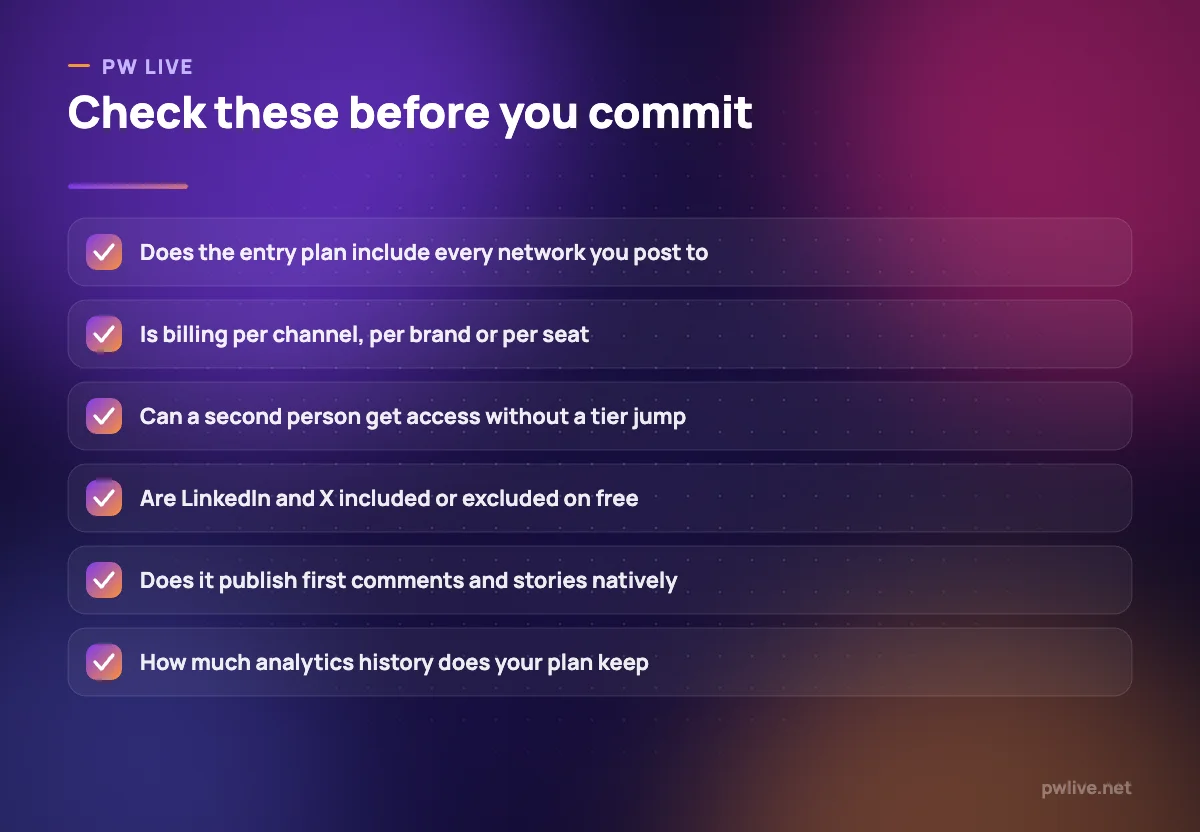
Then check the awkward details: whether LinkedIn and X are included, how much analytics history your tier keeps, and whether the tool posts first comments and stories natively. Our marketing category and the digital marketing skills track go further on planning, and writing content people share will do more for reach than any scheduler.
Key takeaways
- The best social media scheduling tools differ mainly in billing unit: channel, account, brand, social set or seat.
- Buffer, Publer, Metricool, Zoho Social and Meta Business Suite have real free plans; Later, SocialBee, Hootsuite and Sprout Social do not.
- Free tiers often exclude specific networks, notably X on Publer and both LinkedIn and X on Metricool.
- Per-seat tools become expensive the moment a second person needs access.
- If you only publish to Facebook and Instagram, the free native tool may be enough.
Frequently asked questions
Which social media scheduling tools have a genuinely free plan?
Buffer, Publer, Metricool and Zoho Social all publish permanent free tiers, and Meta Business Suite has no subscription at all. Later, SocialBee, Hootsuite and Sprout Social offer trials only.
Is per-channel or per-seat pricing better value?
Per-channel pricing suits small numbers of accounts and single operators. Per-seat pricing makes sense only when several people genuinely need their own login, because each seat carries the full monthly rate.
Can these tools post to Instagram automatically?
All the paid tools here publish to Instagram, but capabilities differ by post type, so check stories, reels and first comments specifically on the plan you are considering rather than assuming parity.
Do I still need native apps if I use a scheduler?
Usually yes. Community management, some story features and certain ad tools remain easier or only possible in the native apps, so most teams schedule in one tool and reply in another.
Pricing checked 2026-09-08. 8 of 9 prices in this article were read from the vendor’s own pricing page on that date; the rest publish no figure, so we describe the model instead. Vendors change prices without notice, so open the linked page before you commit.
Keep learning with PW Live
Browse every tool comparison, or follow the Digital Marketing track to learn the skills these tools support.





Leave a Reply