

The best AI tools for students and researchers are the ones that make you do more thinking, not less. That sounds like a slogan, but it is the practical distinction between a tool that will improve your marks over three years and one that will get you through Tuesday and leave you unable to answer a question in a viva.
This list is for undergraduates, postgraduates and early-career researchers who want help reading, understanding and organising, and who intend to hand in their own work. Eight tools are covered, with published pricing, plan limits and the specific study job each one is good at. Several are free or close to it.
One rule sits above all of this. Whatever your institution’s policy says about AI, follow it, and check it before you use any tool here on assessed work. Rules differ between universities, between departments and sometimes between individual modules. Some allow AI for brainstorming and explanation but not drafting; some require a declaration; some prohibit it outright. Submitting work that AI produced as if it were yours is academic misconduct regardless of how good the output was, and no tool in this article changes that.
How we chose these tools
This round-up is based on each vendor’s own public documentation, support pages and pricing pages, read on 8 September 2026. Nobody at PW Live ran hands-on trials, and nothing here should be read as a test result. Every price, allowance and usage limit was checked on the vendor’s page on that date, and each entry links to the page we read so you can confirm it yourself. Pricing and limits in this category change frequently, so verify before you subscribe, particularly if you are relying on a student discount. No vendor paid for inclusion.
We prioritised tools with free tiers or student rates, since most readers of this list are paying out of a student budget.
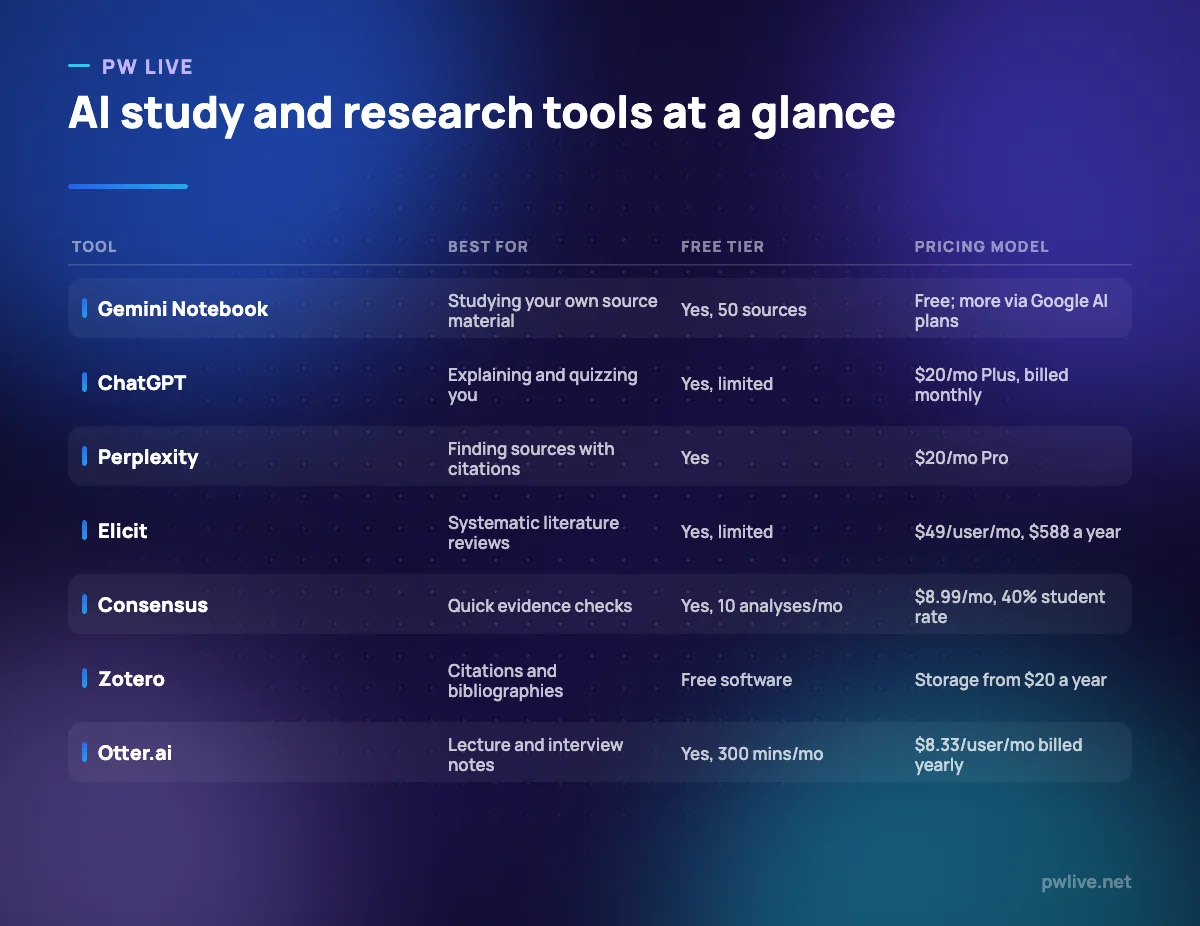
1. Gemini Notebook (NotebookLM) – best for studying your own source material
Gemini Notebook, previously NotebookLM, works only from sources you give it: lecture slides, PDFs of set readings, your own notes. Google states that it “answers questions based on the information provided in your uploaded sources”, which is exactly the property you want when revising, because it keeps the conversation anchored to the material you are actually being examined on.
What it does well – Answers are grounded in your uploaded sources rather than the open web. – The free tier is generous: 100 notebooks, 50 sources per notebook and 50 chats a day. – Audio overviews turn a set of readings into something you can listen to on a commute. – Useful for finding where in a 300-page PDF a concept was actually explained.
Where it falls short – Free users get 3 audio overviews a day, which is quickly used up during revision week. – Sources per notebook are capped at 50 on the free tier, a real constraint for a dissertation. – Google states limits are subject to change, and the product has already been renamed once.
Study integrity note: This is a comprehension tool. Use it to interrogate readings you are supposed to have read, not to produce a summary you then submit as your own reading notes.
Pricing: Free with the limits above; Google AI Plus and Pro raise them. See Gemini Notebook limits. Checked 8 September 2026.
2. ChatGPT – best for having something explained and being quizzed
The most valuable thing a general assistant does for a student is explain the same idea five different ways until one of them lands, then test whether it stuck. Used that way it functions like a patient tutor at two in the morning. Used the other way, it writes your essay and you learn nothing. Our guide on using AI chat tools for studying without cheating yourself covers that line in detail.
What it does well – Will re-explain a concept at any level of difficulty, repeatedly, without impatience. – Good at generating practice questions and marking your attempts against a rubric you supply. – File uploads let you work from your own lecture notes and problem sheets. – The free tier is enough for most explaining-and-quizzing work.
Where it falls short – It states things confidently that are wrong, so it cannot be your only source for factual detail. – Free-tier uploads and deep research are explicitly limited. – It has no access to your reading list unless you upload it, so answers may not match your course.
Study integrity note: Ask it to quiz you, mark you and find the holes in your explanation. Do not ask it to write the thing you will submit.
Pricing: Free tier available; OpenAI’s help centre lists ChatGPT Plus at $20/month billed monthly. See ChatGPT pricing. Checked 8 September 2026.
3. Claude – best for working through long readings and drafts
Claude is the better companion for the long stuff: a 40-page paper you have to critique, a chapter draft that has lost its thread, a set of interview transcripts you need to compare. It is at its most useful as a reader and critic of work that already exists, which happens to be the most defensible academic use of AI.
What it does well – Comfortable with long documents, so you can discuss a whole paper rather than an extract. – Good at structural feedback: what your argument is missing, where the logic jumps. – Projects let you keep a dissertation’s context in one place across many sessions. – Free tier is usable for occasional work.
Where it falls short – Usage limits apply on paid tiers too, which can stop you mid-session. – The step from Pro to Max is $100 per month, well beyond a student budget. – No citation management or reference handling of its own.
Study integrity note: Asking “where is my argument weak?” is study. Asking “write section three” is not. The first improves your next draft; the second replaces it.
Pricing: Free at $0; Pro $17 per month with an annual subscription ($200 up front) or $20 billed monthly; Max from $100 per month. See Claude pricing. Checked 8 September 2026.
4. Perplexity – best for finding sources you can open and check
Perplexity answers with citations, which makes it a starting point for a literature search rather than an answer machine. The right way to use it is to treat every answer as a set of leads: open the sources, read them yourself, and cite the source rather than the tool.
What it does well – Every answer links to sources you can open and evaluate. – The free tier allows search with citations, so source-finding costs nothing. – Pro adds file uploads for questioning documents you already have. – Faster than database searching for orienting yourself in an unfamiliar topic.
Where it falls short – It is a discovery tool, not a scholarly database; coverage of paywalled academic literature is not comparable to a library search. – Citations show provenance, not quality. A cited source can still be unreliable. – Max at $200 per month is irrelevant to almost every student.
Study integrity note: Never cite Perplexity itself. Cite the source you actually read, and read it before you cite it.
Pricing: Free at $0/month; Pro $20/month; Max $200/month; Enterprise not listed. See Perplexity pricing. Checked 8 September 2026.
5. Elicit – best for structured literature reviews
Elicit is built for the research workflow specifically: searching across a large body of papers, extracting comparable data into columns, and screening at volume for a systematic review. It is aimed at researchers rather than undergraduates, and the pricing reflects that.
What it does well – Search across a stated corpus of more than 138 million papers, unlimited even on the free plan. – Extracts structured data across many papers, which is the tedious part of a review. – Pro includes a systematic review workflow that can screen 5,000 papers. – The free tier is enough to see whether the workflow suits your discipline.
Where it falls short – Pro at $49 per user/month is well beyond a typical student budget. – No student or academic discount is listed on the pricing page. – Extraction still needs checking against the papers themselves; it does not remove the reading.
Study integrity note: Screening and extraction are legitimate research assistance in most disciplines, but supervisors and journals increasingly expect you to disclose it. Ask before you rely on it.
Pricing: Basic free; Pro $49 per user/month or $588 annually; Scale $169 per user/month or $2,028 annually; Enterprise custom. See Elicit pricing. Checked 8 September 2026.
6. Consensus – best for quick evidence checks
Consensus is the cheaper, lighter cousin of Elicit: you ask a research question and it searches across a stated corpus of over 200 million papers to show what the literature says. For checking whether a claim in your essay is actually supported, at $8.99 a month with a student discount, it is one of the better-value tools here.
What it does well – Unlimited searches even on the free plan, with 10 deeper analyses a month included. – A 40% student discount is offered with a verified .edu or .ac email address. – Premium at $8.99/mo, or $108 billed annually, is genuinely affordable. – Good for sanity-checking a claim before you build an argument on it.
Where it falls short – Free allowances of 10 analyses, 10 snapshots and 10 Ask Paper messages a month are quickly used. – It summarises findings; it does not replace reading the methods section. – Coverage varies by discipline, and thin literatures produce thin answers.
Study integrity note: Use it to find and check evidence, then read and cite the papers. A summary of a paper you have not opened is not a source you can defend.
Pricing: Free $0/mo; Premium $8.99/mo or $108 billed annually; Teams $9.99 per seat/mo; 40% student discount with a verified .edu or .ac email. See Consensus pricing. Checked 8 September 2026.
7. Zotero – best for references and citations
Zotero is not an AI tool and that is why it belongs here. Every hour you spend fixing a bibliography by hand is an hour not spent thinking, and Zotero describes itself as “a free, easy-to-use tool to help you collect, organize, annotate, cite, and share research”, with support for over 9,000 citation styles and plugins for Word, LibreOffice and Google Docs.
What it does well – The software is free and open source, run by an independent nonprofit. – Captures references from the web as you browse, so your library builds itself. – Generates bibliographies in any of a very large number of citation styles. – Libraries can be shared with as many people as you like at no cost.
Where it falls short – Free online storage is only 300 MB, which fills fast if you save PDFs. – Paid storage is a separate annual cost on top of free software. – Captured metadata is often wrong and needs checking before you cite.
Study integrity note: Getting citations right is the single most reliable way to demonstrate you did the reading. Zotero makes that cheap; it does not make it automatic.
Pricing: Software free and open source. Storage: 300 MB free; 2 GB $20 USD/year; 6 GB $60 USD/year; unlimited $120 USD/year. See Zotero storage. Checked 8 September 2026.
8. Otter.ai – best for lecture and interview transcripts
Otter transcribes recordings, which for students means lectures and seminars and for researchers means interviews. The transcript is not a substitute for attending or listening, but it turns a two-hour recording into something searchable, which is where the time saving actually comes from.
What it does well – Free plan includes 300 transcription minutes a month, enough for a few lectures. – A 20% education discount is listed for students and teachers with a .edu address. – Pro at $8.33 per user/month billed yearly is affordable on a student budget. – Searchable transcripts make finding one remark in a long recording trivial.
Where it falls short – Free conversations are capped at 30 minutes, shorter than most lectures. – Accuracy drops with accents, crosstalk and technical vocabulary, so transcripts need checking. – Monthly minutes cap at 1,200 per user even on Pro.
Study integrity note: Always get consent before recording a lecture, seminar or interview. Many institutions and ethics committees require it, and recording without permission is a separate problem from AI policy.
Pricing: Basic free (300 minutes a month, 30 minutes per conversation); Pro $8.33 per user/month billed yearly or $16.99 monthly; Business $19.99 per user/month billed yearly. See Otter.ai pricing. Checked 8 September 2026.
How to choose between them
Start free and stay free for as long as you can. Gemini Notebook, ChatGPT, Claude, Perplexity, Consensus and Otter all have free tiers that cover ordinary undergraduate study, and Zotero is free outright. Most students do not need to pay for anything on this list until a dissertation forces the issue. Our round-up of free study apps and tools covers the rest of that stack.
Then buy for the specific bottleneck. If your problem is volume of reading, Gemini Notebook’s paid limits help. If it is a systematic review, Elicit is the only tool here built for it. If it is a hundred interview hours, Otter Pro pays for itself. If it is that your notes are chaotic, no AI tool will fix that and a better system will; see our comparison of note-taking apps for students.
Above all, decide in advance what you will and will not use these for, and write it down. The students who get into trouble are rarely the ones who set out to cheat; they are the ones who let a tool drift from explaining to drafting over a long night. Our wider piece on how AI study tools are changing the way students learn is worth reading alongside this list, as is the data science and AI skill track if you want to understand the systems rather than just use them. The technology section covers the surrounding ground.
Key takeaways
- Follow your institution’s rules first, and check them per module, not once per degree.
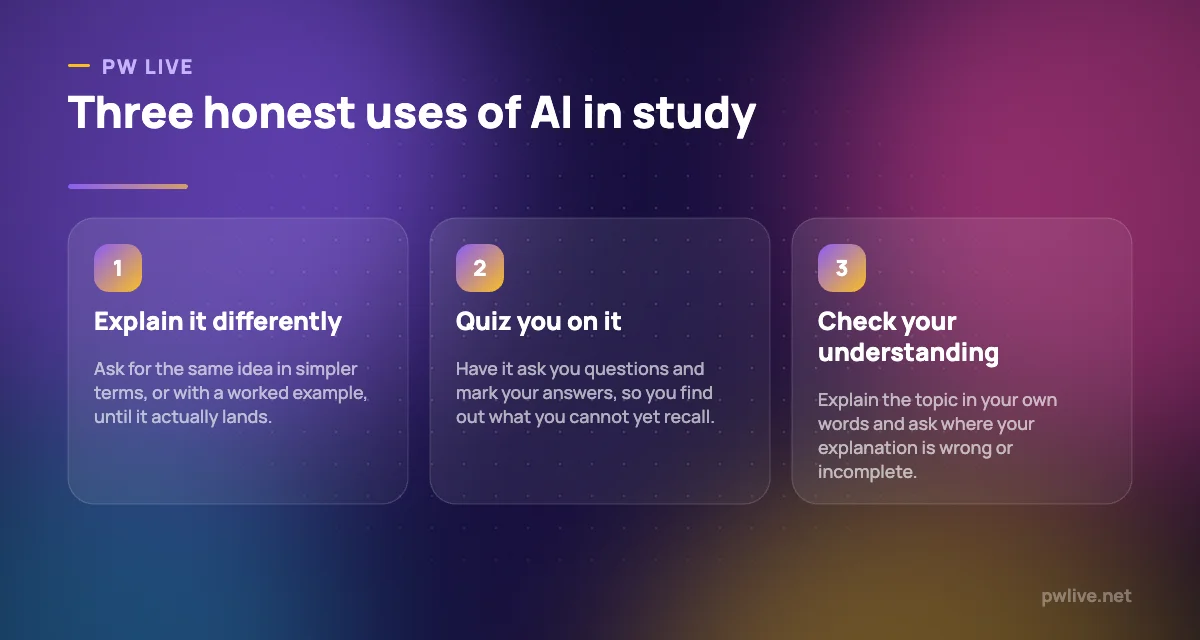
- The honest uses are explaining, quizzing, summarising your own sources and checking your understanding. Producing submitted work is not one of them.
- Free tiers cover most undergraduate needs; Zotero is free permanently and worth setting up in week one.
- Consensus offers a 40% student discount and Otter a 20% education discount with a verified academic email.
- These tools state things confidently that are wrong. Verify anything that will appear in submitted work.
- Cite the sources you read, never the AI tool that found them.
Frequently asked questions
Is using AI for university work cheating?
It depends entirely on your institution’s rules, which you should check before you start. As a general principle, using AI to help you understand material is different from submitting work you did not write. If you would be uncomfortable explaining exactly how you used it, that is a reliable warning sign.
Which of these tools is best for a dissertation?
Gemini Notebook for interrogating your own sources, Zotero for references throughout, and Elicit or Consensus for the literature search. Discuss your intended use with your supervisor before you start, and disclose it if asked.
Can I trust what these tools tell me?
Not without checking. Even tools that cite sources can misrepresent them, and general assistants state incorrect things fluently. Open the source and read it before anything reaches your submission.
Are the student discounts on this list guaranteed?
They were listed on the vendors’ own pages on 8 September 2026: 40% at Consensus with a verified .edu or .ac email, and 20% at Otter for students and teachers with a .edu address. Discounts change, so confirm on the vendor’s page before subscribing.
Pricing checked 2026-09-08. 8 of 8 prices in this article were read from the vendor’s own pricing page on that date; the rest publish no figure, so we describe the model instead. Vendors change prices without notice, so open the linked page before you commit.
Keep learning with PW Live
Browse every tool comparison, or follow the Digital Marketing track to learn the skills these tools support.




Leave a Reply