

Most students do not have a note-taking problem. They have a note-finding problem, and the wrong choice among note-taking apps for students makes it worse by scattering the same subject across three places.
The app matters less than the system you put inside it. A plain app you open every day beats a beautiful one you abandon in week three.
So this guide does not rank products or quote prices, because both change constantly. It explains the kinds of tool that exist, the trade-offs between them, what to check before you commit, and how to run a proper one-week trial.
Decide what job your notes actually do
Before you compare anything, name the job. Notes usually do one of four:
- Capture what happens live in a lecture or video, quickly and messily.
- Organise a syllabus into something you can navigate months later.
- Revise, meaning short, testable summaries you can quiz yourself from.
- Produce, meaning material that becomes an assignment, a report or a presentation.
One app rarely does all four well. Most students need a fast capture tool and a solid organise-and-revise tool, and are happy to let a word processor handle the produce stage.
If you have never separated capture from revision, our guide to taking notes you will actually revise explains why the second pass is where the learning happens.
The four families of note-taking tool
Almost every option falls into one of these families. Recognising the family tells you what it will be good and bad at.
- Plain text and markdown notebooks. Fast, tiny files, no lock-in, weak at diagrams and handwriting.
- Rich notebooks. Folders, notebooks, images, tables, web clipping. The generalist choice for most degree courses.
- Handwriting and PDF annotation apps. Built for a stylus and a tablet. Excellent for maths, physics, chemistry and anything diagram-heavy.
- Linked or database-style workspaces. Powerful for connecting ideas and building trackers, but they invite hours of setup that feel productive and are not.
There is also a fifth thing people forget: your phone’s default notes app is a perfectly good capture tool, and it is already on the device you are holding.
Features worth checking before you commit
Ignore feature lists and check these, in this order:
- Search quality. Can it find a word inside a handwritten note, a PDF, an image? Search is the whole reason to go digital.
- Sync and offline access. Do notes open on patchy campus Wi-Fi, and do edits from two devices merge cleanly?
- Export. Can you get everything out as PDF, markdown or plain files, in one action? If not, treat it as a rental, not a home.
- Cross-platform reach. If you write on a tablet and revise on a shared desktop, the app must exist on both.
- Capture speed. Time from unlocking your phone to typing the first word. Anything over a few seconds and you will stop bothering.
- PDF handling. Most course material arrives as PDF, so annotating it in place saves a lot of copying.
Export deserves special attention. Read the storage terms before you pour two years of work in, and treat anything that cannot export as a temporary experiment. Our PDF tools every student should know covers the formats your notes will eventually need to leave in.
Typing or handwriting: match it to the subject
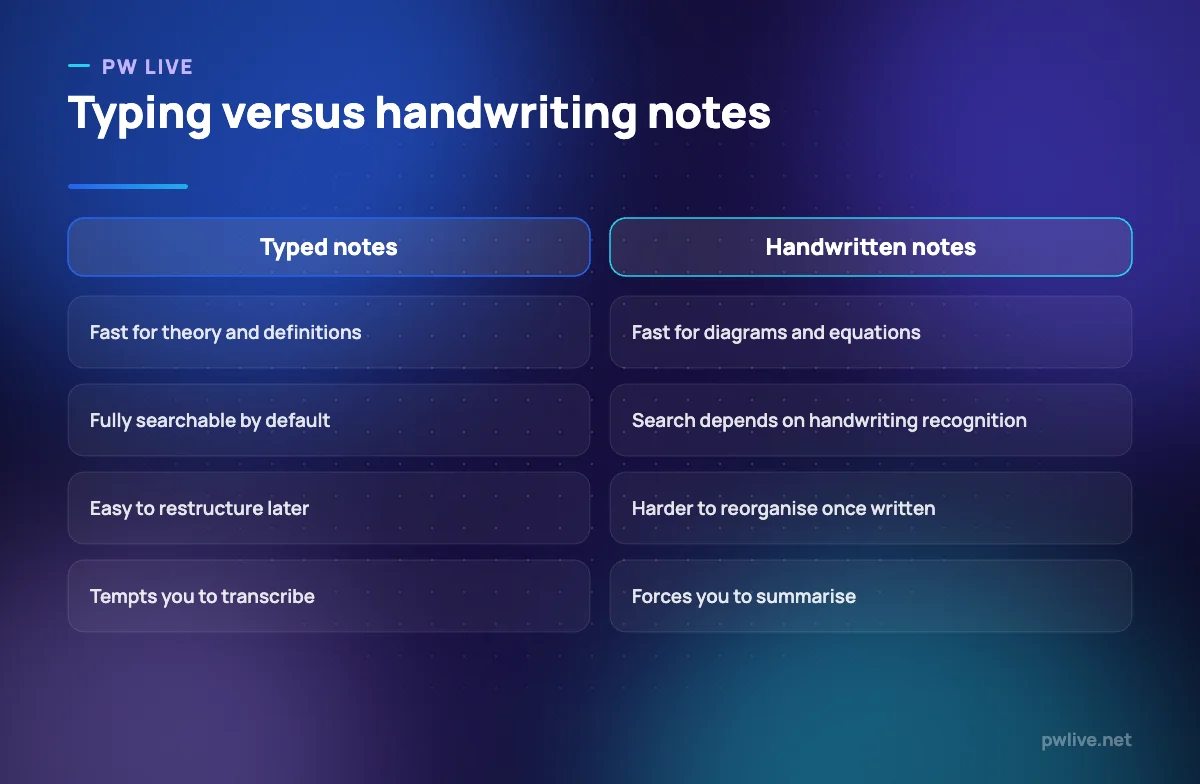
The useful question is not which is better in general, but which is faster for the material in front of you.
Handwriting wins where notation matters. Drawing a free-body diagram or a reaction mechanism with a stylus takes seconds; describing it in text takes a paragraph and is worse.
Typing wins where the content is prose and you will need to search, rearrange and reuse it. Essays, case studies, history timelines, definitions.
The real risk with typing is transcription. If you can type as fast as the lecturer speaks, you will write everything and understand none of it. Force a summary pass afterwards, or use the deliberate compression described in active recall.
Structure notes so future you can find them
Whatever app you pick, the structure carries most of the value.
- Use one notebook per subject, not per week. Weekly notebooks fragment a topic across the year.
- Put the date and the topic in the first line of every note, so search has something to grab.
- Keep a small, fixed tag set. Five tags used consistently beat forty used once each.
- Add a running “questions I could not answer” note per subject. It becomes your revision list for free.
- Leave the top of each note empty for a three-line summary you write later.
That summary line is what turns a capture note into a revision note. Pair it with a spaced repetition schedule and the notes start doing the remembering for you.
Mistakes that make people abandon a note app
Most abandonment has nothing to do with the software.
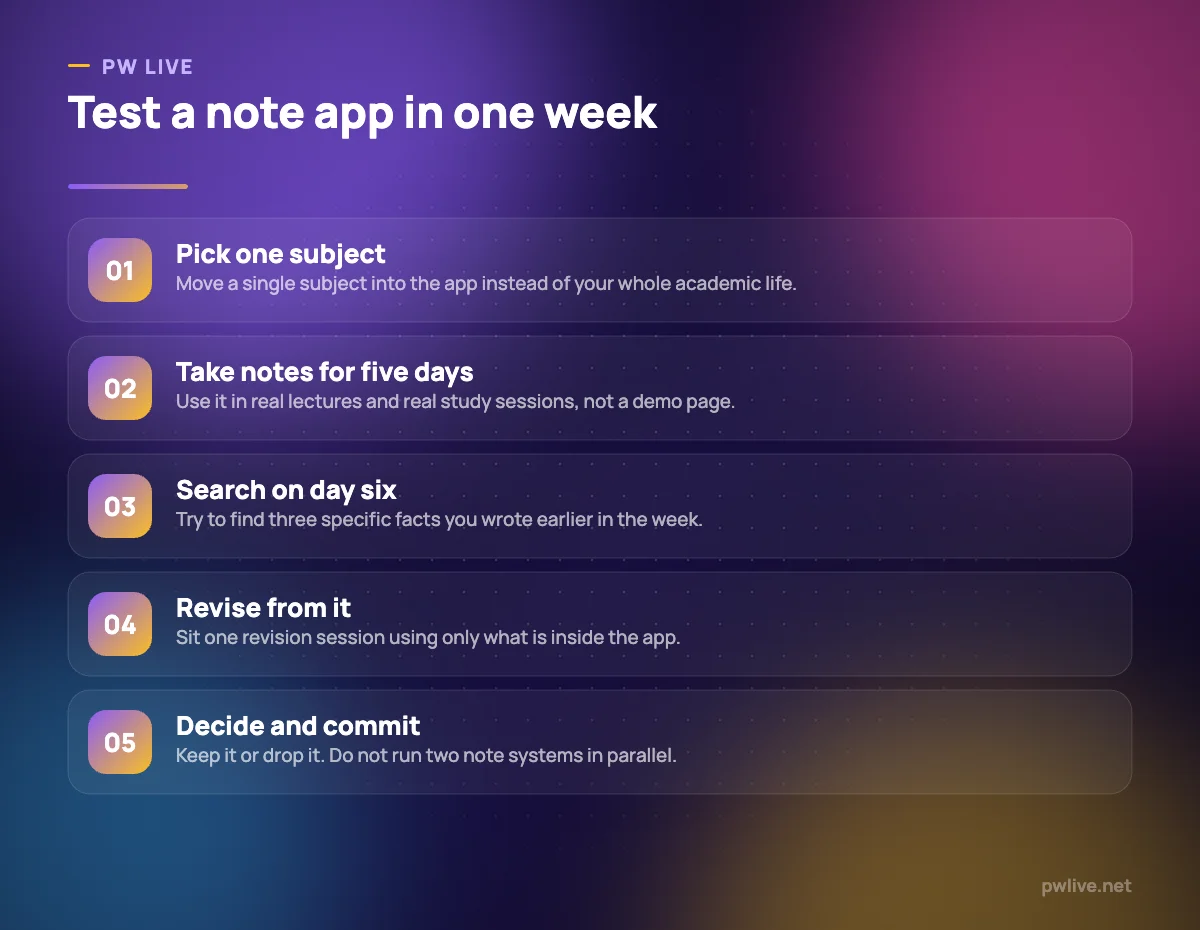
- Migrating everything on day one. Move one subject, prove the app works, then move the rest.
- Building a system before writing a note. Templates, dashboards and colour codes are procrastination in a productive costume.
- Running two apps at once. You will always be unsure which one has the good version.
- Never deleting. A notebook you have never pruned becomes a place you avoid opening.
- Trusting one copy. Sync is not backup. Set up a real second copy using our guide to backing up your notes.
How to compare current options yourself
Prices, storage limits and features change every few months, so check them yourself on the day you decide rather than trusting any list, including this one.
Shortlist no more than three apps. Open each one’s own pricing and export documentation, confirm it runs on every device you own, then run the one-week test in the figure above. Browse the rest of our apps and tools coverage for the surrounding pieces, and the productivity skill track if you want the habits that make any app stick.
Key takeaways
- Choose based on the job your notes do: capture, organise, revise or produce.
- Search quality, offline sync and clean export matter more than feature counts.
- Handwriting suits notation-heavy subjects; typing suits prose you will rearrange.
- One notebook per subject, dated notes and a small tag set beat elaborate systems.
- Test one app with one subject for one week before migrating anything else.
- Verify current pricing and limits yourself, because they change constantly.
Frequently asked questions
Do I need a paid note-taking app as a student?
Not to start. Free tiers and default apps are enough for most courses, and you should only pay once a specific limit, such as device count or storage, actually blocks you.
Should I keep handwritten paper notes as well?
Paper is fine for live capture if it suits you, but photograph or scan the pages into your app weekly so everything is searchable in one place.
How do I move notes between apps without losing them?
Export to a neutral format such as PDF or markdown, check a sample of the exported files opens correctly, and only then delete anything from the old app.
What if my subject is mostly equations and diagrams?
Prefer a handwriting or PDF annotation app on a tablet, and keep a small typed notebook alongside it for definitions and worked-example explanations.
Keep learning with PW Live
Browse every guide in Apps & Tools, or pick a skill track and follow the roadmap step by step.





Leave a Reply