
Recorded lectures are the easiest study material to consume and the easiest to waste. You can finish four hours of video, feel like you have studied all evening, and be unable to solve a single question on the topic the next morning. Learning how to study from video lectures properly is mostly about resisting how comfortable they are.
Video is passive by default. Someone else supplies the pace, the structure and the confidence, and your brain happily accepts all three without doing the work that creates memory.
The fix is a protocol: what you do before, during and after a lecture, plus a rule for the backlog that every online student eventually accumulates.
Decide what the lecture is for before you play it
Watching a lecture “to cover the chapter” is how three hours disappear. Give every session one of three explicit jobs.
First exposure. You have never seen this topic. The lecture builds intuition and gives you a structure to hang the textbook on. Watch it fairly continuously, take light notes, and expect to understand perhaps 70 percent.
Doubt resolution. You have read the chapter and are stuck on one thing. Jump to the relevant part, watch that section closely, and stop. There is no rule that says you must watch a lecture from the beginning.
Revision. You know the topic and want a fast sweep. Raise the speed, skip worked examples you can already solve, and use the video as a checklist rather than a class.
Naming the job before you press play typically halves the time. Most students watch every lecture as first exposure, including topics they half know already.
Set up the session so it cannot drift
Video is delivered by the same device that delivers everything else, which is the core problem. Treat the session like a class rather than an activity you slot around messages.
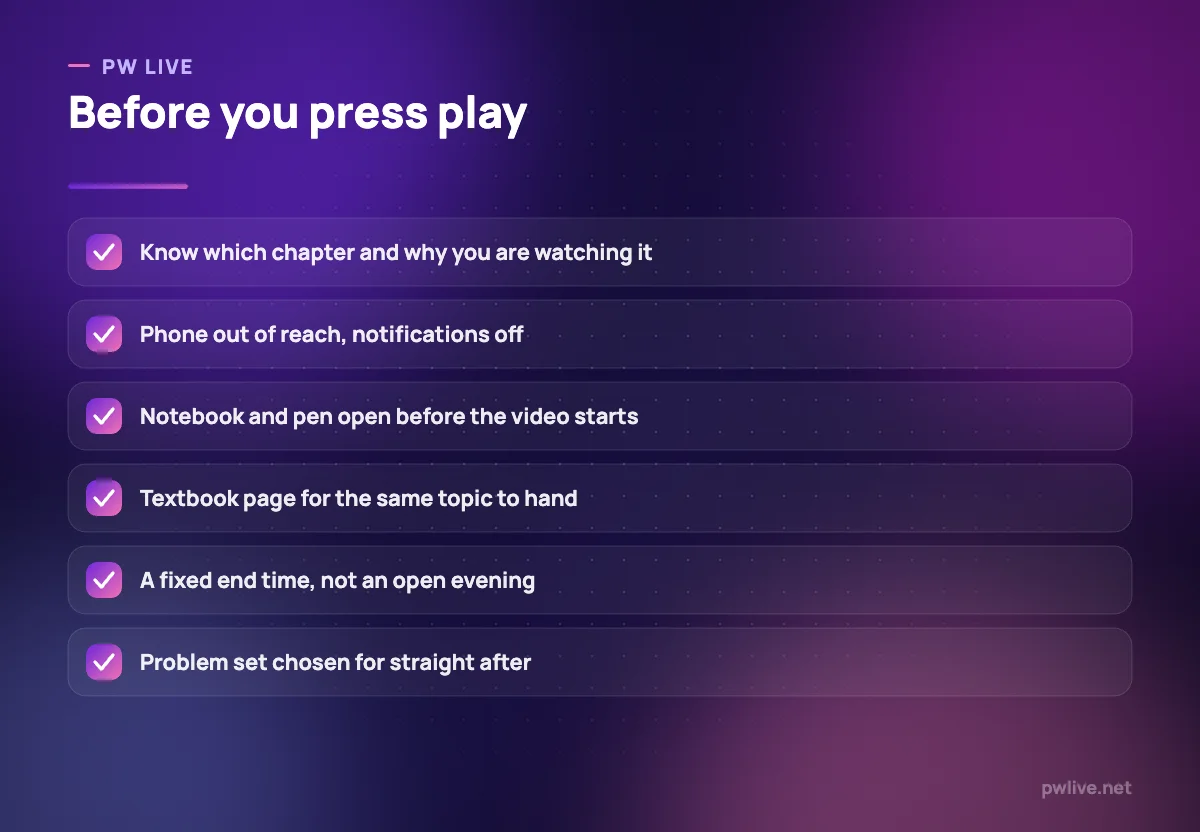
- Put the phone in another room, or at least out of arm’s reach
- Use full screen so the sidebar of recommended videos disappears
- Have the notebook already open at a fresh, dated page
- Keep the textbook chapter next to you for cross-checking
- Set a finish time and a planned break
If focus collapses even with these in place, the problem may be environmental rather than motivational. Our guide to studying or working from home without losing focus and the piece on setting up a study space in a small or shared home both deal with that directly.
Use speed and pausing deliberately
Playback speed is a tool, not a badge. Use it as follows.
Raise the speed for introductions, revision passes, topics you already know and any teacher who speaks slowly. Somewhere around 1.25 to 1.5 times is comfortable for most people on familiar material.
Drop to normal speed for derivations, new concepts and anything numerical. Comprehension, not audio speed, is the bottleneck there.
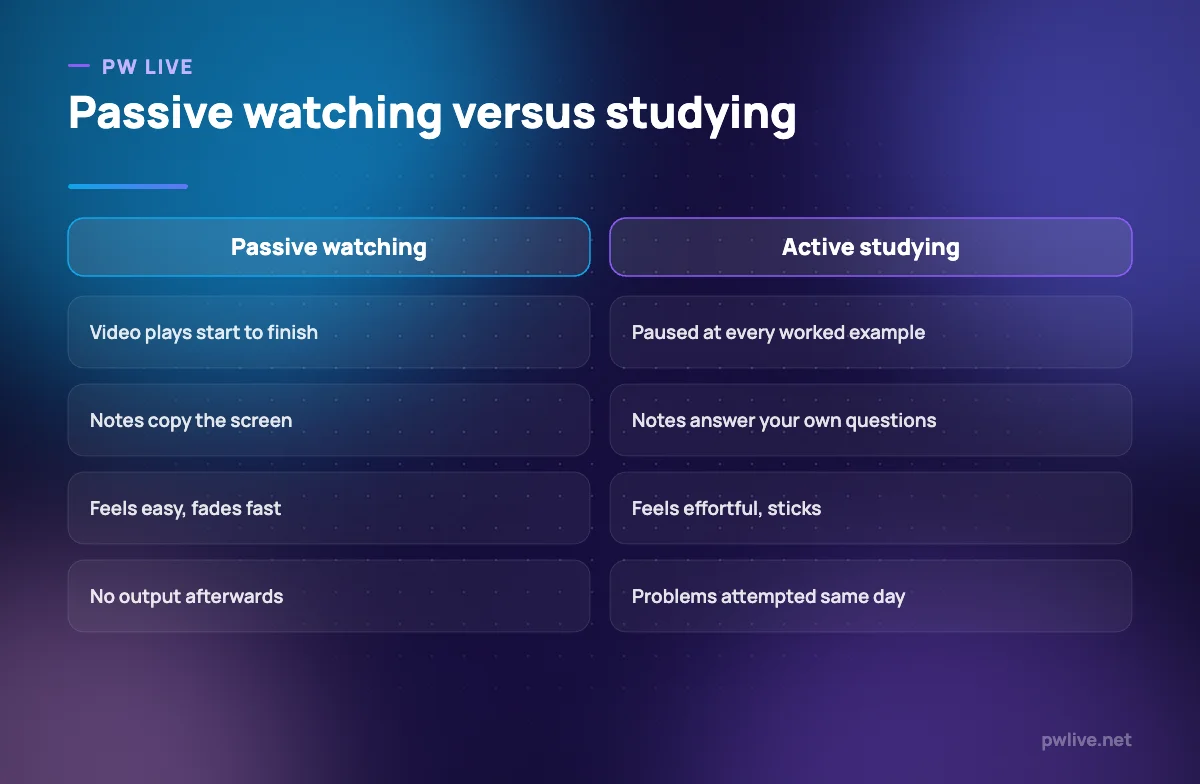
Pause at every worked example. This is the single highest-value habit in this article. When the teacher writes the question and before they write the solution, stop the video and attempt it yourself for two minutes. Then play and compare.
That pause converts a demonstration into practice. Watching someone solve a problem creates the feeling of competence with almost none of it, which is why students who watch endless solved examples still freeze on the same questions.
Do not rewind three times. If a segment does not land after two attempts, write the question down, move on, and resolve it later from the book or by asking someone. Repeated rewinding burns time and morale.
Take notes that are not a transcript
The pause button makes it possible to copy everything on screen, so many students do. The result is a notebook that duplicates a video you already have access to.
Write only:
- The structure of the topic: what it splits into and in what order
- The question types the teacher demonstrates, with the first step of each
- Conditions, exceptions and warnings that would not be obvious from the book
- The things you did not follow, marked so you can find them later
Then, at the end of the lecture, close the notebook and write a short summary from memory before checking anything. This is the point where the session stops being consumption. Our guide to taking notes you will actually revise sets out the page layout that makes this quick.
Attach a problem set to every lecture
A lecture without practice afterwards has a very short half-life. Decide the practice before you start watching, so it is not a decision you have to make when you are tired.
The routine that works:
- Watch the lecture with the pauses described above
- Take a five-minute break away from the screen
- Attempt five to ten problems on that exact topic, with the notes closed
- Only then check the solutions, and mark every error with its cause
The last step matters more than the number of problems. “Careless” is not a cause; “did not check the sign convention” is. Those causes become the items you feed into your review system, described in our practical guide to spaced repetition.
If you cannot attempt any of the problems, that is not a failure of the session, it is information: you need a second explanation or a slower read of the textbook before the practice is meaningful.
Handle the backlog before it handles you
Every student with access to recorded lectures eventually has a backlog, and the backlog is where guilt starts eating study time.
Accept a hard truth first: you are not going to watch all of it, and you do not need to. Recorded content is a library, not an assignment.
Apply a triage rule once a week.
- Watch in full: topics you have not studied at all that are heavily weighted in your exam
- Watch partially: topics you half know, where you skip to the sections you flagged as weak
- Skip entirely: topics you can already solve questions on, and anything outside your syllabus
- Delete from the list: anything more than a month old that you have not needed yet
Then cap the number of lectures you carry forward. A running list of eight pending lectures is manageable. A list of sixty is a source of anxiety that will make you avoid opening the platform at all, which is the worst possible outcome.
If the backlog exists because you have genuinely fallen behind the syllabus rather than just the video queue, the repair is a different exercise. Our guide to catching up when you have fallen behind in a subject covers the triage for that.
Fit lectures into the week honestly
Video expands to fill the evening if you let it. Give lectures a fixed share of your week rather than treating them as the default activity.
A reasonable split for most students is roughly one hour of lecture to one and a half or two hours of independent problem work. If your week is mostly video, your marks will lag your effort, and the gap will be confusing until you look at the ratio.
Build that ratio into your plan using our weekly study timetable guide, and browse the education and learning archive or the productivity skill track for more on protecting study blocks.
Key takeaways
- Name the job of each lecture: first exposure, doubt resolution or revision
- Set up the session like a class, with the phone away and the notebook already open
- Pause before every worked example and attempt it yourself for two minutes
- Take structural notes, never a transcript, and summarise from memory at the end
- Attach a problem set to every lecture and record the cause of each error
- Triage the backlog weekly and accept that you will not watch everything
Frequently asked questions
Is watching lectures at double speed a bad idea?
For new or mathematical content, yes, because comprehension is the limit rather than audio speed. Higher speeds are fine for revision, introductions and material you already understand.
Should I watch the lecture before or after reading the textbook?
For a completely new topic, watch first to get the structure, then read for depth. For a topic you have already read, use the lecture only for the parts you found difficult.
How do I stop getting distracted during online lectures?
Remove the device that distracts you rather than relying on willpower, use full screen, and give the session a fixed end time. A planned break at the halfway point helps more than pushing through.
Are live classes better than recordings?
Live classes add accountability and let you ask questions immediately. Recordings give you pausing, speed control and the ability to skip. The stronger option is whichever one you actually attend consistently.
Keep learning with PW Live
Browse every guide in Education & Learning, or pick a skill track and follow the roadmap step by step.





Leave a Reply