

Picking the best AI writing tools comes down to one question most comparison lists skip: are you trying to write faster on your own, or trying to make several people write consistently? Those are different problems, and they are solved by tools at opposite ends of this list, at very different prices.
This comparison is for writers, marketers and small teams deciding where a writing budget should go. It covers ten tools, from general assistants that cost less than a takeaway meal each month to per-seat platforms that run into thousands a year. For each one we describe what it is actually for, what its plan limits are, and who should not buy it.
We have deliberately avoided ranking tools by which model is behind them. Model names and tiers change constantly, and the one named on a vendor’s page today may be replaced before your annual plan renews. What a tool is designed to do changes far more slowly.
How we chose these tools
This round-up is based on each vendor’s public documentation and pricing pages, read on 8 September 2026. Nobody at PW Live ran hands-on trials, and nothing below is presented as a test result. Every price, seat count and usage limit was checked on the vendor’s own page on that date, and each entry links to the page we read so you can confirm it. Pricing in this category moves quickly, so verify current details before you buy. No vendor paid for inclusion and there are no affiliate links.
Where a vendor publishes no price, we say the plan is quote-based rather than estimating one. Where a price depends on a billing toggle, we state which basis the figure refers to.
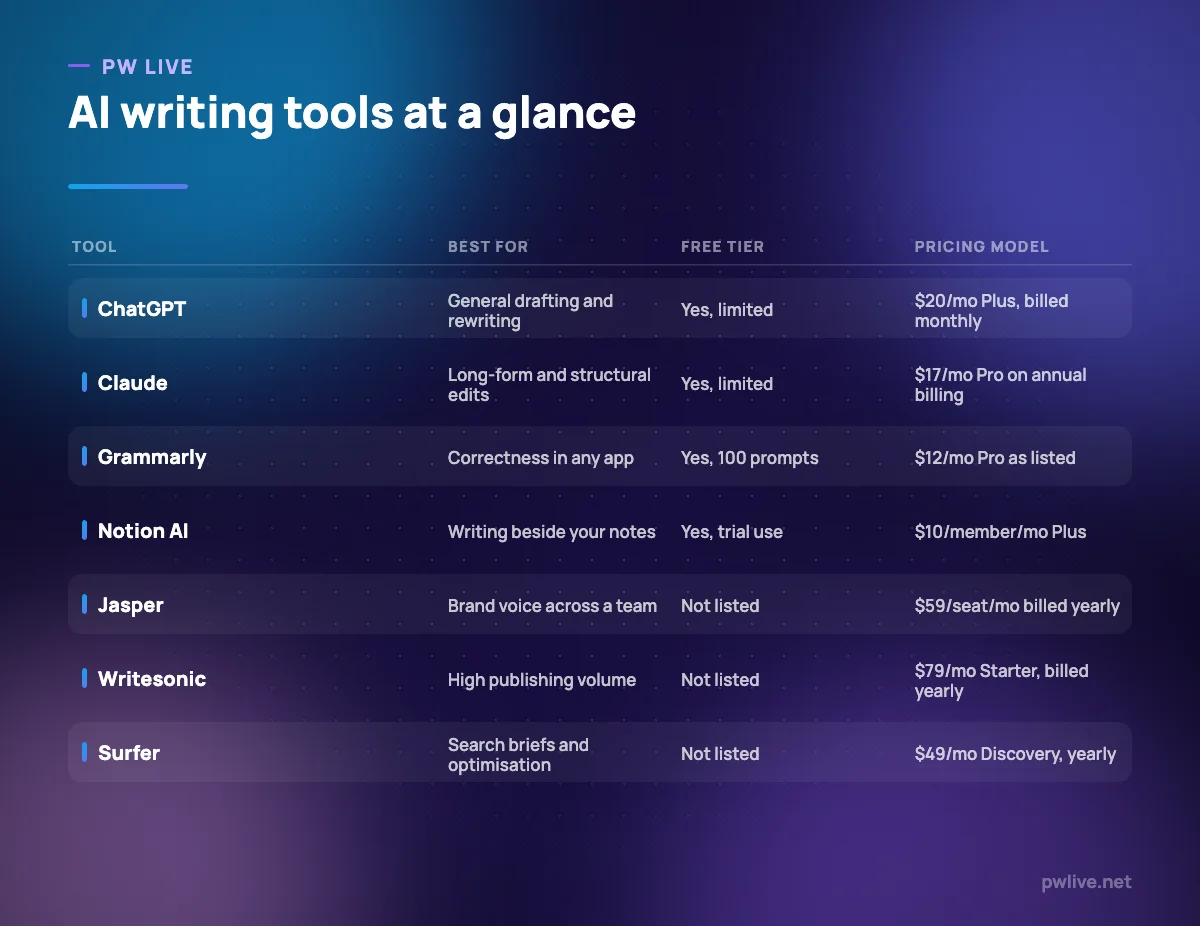
1. ChatGPT – best for general drafting and rewriting
ChatGPT is the general-purpose option most people should try first, simply because it does the widest range of writing jobs adequately: outlining, drafting, rewriting for a different reader, tightening something that is 200 words too long, or turning notes into prose. It is a writing assistant rather than a writing system.
What it does well – Covers outlining, drafting, editing and summarising without switching tools. – Custom instructions let you store tone and audience notes so you stop repeating them. – File uploads make it practical for working from your own source material. – The free tier is enough to judge whether it fits how you write.
Where it falls short – The free tier is limited on uploads, image generation, voice and deep research. – There is no brand voice governance, so consistency across several writers is down to discipline. – The pricing page we checked showed no amounts for the Go, Pro or business tiers.
Pricing: Free tier available; OpenAI’s help centre lists ChatGPT Plus at $20/month billed monthly. See ChatGPT pricing. Checked 8 September 2026.
2. Claude – best for long-form drafting and structural editing
Claude is the better fit when the writing job involves a lot of reading: restructuring a long article, editing a report without losing its argument, or working across several source documents at once. If most of your writing time goes on revision rather than first drafts, this is the more useful assistant.
What it does well – Handles long inputs, which makes it usable for editing rather than only generating. – Projects keep source material and style guidance attached to a body of work. – Annual and monthly prices are both stated plainly on the pricing page. – Team plans start close to individual pricing, so scaling up is not a cliff edge.
Where it falls short – Usage limits apply on every tier, paid ones included, and can interrupt a long session. – There is no SEO, brief or publishing workflow built in. – The next tier up, Max, starts at $100 per month.
Pricing: Free at $0. Pro $17 per month with an annual subscription ($200 up front), or $20 billed monthly. Team standard seats $20 per seat per month billed annually, $25 monthly. See Claude pricing. Checked 8 September 2026.
3. Google Gemini – best for writing inside Google Docs
If your drafts live in Google Docs and your feedback arrives in Gmail, Gemini removes the copy-paste step. Google sells access through consumer AI plans that also include storage, and separately through Workspace, where Gemini features appear inside the apps.
What it does well – Assists where the document already is, rather than in a separate tab. – The free tier handles ordinary drafting and rewriting. – Google AI Plus at $4.99 per month is the cheapest paid entry on this list. – Paid tiers bundle storage, which offsets the cost if you were already paying for it.
Where it falls short – Plan names and tiers have been renamed repeatedly, so older advice about them goes stale fast. – Consumer AI plans and Workspace Gemini access are separate purchases with different features. – There are no brand voice or template features for teams.
Pricing: Free at $0/month with a Google Account; Google AI Plus $4.99/month; Google AI Pro $19.99/month; Google AI Ultra from $99.99/month. See Google AI subscriptions. Checked 8 September 2026.
4. Microsoft 365 Copilot – best for writing inside Word and Outlook
Copilot’s value is location. It drafts and rewrites inside Word, Outlook and PowerPoint, with access to the files and mail those apps already hold. For anyone whose writing life is documents and email rather than a browser tab, that context is the whole argument.
What it does well – Works inside the Office apps, so output lands in the document you were already writing. – Consumer subscriptions bundle Copilot chat with the Office apps themselves. – Both monthly and annual prices are published clearly. – Higher consumer tiers offer more extensive Copilot usage.
Where it falls short – On Family plans, AI features are for the subscription owner only and cannot be shared. – Usage limits apply to the AI features on every consumer tier. – Business Copilot licensing sits on top of a qualifying Microsoft 365 plan, so the add-on price is not the total cost.
Pricing: Microsoft 365 Personal $99.99/year or $9.99/month; Family $129.99/year or $12.99/month; Premium $199.99/year or $19.99/month. See Microsoft 365 plan comparison. Checked 8 September 2026.
5. Grammarly – best for correctness across every app
Grammarly is not a drafting tool in the way the rest of this list is. It sits on top of whatever you are writing in and catches the things that make writing look careless: grammar, spelling, tone that has drifted, sentences that could be half as long. For most professionals that is the higher-value job.
What it does well – Works across the apps you already write in rather than in its own editor. – Tone detection is genuinely useful for email and client communication. – The free tier includes 100 AI prompts, so you can judge the AI features before paying. – Pro adds plagiarism and AI-text detection, which matters for editorial teams.
Where it falls short – AI generation is capped by a prompt allowance rather than being unlimited. – It improves sentences, not arguments; a well-edited weak article is still weak. – Enterprise features such as custom roles and data loss prevention are quote-based.
Pricing: Free $0 USD/month with 100 AI prompts; Pro listed at $12 USD per month with 2,000 AI prompts; Enterprise quote-based. Check the billing toggle before buying. See Grammarly plans. Checked 8 September 2026.
6. Notion AI – best for writing where your notes already live
Notion AI is bundled into Notion’s paid plans rather than sold as a separate product, which changes the calculation: if your team already keeps documentation, briefs and project notes in Notion, the writing help arrives beside the source material rather than in a separate app.
What it does well – AI is included in paid plans rather than being another line item. – Drafting happens next to the notes, databases and briefs that inform it. – Business adds enterprise search across your workspace, which is useful for reusing existing material. – Yearly billing is stated as saving up to 20% over monthly.
Where it falls short – The free plan only allows trial-level AI use, not sustained work. – Custom agents are a separate cost, listed at $10 per 1,000 monthly Notion credits. – If your documents are not already in Notion, adopting it for AI writing alone is a large migration for a small benefit.
Pricing: Free $0 per member/month; Plus $10 per member/month; Business $20 per member/month; Enterprise custom. Monthly or yearly billing. See Notion pricing. Checked 8 September 2026.
7. Jasper – best for brand voice consistency across a team
Jasper is a marketing writing platform rather than a chat assistant. The problem it solves is several people producing content that sounds like one organisation, which is a real problem at ten writers and no problem at all at one. Our copywriting fundamentals guide covers the voice decisions you should make before configuring any tool to enforce them.
What it does well – Brand voice is a stored, reusable setting rather than a prompt you retype. – Templates and workflows are built around marketing content types. – Business adds custom agents, API access and account management. – Entry-tier pricing is published, which is unusual in this bracket.
Where it falls short – No free tier is listed, so evaluating it means a purchase or a sales conversation. – Pro is one seat and two brand voices, which pushes any real team to the quote-based tier. – Business requires a custom 12-month commitment, so you cannot budget without talking to sales.
Pricing: Pro $59 per seat per month billed annually, or $69 billed monthly, with 1 seat and 2 brand voices. Business quote-based on a 12-month commitment. See Jasper pricing. Checked 8 September 2026.
8. Copy.ai – best for multi-step content and sales workflows
Copy.ai has shifted from generating copy to running workflows: multi-step processes that take an input, do several things to it, and put the result somewhere. Its cheapest plan is a chat product with five seats; everything above that is priced for companies with a revenue team.
What it does well – Five seats on the entry plan is unusually generous at that price. – Unlimited words in chat, so the constraint is workflow credits rather than output length. – Workflow credits suit repeatable processes better than one-off prompting. – Access to models from several providers is included on the entry plan.
Where it falls short – The jump from $29/month to $1,000/month is severe, with nothing between. – Higher plans are annual-only commitments. – Workflow credit consumption is harder to forecast than a word count.
Pricing: Chat $29/month, or $24/month billed annually at $288/year, with 5 seats. Growth $1,000/month billed annually at $12,000/year. Enterprise quote-based. See Copy.ai pricing. Checked 8 September 2026.
9. Writesonic – best for publishing volume with search tracking
Writesonic is now positioned around AI search visibility as much as article production: its plans are described in terms of AI articles per month, prompts and answers tracked daily across AI platforms, and site audits. It suits a team publishing on a schedule and monitoring how it appears in AI answers, not an individual writing occasionally.
What it does well – Plans are described in concrete output units, so you can match spend to publishing volume. – Combines article generation with site audits and AI-answer tracking in one subscription. – Higher tiers add more projects and users for agency-style work. – Article and audit limits are stated per plan rather than buried.
Where it falls short – Starter is one user and one project, which rules out agencies at that price. – No free tier is listed, so there is no cost-free way to evaluate output quality. – Prices shown are billed annually, so month-to-month costs more.
Pricing: Starter $79/month billed annually (1 user, 15 AI articles); Basic $199/month billed annually (2 users, 25 articles); Growth $399/month billed annually (3 users, 50 articles); Enterprise custom. See Writesonic pricing. Checked 8 September 2026.
10. Surfer – best for turning a keyword into a usable brief
Surfer is the step before writing, not the writing itself. It takes a target query and produces a brief and on-page guidance so a writer knows what a page needs to cover. It is worth its price only if you publish often enough that writing briefs is itself a bottleneck. If search is new to you, SEO for beginners is the cheaper starting point.
What it does well – Converts a query into a concrete brief instead of a vague instruction. – Document allowances are stated per plan, so cost per article is easy to calculate. – Higher tiers track how your brand appears in AI answers. – Team seats are included from Standard upwards.
Where it falls short – No free tier is listed. – Discovery includes one seat and 120 documents, which a busy team exhausts quickly. – Optimisation guidance is a checklist, not editorial judgement; following it exactly produces flat writing.
Pricing: Discovery $49 USD per month billed yearly (120 documents, 1 seat); Standard $99 USD per month billed yearly (360 documents, 3 seats). See Surfer pricing. Checked 8 September 2026.
How to choose between them
If you write alone, stop at the first four entries. A general assistant plus Grammarly covers drafting and editing for under $35 a month, and nothing further down this list will make you a better writer for the extra money. Spend the difference on learning the craft instead; our guide to writing content people actually read will do more for your output than a second subscription.
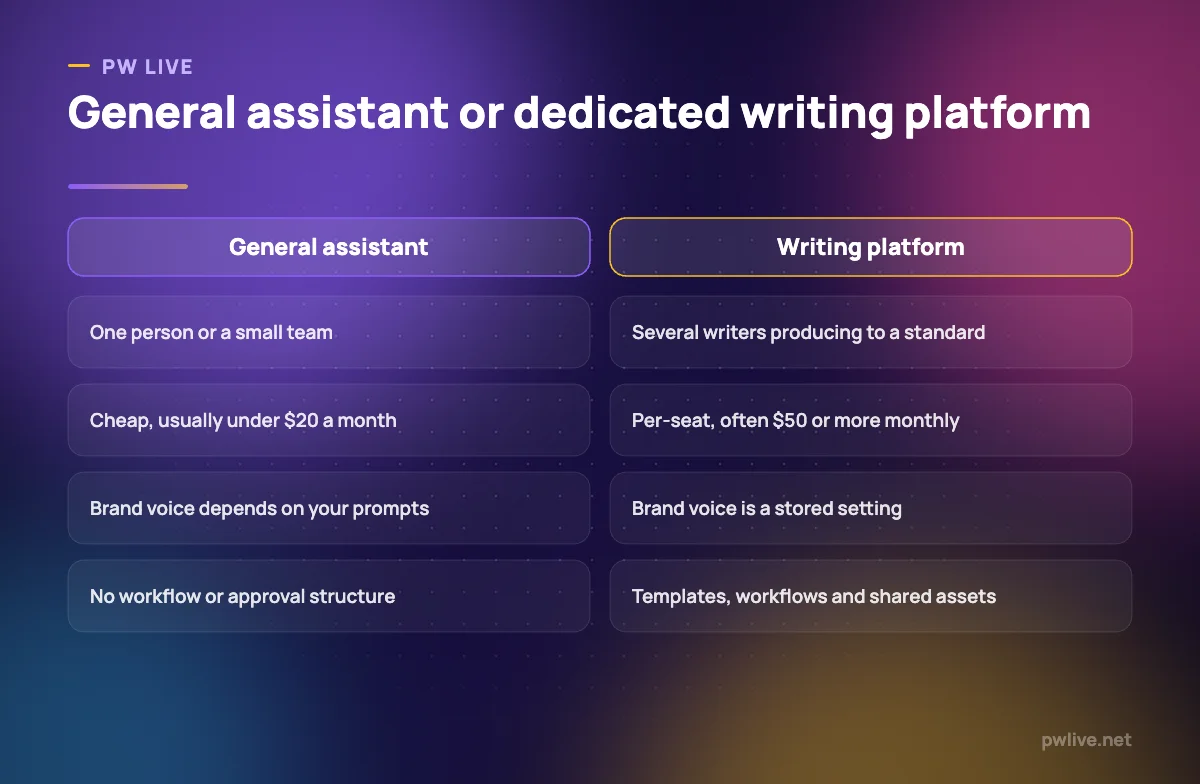
If you run a team producing to a standard, the calculation changes. Brand voice, templates and shared workflows are what you are buying at $59 a seat, not better sentences. Work out the annual cost per writer, then per published piece, and compare it with what inconsistency currently costs you in rewriting time. Many teams find one senior editor solves the same problem more cheaply.
If your bottleneck is knowing what to write rather than writing it, buy Surfer or Writesonic and skip the platforms. And if you write product pages, our guide to product descriptions that convert is worth reading before you automate them. The wider apps and tools section and the digital marketing skill track cover the surrounding decisions.
Key takeaways
- Solo writers rarely need more than a general assistant and an editing layer.
- Per-seat platforms sell consistency and workflow, not better prose. Buy them only if inconsistency is costing you real time.
- Free tiers here are for evaluation: prompt allowances, single seats and trial-level AI use are the norm.
- Credits, documents and articles per month are the real constraints, not word counts.
- Several tools on this list have no free tier at all, so budget for a paid month just to evaluate them.
- Model names change faster than plans do. Choose on what a tool is built for, not on which model it advertises.
Frequently asked questions
What is the difference between an AI assistant and an AI writing platform?
An assistant such as ChatGPT or Claude helps one person write anything, cheaply. A platform such as Jasper or Copy.ai adds brand voice, templates and workflows so several people produce consistent output, at per-seat prices.
Can these tools write publishable content on their own?
Not reliably. Every entry above still needs a human to check facts, cut padding and make sure the argument holds. Treat output as a draft, not a finished piece.
Do I need a separate SEO writing tool?
Only if you publish frequently enough that briefing is a bottleneck. Surfer and Writesonic both start at meaningful monthly costs, which is hard to justify below a steady publishing schedule.
How current are the prices in this article?
Every figure was checked on each vendor’s own pricing page on 8 September 2026 and linked in the entry. This category changes pricing and plan names several times a year, so confirm on the vendor’s page before buying.
Pricing checked 2026-09-08. 10 of 10 prices in this article were read from the vendor’s own pricing page on that date; the rest publish no figure, so we describe the model instead. Vendors change prices without notice, so open the linked page before you commit.
Keep learning with PW Live
Browse every tool comparison, or follow the Digital Marketing track to learn the skills these tools support.





Leave a Reply