
Free CRM tools have a reputation problem: half of them are trials wearing a costume. The useful question is not whether a free plan exists but how many users and records it allows, and what breaks when you hit that ceiling.
This list is for small businesses, freelancers and early teams who want to stop running the pipeline out of a spreadsheet without adding another subscription. Every tool here has a permanent free plan documented on the vendor’s own pricing page, and where the vendor states a seat or record limit we quote it exactly.
Two things to keep in mind. Free plans usually withhold automation and custom reporting, which are the features that make a CRM save time rather than just store data. And the paid tier directly above the free plan is the price you should really compare, because that is where you end up if the tool works.
How we chose these tools
We did not run trials of these products, and this article does not pretend to. Each free plan, seat limit, record cap and paid price below comes from the vendor’s own public pricing page, opened and read on 8 September 2026, with the exact page linked in every entry. Tools whose “free” offer turned out to be a time-limited trial were left out, which is why Pipedrive, Freshsales, monday CRM, folk and Insightly do not appear. Where a number is not published, we say so instead of estimating. Vendors change plan limits without notice, so confirm before you commit. No vendor paid to appear here.
1. HubSpot CRM – best for the most complete free feature set
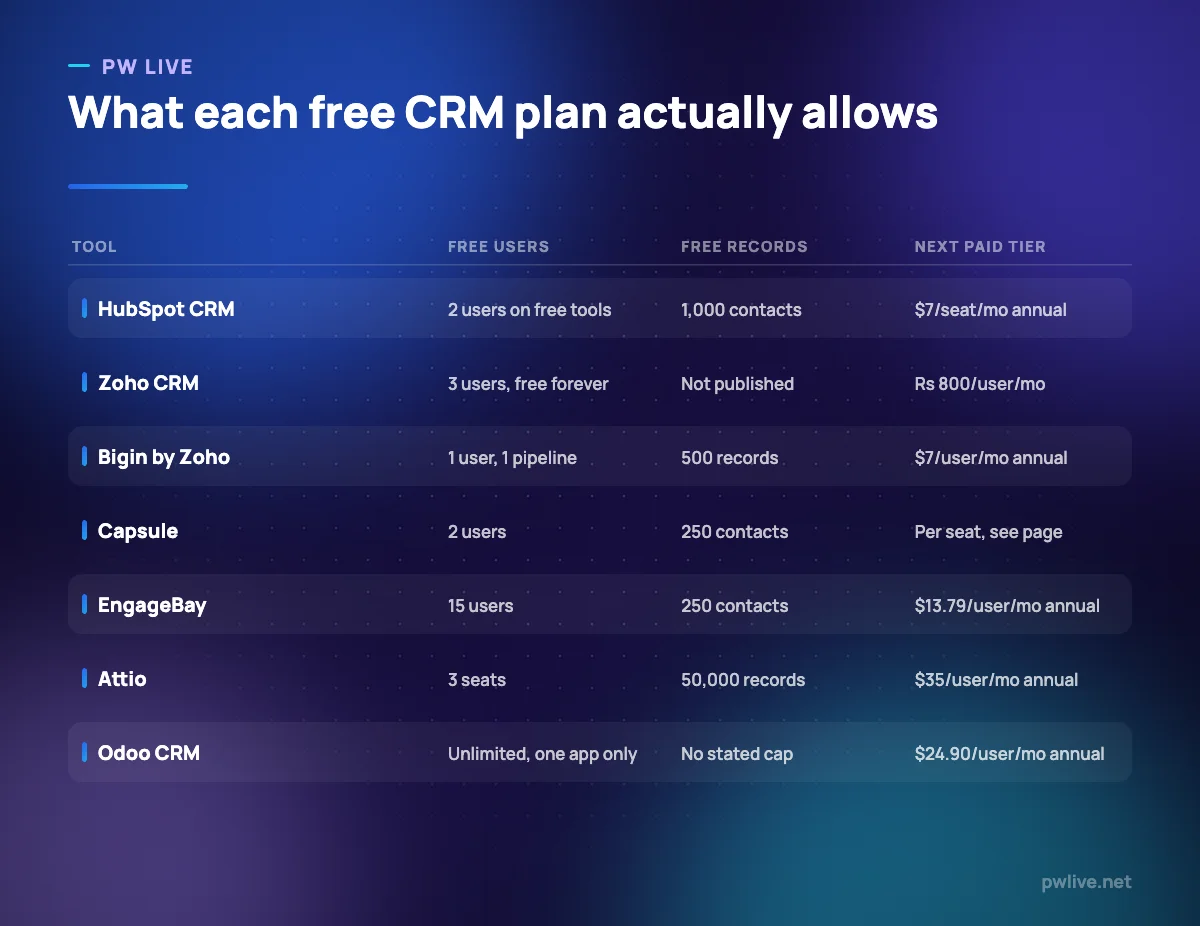
HubSpot’s free tools are the closest thing to a full CRM you can use without paying: contact and company records, deal pipelines, tasks, email templates and dashboards, with no expiry date. The ceiling is the catch. HubSpot states the free functionality covers up to two users and 1,000 contacts, which suits a founder and one colleague but not a five-person team. Before you fill those slots with cold contacts, read our guide to email marketing basics.
What it does well – Pipelines, tasks, dashboards and email templates free with no time limit. – One contact record shared with HubSpot’s marketing and service tools later. – Thoroughly documented, with a large library of tutorials and integrations.
Where it falls short – The free tools cover only two users and 1,000 contacts. – Meaningful automation sits on the paid Professional tier, not free or Starter. – Upgrading past Starter carries a mandatory one-time onboarding fee.
Pricing: Free tools $0 for up to 2 users and 1,000 contacts. Starter Customer Platform $7 per seat per month billed annually, or $20 per seat per month billed monthly. Verified on the HubSpot CRM pricing page, 8 September 2026.
2. Zoho CRM Free Edition – best for the most generous free user count
Zoho’s free edition allows three users, which is often exactly what a founder plus two early hires needs. It is a genuine edition rather than a stripped shell: contact management, basic workflow automation, standard reports, mobile apps and API access are all listed. The trade-off is the same as paid Zoho, namely a dense interface and a four-edition ladder where features you assume are standard may sit two tiers up.
What it does well – Three free users, more than most rivals allow. – Standard reports and basic workflow automation included on the free edition. – Mobile apps and API access are not withheld from free users. – A gradual upgrade path through four paid editions.
Where it falls short – No record cap is published for the free edition, so capacity is unclear. – The admin interface takes real time to learn compared with Bigin or Capsule. – Prices are localised with taxes on top, which makes comparison awkward.
Pricing: Free edition $0 for 3 users, described as forever free. On the India pricing page we opened, the next tier is Standard at Rs 800 per user per month with local taxes charged in addition, and a discount is advertised for yearly billing. Verified on the Zoho CRM pricing page, 8 September 2026.
3. Bigin by Zoho CRM – best for solo founders who want a pipeline, not a platform
Bigin is Zoho’s answer to the complaint that CRMs are too heavy for small businesses. It is pipeline-first and can be set up in an afternoon. Its free plan is the narrowest here but honest about what it is: one user, 500 records, one pipeline. That single-pipeline limit is the thing to test, because separate processes for new business and renewals will not fit.
What it does well – Quick to set up, with a clear pipeline-first interface. – The free plan is permanent, not a trial, and includes a working pipeline. – The cheapest paid step-up here at $7 per user per month billed annually.
Where it falls short – The free plan is one user only, so there is no team collaboration at all. – 500 records and one pipeline is a low ceiling for anything with volume. – Deliberately limited: not the tool for complex sales operations.
Pricing: Free plan $0 for 1 user, 500 records and 1 pipeline. Express $7 per user per month billed annually or $9 billed monthly; Premier $12 or $15; Bigin 360 $18 or $21. Verified on the Bigin pricing page, 8 September 2026.
4. Capsule – best for a clean free contact database
Capsule’s free plan gives two users and 250 contacts, which sounds small until you consider what most small businesses actually track: current clients, live prospects and referral sources rather than every business card ever collected. One caveat on transparency: when we fetched Capsule’s pricing page, the plan structure and contact limits rendered but the per-seat prices did not, so we are not quoting a figure we could not see.
What it does well – Two free users, so a founder and a colleague share the same records. – Contact caps published clearly for every paid tier. – Tags, custom fields and a simple pipeline on a very short learning curve.
Where it falls short – 250 free contacts is the tightest record limit here apart from Bigin’s 500. – Ultimate is quote-based and aimed at teams of five or more.
Pricing: Free plan $0 for 2 users and 250 contacts. Paid tiers are sold per user per month with contact caps of 30,000, 60,000 and 120,000; Ultimate is pricing on request. The numeric seat prices did not appear in the page text we captured, so we have not stated them. Verified on the Capsule pricing page, 8 September 2026.
5. EngageBay – best for free CRM with marketing and helpdesk attached
EngageBay bundles CRM, email marketing, landing pages, live chat and a helpdesk into one account, and its free plan allows fifteen users. That seat count is unusual and suits a small team where several people need visibility. The contact limit is the counterweight: fifteen users sharing 250 contacts tells you the free plan is for evaluation rather than operation. Early effort is better spent on finding your first ten customers than on importing a list you cannot store.
What it does well – Fifteen free users, by far the highest free seat count here. – CRM, marketing, live chat and helpdesk in one free account. – Publishes monthly, annual and biennial per-user prices side by side.
Where it falls short – The free plan holds only 250 contacts, which does not match the seat allowance. – Individual modules are less deep than specialist tools. – The jump from Basic to Growth is large, and automation lives higher up.
Pricing: Free plan $0 for 15 users and 250 contacts. All-in-One Basic $14.99 per user per month billed monthly, $13.79 annually or $12.74 biennially; Growth $64.99 monthly or $59.79 annually; Pro $119.99 monthly or $110.39 annually. Verified on the EngageBay pricing page, 8 September 2026.
6. Attio – best for the largest free record allowance
Attio is a data-model-led CRM: rather than fixed contact and deal objects, you build tables and relationships that match your business. Its free plan allows up to three seats and 50,000 records, far more headroom than anything else here at zero cost. That suits founders doing research-heavy business development or anyone otherwise running a very large spreadsheet.
What it does well – Up to 3 seats and 50,000 records free, the largest free allowance here. – Flexible objects and tables rather than a fixed contact-and-deal model. – Real-time contact syncing and automatic enrichment listed on the free plan.
Where it falls short – Sequences, call intelligence and advanced reporting need Pro at $79 per user per month billed annually. – Plus is capped at 10 seats, so growing teams upgrade rather than add seats. – Enterprise is pricing on request, billed annually only.
Pricing: Free plan $0 for up to 3 seats and 50,000 records. Plus $35 per user per month billed annually or $44 monthly, up to 10 seats; Pro $79 annually or $99 monthly with unlimited seats and 1,000,000 records; Enterprise on request. Verified on the Attio pricing page, 8 September 2026.
7. Odoo CRM – best for unlimited free users on a single app
Odoo’s One App Free plan is the odd one out: instead of limiting users or records, it limits you to one Odoo app. Choose CRM and you get pipelines, activities and contact management for unlimited users at no cost. The condition is strict, though: switch on a second app, invoicing for example, and you pay the full per-user price for the whole suite. Read how to price your product before you build a quoting workflow you will then have to pay for.
What it does well – Unlimited users on the free plan, provided you use only one app. – No published record cap on the free plan. – Open-source lineage with a self-hosting route, covered in open source software explained.
Where it falls short – Strictly one app; a second moves you to full per-user pricing for everything. – The CRM module is less refined than dedicated tools like Bigin or Capsule.
Pricing: One App Free $0 for one app with unlimited users on Odoo Online. Standard $24.90 per user per month billed annually or $38.90 monthly; Custom $49.00 annually or $76.20 monthly. Verified on the Odoo pricing page, 8 September 2026.
How to choose between them
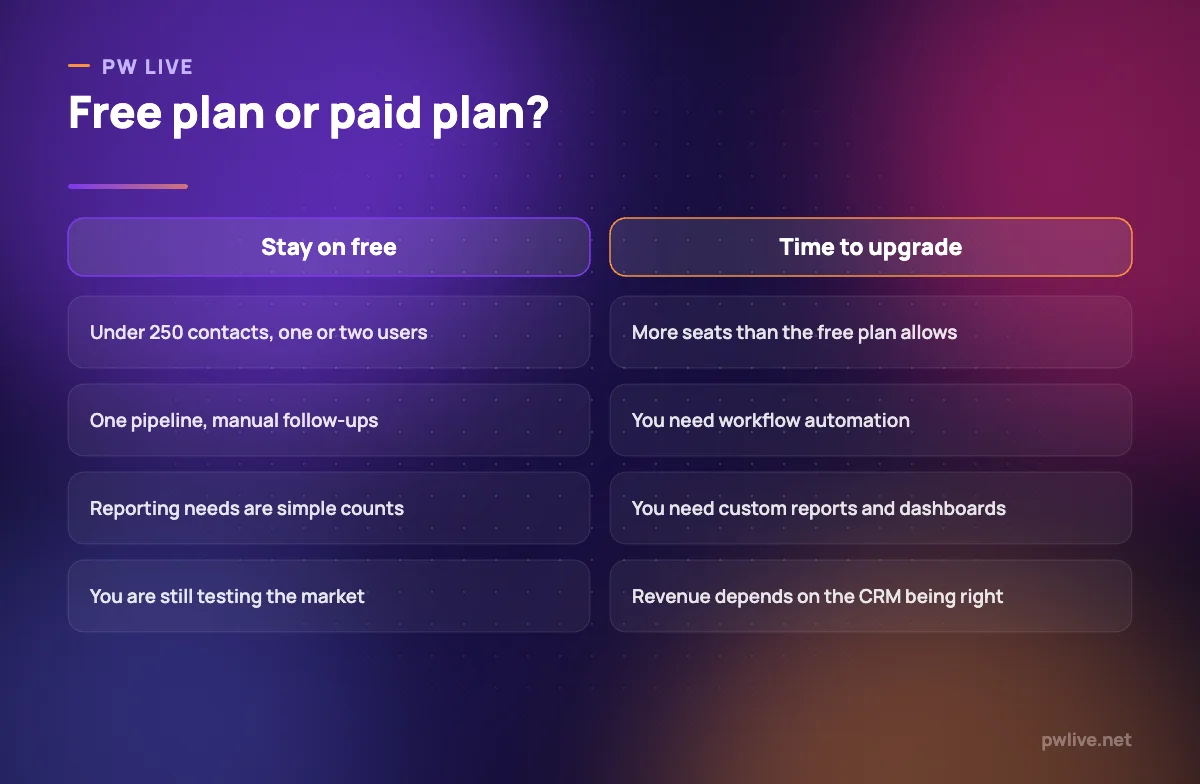
Work out two numbers first: how many people need to open the CRM, and how many records you will hold in twelve months. One user with a small pipeline should start with Bigin. Two users with a tidy client base should start with Capsule or HubSpot. Three users who want depth should start with Zoho. A larger group who all need read access should look at EngageBay or Odoo.
Then decide whether you need automation now. All seven withhold most of it on the free tier, so if your real problem is forgotten follow-ups, price the paid plan before committing to the free one. Simple reminders can also be handled outside the CRM using the approaches in automation for non-programmers.
Two options outside this list are worth knowing. Salesforce lists a Free Suite at $0 on its Sales Cloud pricing page with lead, account, contact and opportunity management. And SuiteCRM is open source and free to self-host, with SalesAgility charging only for managed hosting from £50 per month and support on top, which suits teams with technical help available. More comparisons are in our apps and tools section, and the digital marketing skill track covers what to do with the data once it is in there.
Key takeaways
- A free CRM plan is only useful if its seat and record limits match your next twelve months.
- HubSpot allows 2 free users and 1,000 contacts; Zoho CRM allows 3 users; Capsule allows 2 users and 250 contacts.
- EngageBay allows 15 free users but only 250 contacts; Odoo allows unlimited users on exactly one app.
- Attio has the largest free record allowance at 50,000 records across up to 3 seats.
- Automation and custom reporting are nearly always withheld from free plans.
- Pipedrive, Freshsales, monday CRM, folk and Insightly offer trials, not permanent free plans.
Frequently asked questions
Which free CRM allows the most users?
Odoo’s One App Free plan allows unlimited users, provided you use only the CRM app. Among conventional CRMs, EngageBay’s free plan lists 15 users, then Zoho CRM and Attio at 3 each.
Do free CRM plans expire?
The plans listed here are described as permanent rather than trials. HubSpot states its free functionality has no expiration date and Zoho describes its free edition as forever free. Trials from Pipedrive, monday CRM and Freshsales do expire.
What do free CRM plans usually leave out?
Workflow automation, custom reporting, bulk email and advanced permissions are the usual omissions. Free plans give you storage and visibility; paid plans give you the automation that saves time.
Is a free CRM safe for customer data?
These are established vendors with published security documentation, but access control is your responsibility. Limit admin rights, use unique passwords with two-factor authentication, and confirm you can export your data before relying on any free plan.
Pricing checked 2026-09-08. 6 of 7 prices in this article were read from the vendor’s own pricing page on that date; the rest publish no figure, so we describe the model instead. Vendors change prices without notice, so open the linked page before you commit.
Keep learning with PW Live
Browse every tool comparison, or follow the Digital Marketing track to learn the skills these tools support.





Leave a Reply