
The best AI image generators are no longer separated by output quality alone. They are separated by what you are allowed to do with the result, how output is metered, and whether the image arrives somewhere you can actually use it. Two tools can produce a similar picture and give you very different rights over it.
This list is for marketers, small business owners, students and designers choosing where to spend a modest budget. Nine tools are covered, each with its published pricing, its plan limits, and what the vendor’s own terms say about commercial use and training data. That last part matters more here than in any other software category, and it is the part most round-ups skip.
One warning before the list. Nothing below is legal advice, and we do not tell you that any tool’s output is copyright-free, safe for commercial use or indemnified. We report what each vendor publishes, and we link to the page we read. The law in this area is unsettled and differs by country, so check the licence yourself and take advice for anything commercially important.
How we chose these tools
This round-up is based on each vendor’s public pricing pages, documentation and published terms, read on 8 September 2026. Nobody at PW Live ran hands-on trials, and no output quality claims here come from testing. Every price, credit allowance and licence statement was checked on the vendor’s own page on that date and linked so you can verify it. Prices, credits and terms in this category change often, sometimes several times a year, so confirm current details before you buy or publish. No vendor paid for inclusion.
Where a page failed to display prices for us, we say so and mark the tool as unverified rather than reusing a number from memory. Where a vendor’s licence position differs between free and paid tiers, we state that difference explicitly.
1. Midjourney – best for stylised, art-directed images
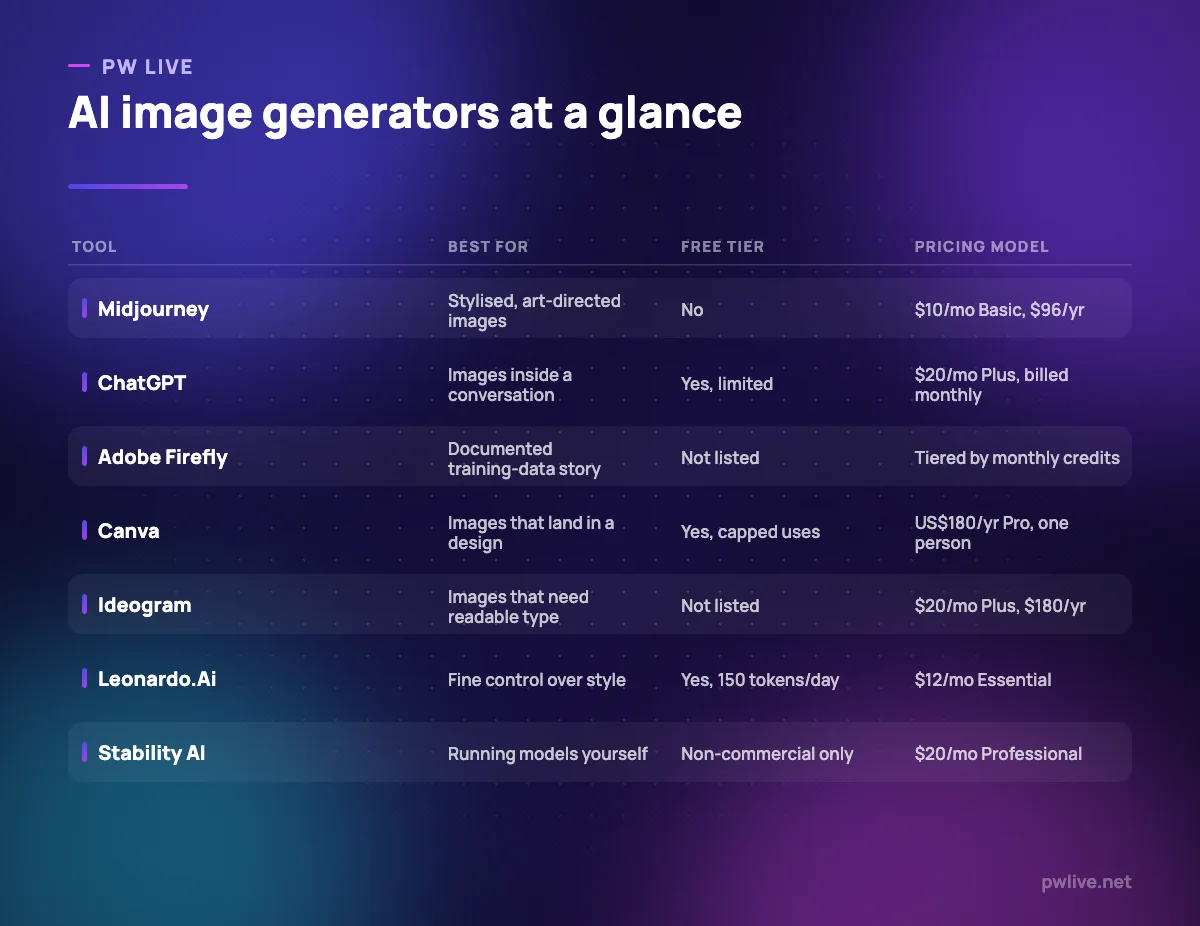
Midjourney is the tool people reach for when they want images with a strong aesthetic point of view rather than a literal rendering of a prompt. It is metered in fast GPU time, with relaxed generation available from the Standard plan upward, and it is one of the few tools here with no free tier at all.
What it does well – Plans are clearly tiered by fast GPU hours, so heavy users can see what they are buying. – Relax mode on Standard and above gives unlimited images without consuming fast hours. – Stealth Mode on Pro and Mega keeps generations out of the public gallery. – Annual billing is stated alongside monthly, at roughly a 20% saving.
Where it falls short – No free tier, so evaluating it costs at least $10. – Stealth Mode is only on Pro ($60/month) and Mega, so cheaper plans generate in public. – Basic has no relax mode, meaning 3.3 fast hours is a hard monthly ceiling.
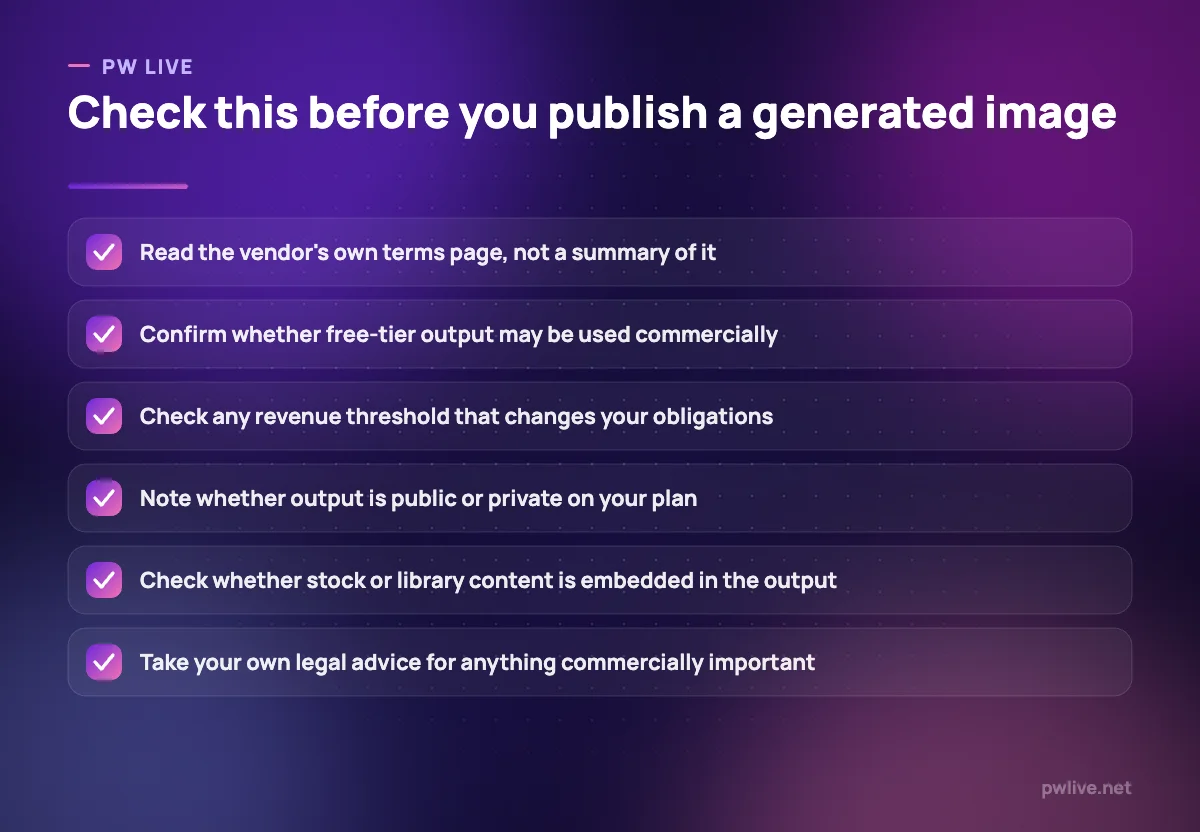
Commercial use and terms: Midjourney’s terms state “You own all Assets You create with the Services to the fullest extent possible under applicable law.” They also state that if you are a company, or an employee of a company, with more than $1,000,000 USD a year in revenue, you must be subscribed to a Pro or Mega plan to own your assets. Midjourney adds: “Please consult Your own lawyer if You want more information about the state of current intellectual property law in Your jurisdiction.”
Pricing: Basic $10/month or $96/year; Standard $30/month or $288/year; Pro $60/month or $576/year; Mega $120/month or $1,152/year. See Midjourney plans. Checked 8 September 2026.
2. ChatGPT image generation – best for images inside a conversation
Generating images inside ChatGPT is convenient in a way dedicated tools are not: you can describe what you want in the same conversation where you are drafting the post the image belongs to, then adjust it in plain language. It is the lowest-friction option for people who are not image specialists.
What it does well – No separate subscription or tool to learn if you already use ChatGPT. – Iterating conversationally is easier than rewriting prompt syntax. – Free tier includes image generation, so you can see the output before paying. – Works alongside the drafting and research you were already doing.
Where it falls short – Free-tier image generation is explicitly described as limited and slower. – There is no gallery, style library or asset management for repeated brand work. – The pricing page we checked did not display an amount for the Pro tier that removes image limits.
Commercial use and terms: OpenAI’s terms of use state that as between you and OpenAI, “you (a) retain your ownership rights in Input and (b) own the Output”, and that OpenAI assigns to you all its right, title and interest in the output. The same terms add that this assignment “does not extend to other users’ output or any Third Party Output”, and that “You must evaluate Output for accuracy and appropriateness for your use case, including using human review as appropriate, before using or sharing Output.”
Pricing: Free tier with limited image generation; OpenAI’s help centre lists ChatGPT Plus at $20/month billed monthly. See ChatGPT pricing. Checked 8 September 2026.
3. Adobe Firefly – best for a documented training-data story
Firefly is the option to consider when someone in your organisation is going to ask where the training data came from. Adobe publishes an answer to that question, which is unusual, and its plans are metered in generative credits that are also spent across Adobe’s other AI features.
What it does well – Adobe publishes what the commercial model was trained on, which most vendors do not. – Credit allowances are stated clearly per tier, from 2,000 to 50,000 a month. – Team licences exist at the same per-seat structure as individual plans. – Credits work across Adobe’s wider generative features, not only image generation.
Where it falls short – Credits do not roll over: Adobe states they reset monthly and are deducted up front, even when a generation fails. – Running out mid-month means waiting for the reset or buying more credits. – The plans page prices in local currency, so the figure you see depends on your region.
Commercial use and terms: Adobe states it is “training our initial commercial Firefly model on Adobe Stock images, openly licensed content, and public domain content where copyright has expired”, and describes this as “part of Adobe’s effort to design Firefly to be commercially safe”. We did not find an indemnification statement on the FAQ page we checked, so if legal cover matters to your organisation, ask Adobe directly rather than assuming it applies to your plan.
Pricing: Four individual tiers by monthly generative credits (2,000 / 4,000 / 10,000 / 50,000). The page displayed CAD $12.99/month for Standard and CAD $25.99/month for Pro when we checked; your currency and price will depend on region. See Adobe Firefly plans. Checked 8 September 2026.
4. Canva Magic Studio – best for images that land in a design
Canva’s image generation matters less for raw quality than for where the output ends up: inside a layout, next to your brand fonts, at the right size for the platform you are posting to. For small teams without a designer, that saves more time than a better model would. Our round-up of free design tools covers the surrounding workflow.
What it does well – Generated images drop straight into a design rather than a download folder. – Brand kits keep the surrounding layout consistent with your identity. – The free plan includes a real, if small, AI allowance. – Business plans share a larger allowance across a team on per-person pricing.
Where it falls short – AI use is capped by a monthly allowance and higher-quality generations consume more of it. – Exceeding the allowance means buying an AI Pass add-on on top of the subscription. – Control over composition and style is coarse compared with dedicated generators.
Commercial use and terms: Canva’s AI product terms state “you own your Output, except for any Output that modifies or incorporates Licensed Content…which is licensed to you as described below”, and that “You may use your Output for any lawful purpose, provided that you comply with these terms and that you accept that any such use is at your own risk.” Canva also states it “makes no warranty or guarantee as to the accuracy, completeness or reliability of the Output”. In practice, if your design pulls in Canva library assets, your rights over the finished file follow that library licence, not outright ownership.
Pricing: Free US$0/year for one person (up to 200 Standard AI uses or 20 Premium AI uses); Pro US$180/year; Business US$250/year per person. See Canva pricing. Checked 8 September 2026.
5. Google Gemini – best for quick image work alongside everyday AI use
Google bundles image generation into its consumer AI plans rather than selling it separately, which makes it close to free for anyone already using Gemini for other things. It is the right choice for casual, occasional image needs and the wrong choice for sustained production work.
What it does well – Image generation is included on the free tier with a Google Account. – Paid tiers raise usage limits and add video generation for $4.99/month upward. – No separate subscription to manage if you already pay for a Google AI plan. – Bundled storage on paid tiers offsets the cost for some households.
Where it falls short – Usage is expressed as multiples of the free tier rather than an absolute count, which makes planning hard. – No asset library, style presets or team features for repeated brand work. – Plan names in Google’s AI line-up have changed repeatedly, so terms you agreed to previously may sit under a different product name now.
Commercial use and terms: Google’s generative AI additional terms tell users to “Use discretion before relying on, publishing, or otherwise using content provided by the Services.” Google DeepMind also states that SynthID “adds an invisible digital watermark to an AI-generated image (or video segment)” and that “The watermark doesn’t change the image or video quality”, so assume generated images carry provenance signals. Read the terms attached to your specific plan before commercial use.
Pricing: Free at $0/month; Google AI Plus $4.99/month; Google AI Pro $19.99/month; Google AI Ultra from $99.99/month. See Google AI subscriptions. Checked 8 September 2026.
6. Ideogram – best for images that need readable type
Text inside generated images has historically been the weak point of the whole category, and Ideogram positions itself directly at that problem, describing “readable type in every layout” and editable text layers. If you make social graphics, posters or anything where words sit inside the picture, that focus is the reason to look at it.
What it does well – Built around typography rather than treating text as an afterthought. – Plus and Pro subscribers can generate privately and unpublish previously published images. – Annual billing is a stated 33% discount on both individual tiers. – Team plans exist at $30 per user per month with shared billing.
Where it falls short – No free tier is listed on the pricing page, so evaluation costs $20. – Credits are the constraint: 1,000 a month on Plus, which heavy iteration burns through. – Team plans require a minimum of two users and annual billing.
Commercial use and terms: Ideogram’s pricing page states: “We do not claim ownership of your generated images, and you’re free to use them for any purpose, including commercial use.” That is a clear position, but it is a statement about Ideogram’s own claims, not a guarantee about third-party rights in what a model produces. Read the full terms before relying on it.
Pricing: Plus $20/month or $180 billed annually (1,000 credits); Pro $60/month or $504 billed annually (3,500 credits); Team $30 per user per month billed annually, two-user minimum; Enterprise custom. See Ideogram pricing. Checked 8 September 2026.
7. Leonardo.Ai – best for fine control over style at volume
Leonardo is aimed at people producing sets of images that need to look related: game assets, product visuals, campaign variations. It uses a token system with a daily free allowance, which makes it one of the more approachable tools for someone learning what these models can and cannot do.
What it does well – The free tier gives 150 fast tokens a day, enough for genuine experimentation. – Paid tiers add private creations, so work is not public by default. – Premium and Ultimate include unlimited relaxed generation on selected models. – Team plans share a token pool rather than splitting per-seat allowances.
Where it falls short – Token accounting is harder to reason about than a simple image count. – Private creations are a paid feature, so free-tier work is not private. – Team pricing starts at $72/month with $24 per additional seat, which adds up quickly.
Commercial use and terms: Leonardo’s pricing page states that paid subscribers “retain full ownership, copyright, and other intellectual property rights” in their creations, and describes a different arrangement for free users, under which Leonardo is granted a licence to access creations. If you intend to use output commercially, treat the paid tier as the minimum and read the current terms in full before publishing.
Pricing: Free $0/month (150 fast tokens a day); Essential $12/month; Premium $30/month; Ultimate $60/month; Team from $72/month. See Leonardo.Ai pricing. Checked 8 September 2026.
8. Stability AI – best for running image models yourself
Stability is the option for developers and technically confident teams who want to run models on their own infrastructure rather than through someone else’s interface. That buys privacy and control, and it costs you the setup. It is also the clearest example of a licence that depends on your revenue rather than your plan. If the underlying ideas are unfamiliar, our explainer on how large language models work covers the same principles in plain terms.
What it does well – Models can be run on your own hardware, keeping prompts and outputs off a vendor’s servers. – Non-commercial use is free, which suits students and personal projects. – The commercial threshold is stated numerically rather than left vague. – Professional membership is a flat $20 per month rather than credit-metered.
Where it falls short – There is no polished consumer interface; this is infrastructure, not an app. – Free membership is non-commercial only, so any business use requires a paid tier. – Crossing the stated revenue threshold means moving to an Enterprise licence at custom pricing.
Commercial use and terms: Stability states that use of its Core Models “is free for everyone, unless you’re using the Core Models for a commercial purpose and you or your organization generate over USD $1M (or local currency equivalent) of annual revenue, regardless of the source of that revenue.” Above that figure, an Enterprise Licence is required. Note this is a threshold on your revenue, not on your usage.
Pricing: Non-commercial free; Professional $20 per month excluding VAT and sales taxes, for creators and developers under $1M annual revenue, $1M institutional funding and 1M monthly active users; Enterprise custom. See Stability AI membership. Checked 8 September 2026.
9. Recraft – best for vector assets and reusable brand styles
Recraft describes itself as a text-to-image model and design platform covering “photorealism, vector generation, custom styles, mockups, and more”, and it is the only tool here whose stated speciality is editable vector output. For icon sets, logos and anything that has to scale cleanly, that is a meaningful difference from a raster generator.
What it does well – Generates editable vector graphics rather than only bitmap images. – Custom styles can be built by uploading reference images and reused across a set. – Covers icons and mockups as distinct workflows rather than generic prompting. – Subscription credits reset at the start of each billing cycle.
Where it falls short – The pricing page did not render plan names or amounts when we checked, so we could not verify a price. – Free-plan images are owned by Recraft and are publicly visible in a community gallery. – Vector output still needs a designer’s eye; generated shapes are rarely production-ready as they stand.
Commercial use and terms: Recraft states that “Images generated on the Free plan are owned by Recraft. They are publicly visible in the community gallery and are not licensed for commercial use”, while “Paid plans grant you full ownership and commercial rights for all images generated while subscribed.” This is the sharpest free-versus-paid licence split on this list, and a useful reminder to check tier-level terms rather than a vendor’s headline claim.
Pricing: Free tier plus paid subscription tiers with monthly credits; we could not verify plan prices on the page we checked. See Recraft pricing. Checked 8 September 2026.
How to choose between them
Start with where the image needs to end up. If it goes into a social post or a poster, Canva saves you the most steps. If it needs readable text inside it, Ideogram is built for that. If it needs to be a scalable vector, Recraft is the only entry here that says so. If it just needs to exist while you are drafting something else, ChatGPT or Gemini will do.
Then decide how much the licence position matters. For a personal blog or a student project, most of these are fine and the free tiers are enough; our guide to taking good product photos with a phone is often the better answer anyway. For a commercial campaign, read the terms in full, note the revenue thresholds at Midjourney and Stability, and remember that Recraft’s and Leonardo’s free tiers carry materially different rights from their paid ones.
Finally, budget for iteration. Every paid tool here meters something: fast hours, credits or tokens. First attempts are rarely usable, so estimate five to ten generations per finished image and check the allowance covers it. For social work specifically, our social media strategy guide for small businesses will tell you how many images you actually need before you pay for capacity you will not use. The technology section and the data science and AI skill track cover the wider background.
Key takeaways
- Rights differ sharply between tools, and between the free and paid tiers of the same tool. Check yours before publishing.
- Midjourney and Stability both tie obligations to your organisation’s revenue, not your usage.
- Adobe publishes what its commercial model was trained on; most vendors do not.
- Free tiers frequently mean public generations, watermarks or non-commercial licences only.
- Credits, tokens and fast hours are the real limits. Budget several attempts per usable image.
- Nothing in this article is legal advice. Read the vendor’s terms and take your own advice for commercial work.
Frequently asked questions
Can I use AI-generated images commercially?
It depends entirely on the tool and your plan, and this article is not legal advice. Ideogram states you may use generated images commercially; Recraft’s free-plan images are explicitly not licensed for commercial use; Midjourney ties asset ownership to a Pro or Mega plan above $1,000,000 in company revenue. Read the vendor’s terms yourself.
Do AI images carry a watermark?
Some do. Google DeepMind states that SynthID adds an invisible digital watermark to AI-generated images without changing quality. Other vendors apply visible watermarks on free tiers. Check the plan you are on.
What is the cheapest way to start?
Google Gemini’s free tier and Leonardo’s 150 daily free tokens both allow real experimentation at no cost, and Canva’s free plan includes a small AI allowance. None are suitable for sustained commercial production.
How were the prices in this article verified?
Each figure was read on the vendor’s own pricing page on 8 September 2026, and every entry links to that page. One tool, Recraft, did not display prices when we checked, and we have marked it unverified rather than guessing.
Pricing checked 2026-09-08. 8 of 9 prices in this article were read from the vendor’s own pricing page on that date; the rest publish no figure, so we describe the model instead. Vendors change prices without notice, so open the linked page before you commit.
Keep learning with PW Live
Browse every tool comparison, or follow the Digital Marketing track to learn the skills these tools support.





Leave a Reply