

Picking between the best SEO tools is less about finding a single winner than about working out which part of the job you need help with. Most sites need one free source of truth, one research tool, and something that helps them fix pages.
This list is for the person paying the bill: a founder, a solo marketer or a small in-house team. It is not a ranking of the most powerful platform, because power you never use is just cost.
Match each entry to a job rather than a score. If SEO itself is new to you, our guide to SEO for beginners is a better starting point than any product page.
How we chose these tools
This round-up is based on each vendor’s own public documentation and pricing pages, read on 8 September 2026. We did not run hands-on trials, and nothing here is a test result. Prices and plan limits change often, so confirm current details on the vendor’s page before you buy. Where a pricing page would not load for us, we say so and describe only the model rather than quoting a number. No vendor paid for inclusion and there are no affiliate links.
1. Semrush – best for all-round SEO and PPC research
Semrush is the broadest of the mainstream suites. Keyword research, competitor organic and paid analysis, rank tracking, site auditing and link data sit in one account, which is why agencies with mixed client work land on it. The plan structure now splits classic SEO from AI-search features, so read tier names carefully.
What it does well
- Covers organic and paid research together, unusual at this price.
- Keyword databases are large enough that long-tail work does not run dry.
- Rank tracking and client-ready reporting are included rather than sold separately.
Where it falls short
- The entry SEO plan covers 5 websites and 500 keywords tracked daily, which a busy agency clears quickly.
- Extra seats start at $45 per month, so a three-person team is not the headline price.
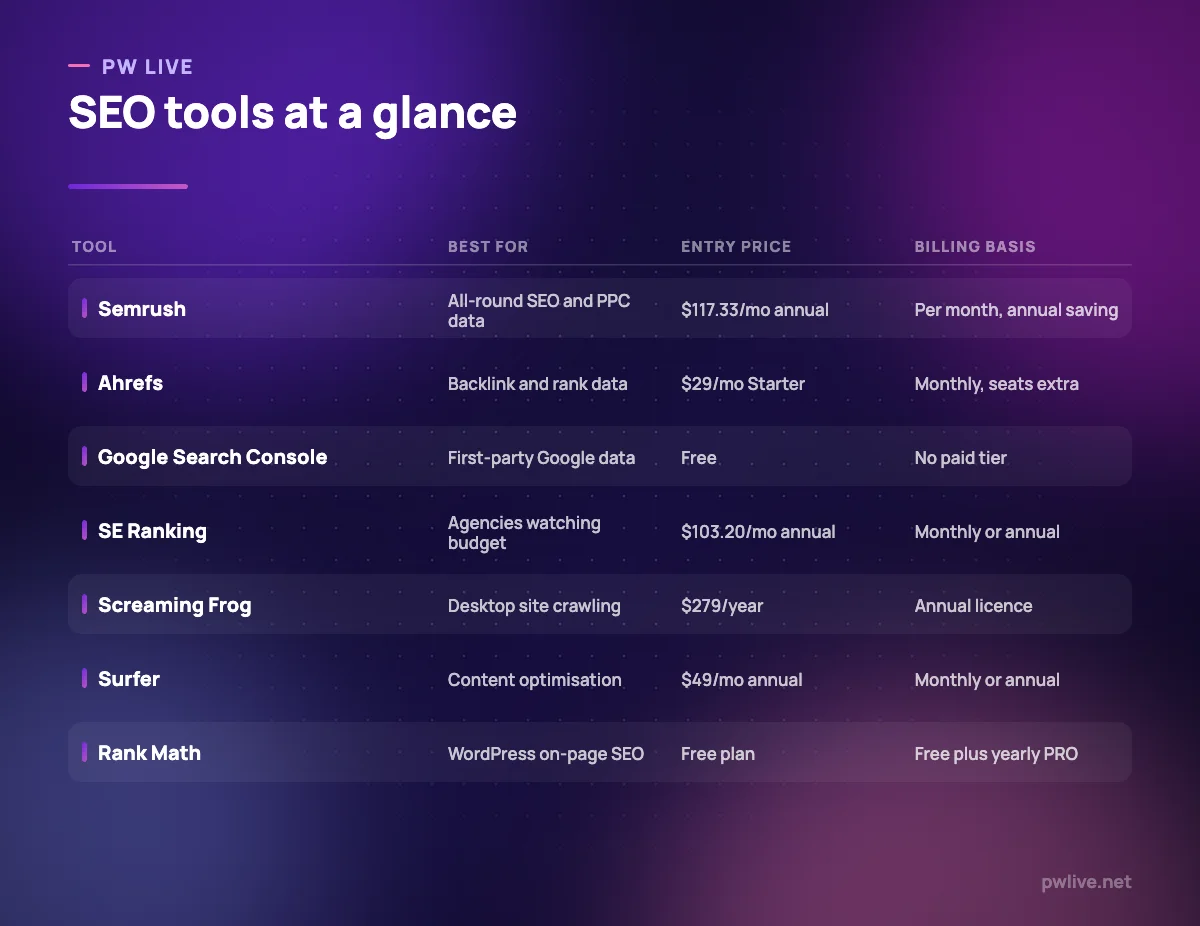
Pricing: the SEO plan is listed at $117.33 per month billed annually or $139 billed monthly, rising to $248.17 (Pro+) and $455.67 (Advanced) annually, as of 8 September 2026 on the Semrush pricing page.
2. Ahrefs – best for backlink and competitor research
Ahrefs built its reputation on link data, and that is still the clearest reason to choose it. Site Explorer tells you which pages on a competing domain earn traffic and which sites link to them, the raw material for most link-building and content-gap work.
What it does well
- The backlink index and its filtering remain the strongest part of the product.
- Keywords Explorer gives clicks data alongside volume, which reduces bad targeting.
- A free Webmaster Tools tier audits your own verified site.
Where it falls short
- Lite includes 6 months of historical data and 750 tracked keywords, which is thin for trend work.
- Only one user is included on every paid tier; extra seats cost $40 to $100 per month.
Pricing: Starter $29 per month, Lite $129, Standard $249, Advanced $449 and Enterprise $1,499 on an annual commitment, with up to 17% off annual billing, as of 8 September 2026 on the Ahrefs pricing page.
3. Google Search Console – best for first-party search data
Every other tool on this list estimates. Search Console reports. It shows the queries that actually produced impressions and clicks for your pages, plus indexing status, and nothing else shows you that.
What it does well
- Query and page data comes straight from Google rather than a third-party model.
- URL Inspection shows how Google crawled and rendered a specific page.
- Sitemap submission, indexing reports and email alerts sit in the same account.
Where it falls short
- It only covers sites you have verified, so no competitor research at all.
- The Performance report opens on the last three months by default, and it reports symptoms rather than causes.
Pricing: free. Google documents Search Console as a free service and publishes no paid tier, checked 8 September 2026.
4. Moz Pro – best for a gentler introduction to SEO metrics
Moz has spent years making SEO concepts approachable, and the product reflects that. Keyword Explorer, link metrics and site crawling sit in an interface that explains itself, which suits marketers who came to SEO from content or brand work.
What it does well
- Explanatory interface reduces the learning curve compared with the bigger suites.
- Keyword difficulty and SERP analysis are presented in plain language.
- A long-running library of free tools and learning material sits alongside the paid product.
Where it falls short
- Link and keyword indexes are generally smaller than the two market leaders, so use it as a second opinion.
- We could not load the vendor pricing page during checking, so plan limits are unconfirmed.
Pricing: a tiered subscription with monthly and discounted annual billing, plus free tools. The Moz Pro pricing page did not load for us on 8 September 2026, so we quote no figure; check it directly.
5. SE Ranking – best for agency work on a smaller budget
SE Ranking covers most of what the larger suites do, with limits that are generous for the money. Its Core plan bundles rank tracking, competitive research and a site audit that handles a quarter of a million pages a month.
What it does well
- Audit allowances are large for the price, at 250,000 pages a month on the entry plan.
- 10 projects and 2,000 daily tracked keywords on Core suit a portfolio of small clients.
- Annual billing is discounted 20% and a 14-day trial needs no card.
Where it falls short
- Core includes only one manager seat, so a second team member means moving up a tier.
- Extras such as the agency pack, AI search and API access are priced separately, and its research data is not the reference point Ahrefs or Semrush data is.
Pricing: Core $129 per month billed monthly or $103.20 billed annually, Growth $279 or $223.20, Enterprise quote-based, as of 8 September 2026 on the SE Ranking pricing page.
6. Screaming Frog SEO Spider – best for desktop site crawling
The SEO Spider is a desktop crawler that walks your site the way a search engine would and reports what it finds: broken links, redirect chains, duplicate titles, orphaned URLs. Screaming Frog documents it as auditing over 300 SEO issues.
What it does well
- Crawls are fast and run locally, so nothing queues behind other customers.
- Connects to Search Console, Analytics and PageSpeed Insights on the paid licence to enrich a crawl.
- The one-year licence is cheap compared with monthly platform fees.
Where it falls short
- The free version stops at 500 URLs and cannot save crawls, schedule them, or use the API integrations.
- Crawl size is bounded by your machine’s memory, and issues arrive as tables rather than explanations.
Pricing: $279 per licence per year, falling to $265, $249 and $235 at 5, 10 and 20 licences, as of 8 September 2026 on the Screaming Frog pricing page.
7. Surfer – best for optimising a draft against the SERP
Surfer sits at the writing stage. You give it a target term, it analyses what currently ranks, and it scores your draft against that pattern while you edit. Used with judgement it stops writers missing obvious subtopics; used without it, you get stuffed, samey pages.
What it does well
- Editor works inside Google Docs and WordPress rather than forcing another window.
- Content briefs give writers a concrete structure to work from.
- Higher plans add internal linking suggestions and cannibalisation reports.
Where it falls short
- Discovery includes 120 documents, 10 tracked pages and a single seat, so a content team outgrows it fast.
- It optimises against what already ranks, which nudges everything towards the average.
Pricing: Discovery $49 per month billed annually, Standard $99, Pro $182, Peace of Mind $299, Enterprise from $999, as of 8 September 2026 on the Surfer pricing page. Before paying for a content scorer, read how to write content people actually read.
8. Rank Math – best for on-page SEO inside WordPress
If your site runs on WordPress, an SEO plugin handles the plumbing: titles, meta descriptions, canonical tags, schema, sitemaps and redirects. Rank Math does all of that, with a free version covering the essentials. For transparency, PW Live runs Rank Math. That is a choice about our own stack, not a claim that it beats Yoast, which covers the same ground.
What it does well
- The free version includes schema generation, Search Console integration and on-page analysis.
- The PRO tier covers unlimited personal sites rather than charging per domain.
- Setup wizard gets a new site into a sensible default state quickly.
Where it falls short
- It only exists for WordPress, and beginners tend to switch on modules they do not need.
- Keyword tracking is capped at 500 keywords on PRO.
Pricing: free version available; PRO EUR 7.99 per month billed annually, renewing at EUR 8.99; Business EUR 24.99 for 100 client sites; Agency EUR 54.99 for 500, as of 8 September 2026 on the Rank Math pricing page.
9. Google Analytics 4 – best for measuring what organic visitors do
Rankings are not the point; what people do after they arrive is. GA4 connects organic sessions to enquiries, sign-ups or orders, it is free for standard properties, and it pairs with Search Console. Our guide to marketing metrics that matter covers which of its numbers deserve attention.
What it does well
- Free at the standard tier, with no seat charges.
- Event-based model handles single-page apps and mobile properties consistently.
- BigQuery export works even on the free tier, at up to 1 million events a day.
Where it falls short
- Standard properties retain data for a maximum of 14 months.
- The reporting interface is markedly harder to learn than the tool it replaced.
- Analytics 360 raises those limits but its price is not published.
Pricing: standard properties are free; Analytics 360 pricing is not published and is arranged through Google sales or a Sales Partner, per the Analytics 360 documentation checked 8 September 2026.
10. Serpstat – best for a cheaper second research source
Serpstat bundles keyword research, competitor analysis, rank tracking and site auditing at a lower entry price than the two market leaders. It suits anyone wanting a second data source to sanity-check a keyword list.
What it does well
- Individual covers keyword research, rank tracking and audits in one subscription.
- Daily search limits are stated plainly per plan, so overruns are predictable.
- Higher tiers include a lot of seats for the money, at 30 users on Agency.
Where it falls short
- Individual is limited to 100 searches a day and 5 projects, which disappears fast during a research sprint.
- There is no free tier, the trial needs a card, and data depth in smaller markets is thinner than the leaders.
Pricing: Individual $50 per month, Team $100, Team x2 $169 and Agency $410, discounted annually, as of 8 September 2026 on the Serpstat pricing page.
How to choose between them
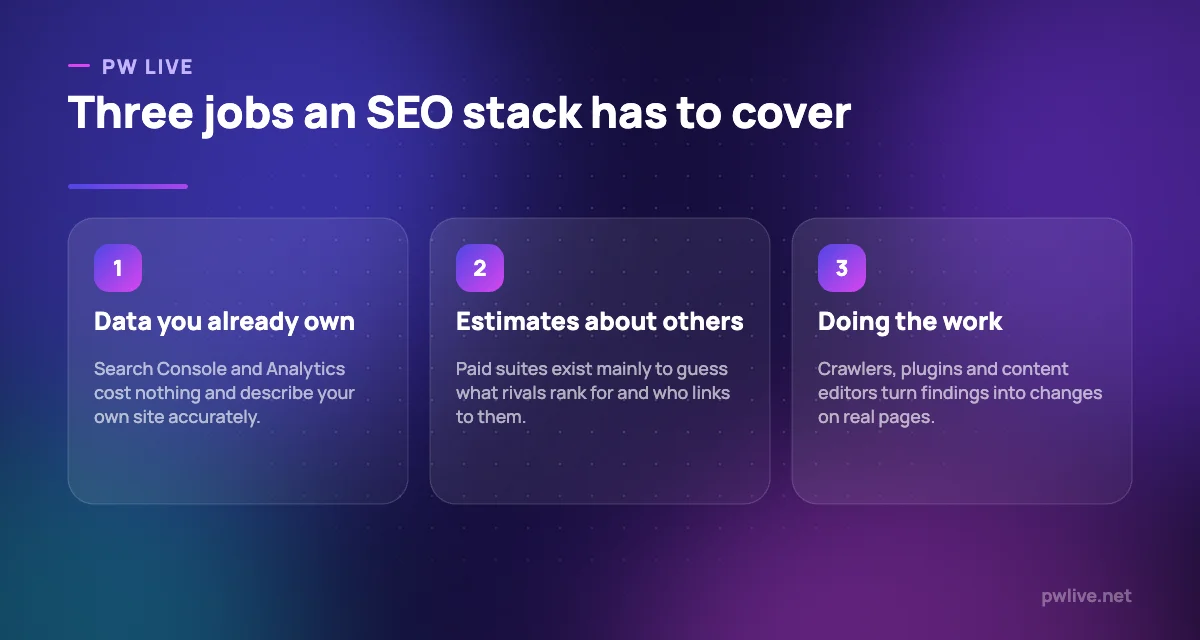
Start with the free layer. Search Console and Analytics cost nothing, describe your own site accurately, and will keep a small site busy for months.
Add a paid tool only when you can name the question it answers. “What do competitors rank for that we do not?” points at Ahrefs, Semrush or Serpstat. “Why is this section not indexed?” points at Screaming Frog. “Our writers keep missing subtopics” points at Surfer. If you cannot name the question, the tool becomes a charge you never open.
Then budget for seats, not plans, because that is where team costs quietly break. A sensible small-business stack is Search Console and Analytics for free, one crawler bought annually, and one research subscription. Our digital marketing skill track and the wider marketing section cover the fundamentals these tools assume you have.
Key takeaways
- Free first-party data from Search Console and Analytics beats paid estimates about your own site.
- Paid suites are mostly worth it for what they tell you about competitors, not about you.
- Compare tracked keywords, seats and crawl allowances rather than headline prices.
- Extra seats are usually a separate charge; price the whole team, not one login.
- A desktop crawler bought once a year often solves more than another monthly subscription.
Frequently asked questions
Do I need a paid SEO tool to rank?
No. Search Console, Analytics and a free crawler surface most issues on a small site. Paid tools mainly buy competitor data and scale, which matter more as the site grows.
Is Semrush or Ahrefs better?
They overlap heavily. Ahrefs is generally chosen for link data and Semrush for combined organic and paid research. Both publish their limits, so compare tracked keywords, seats and projects against how you work.
Can I share one subscription across a team?
Not usually. Ahrefs and Semrush include a single user by default and charge for extra seats, so the real cost is the seat count, not the plan.
How often should I re-check pricing?
Before every renewal, since plan structures and free tiers on these products change regularly. Our guide to keyword research without expensive tools is a useful fallback if a price rise pushes a tool out of reach.
Pricing checked 2026-09-08. 9 of 10 prices in this article were read from the vendor’s own pricing page on that date; the rest publish no figure, so we describe the model instead. Vendors change prices without notice, so open the linked page before you commit.
Keep learning with PW Live
Browse every tool comparison, or follow the Digital Marketing track to learn the skills these tools support.





Leave a Reply