

Every set of keyword research tools is guessing. Only Google knows how many people searched a term; every commercial tool models that number from clickstream data, ad estimates or both. Use them to rank ideas against each other, not as a source of precise truth.
This comparison is for someone choosing one keyword tool, not five. It covers what each product gives you, what its entry plan restricts, and where its numbers come from, so you can pick the one whose weaknesses you can live with.
If you are starting from zero, our guides to SEO for beginners and keyword research without expensive tools will get you further than a subscription will.
How we chose these tools
This comparison is based on each vendor’s public documentation and pricing pages, read on 8 September 2026. Nobody at PW Live ran hands-on trials, and nothing here is a test result. Two vendors, Mangools and AnswerThePublic, render prices in a way we could not read, so we describe only their model and quote no figures. Prices and limits change often, so confirm current details on the vendor’s page before buying. No vendor paid to be included and there are no affiliate links.
1. Google Keyword Planner – best for forecasts straight from Google Ads
Keyword Planner is the only tool here whose numbers come from inside Google. It exists to help advertisers build search campaigns, and it gives keyword ideas, average monthly search figures and forecasts of impressions and clicks. For sizing a topic before you commit to writing about it, that is often enough.
What it does well
- Generates ideas from a seed term, a whole website or a product category.
- Forecast tool projects impressions, clicks and cost for a keyword list.
- Data comes from Google’s own advertising system rather than a third-party estimate.
- Costs nothing, whatever your budget looks like.
Where it falls short
- Google documents that you need a Google Ads account and a created campaign to reach it.
- Accounts without meaningful spend generally see wide volume bands, not precise figures.
- It has no concept of organic difficulty, so it cannot tell you whether you could rank.
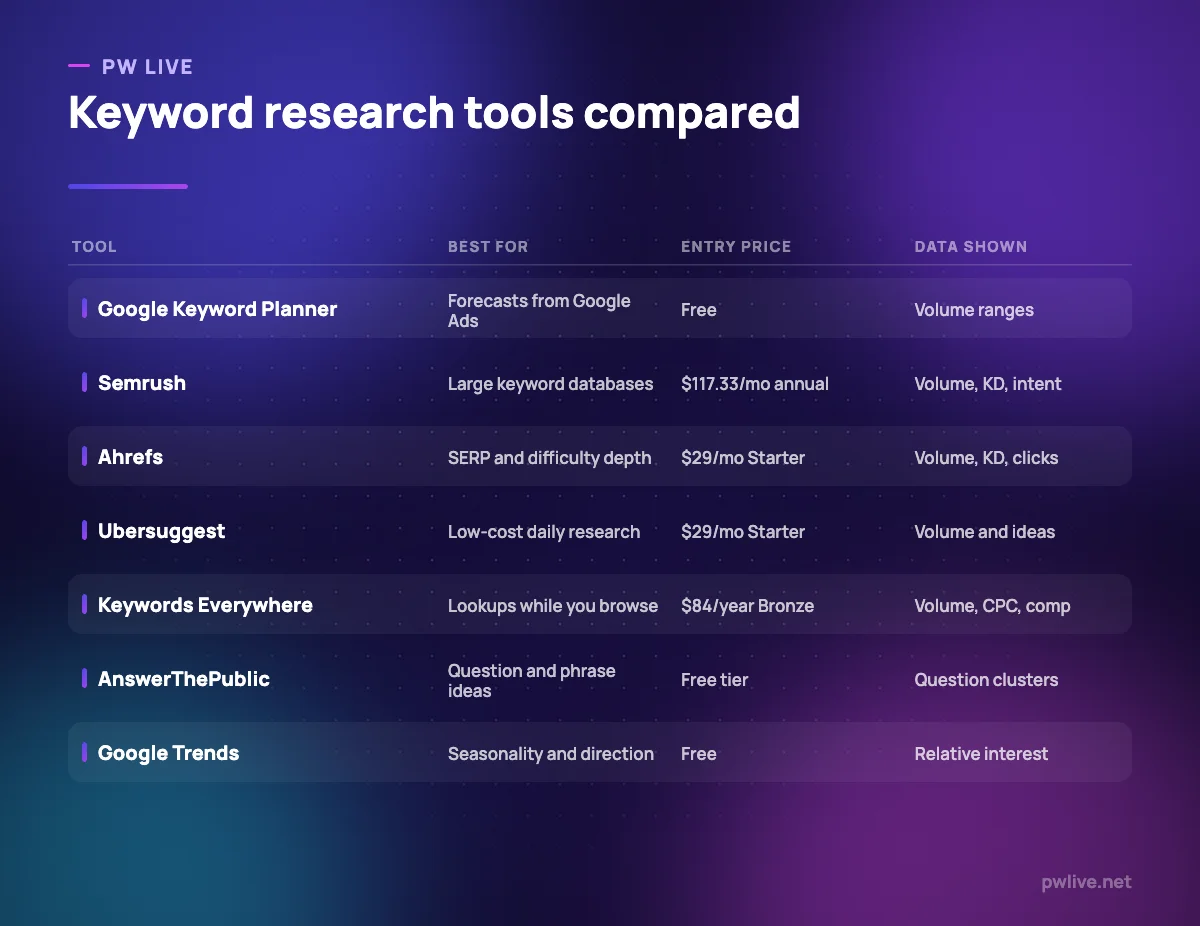
Pricing: free. Google describes it as a free keyword search tool accessible to anyone with a Google Ads account after creating a campaign, checked 8 September 2026.
2. Semrush Keyword Magic Tool – best for very large keyword databases
Keyword Magic is the research module inside Semrush, and its strength is breadth. Feed it a seed and it returns a large set grouped into subtopics, with intent labelling and difficulty scores attached. For building a content plan covering a whole category, that grouping saves real hours.
What it does well
- Subtopic grouping turns a flat export into a rough content plan.
- Intent labels help separate research queries from buying queries early.
- Sits alongside competitor, backlink and rank-tracking data in one account.
- Filters are detailed enough to strip out branded and irrelevant terms quickly.
Where it falls short
- It is not sold separately, so you are buying the whole platform to get it.
- The entry SEO plan covers 5 websites and 500 daily tracked keywords.
- Additional users start at $45 per month, so a small team’s real cost is higher than the headline.
Pricing: available on Semrush plans, with the SEO plan listed at $117.33 per month billed annually or $139 billed monthly, Pro+ at $248.17 annually and Advanced at $455.67 annually, as of 8 September 2026 on the Semrush pricing page.
3. Ahrefs Keywords Explorer – best for SERP detail and clicks data
Ahrefs reports clicks alongside search volume, which is the single most useful distinction in this category. A term with 10,000 searches and very few clicks is being answered on the results page itself, and no amount of writing will change that. Keywords Explorer also exposes the current ranking pages and their link profiles.
What it does well
- Clicks data reveals queries where ranking would earn you nothing.
- SERP overview shows who ranks now and how strong their pages are.
- Parent topic grouping stops you writing three pages for one intent.
- The free Webmaster Tools tier gives limited access for your own verified sites.
Where it falls short
- Lite includes 1,000 credits per user per month, so heavy research days run out.
- Only one user is included on every paid plan, with seats from $40 to $100 per month.
- Lite is limited to 750 tracked keywords and 6 months of historical data.
Pricing: Starter is listed at $29 per month, Lite $129, Standard $249, Advanced $449, and Enterprise $1,499 per month on an annual commitment, with annual billing saving up to 17%, as of 8 September 2026 on the Ahrefs pricing page.
4. Mangools KWFinder – best for a simple interface for solo marketers
KWFinder is part of the Mangools bundle and has always aimed at people who find the big suites overwhelming. You type a seed, you get a list with difficulty scores and a SERP preview beside it, and there is very little else to learn. For a freelancer or a single-site owner, that restraint is a feature.
What it does well
- The interface is genuinely approachable, with difficulty and SERP shown together.
- Mangools documents a free plan that does not require a credit card.
- The bundle includes rank tracking, SERP checking and backlink tools in the same subscription.
- Plan limits refresh every 24 hours, so a heavy day does not cost you the month.
Where it falls short
- Its keyword and link indexes are smaller than the market leaders, so treat coverage of niche terms as incomplete.
- Prices did not render on the vendor’s plans page when we checked, so we cannot confirm any figure.
- Daily lookup limits mean bulk research is awkward compared with an export-driven workflow.
Pricing: a free plan is offered with no card required, alongside Basic, Premium and Agency subscriptions, with annual billing saving up to 35% and a 48-hour money-back guarantee. Exact figures did not render for us on the Mangools plans page on 8 September 2026, so check it directly.
5. Ubersuggest – best for low-cost daily keyword work
Ubersuggest is priced well below the flagship suites and covers keyword ideas, basic competitor views, a site audit and rank tracking. It suits someone who wants a paid tool but cannot justify a three-figure monthly bill, and who mostly needs direction rather than depth.
What it does well
- Starter is $29 per month, which is a meaningful step down from the major suites.
- Includes a weekly site audit of 1,000 pages even on the entry plan.
- Keyword research allowance of 20,000 suggestions a month on Starter is generous for the price.
- A browser extension brings the data onto search results pages.
Where it falls short
- Starter covers a single project and 125 tracked keywords, so it suits one site only.
- Reports are capped per day at 150 on Starter, which limits research sprints.
- Its estimates are less consistent than Ahrefs or Semrush, so treat close comparisons with caution.
Pricing: Starter is listed at US$29 per month, Professional at US$49 and Business at US$99, as of 8 September 2026 on the Ubersuggest pricing page. A lifetime option is referenced on the vendor’s site but no figure is shown there.
6. Keywords Everywhere – best for lookups while you browse
Keywords Everywhere is a browser extension that overlays keyword data on Google results, YouTube, Amazon and other sites you already use. It is sold as credits rather than a subscription tier, which makes it unusually well suited to occasional research. You pay for what you look up.
What it does well
- Data appears where you are already working instead of in a separate tab.
- Credit packages mean light users are not paying a monthly platform fee.
- Related and People Also Search For widgets keep working even with no credits left.
- Cheapest package is $84 a year, well below any full research suite.
Where it falls short
- When credits run out, volume, CPC and competition figures stop appearing entirely.
- Credits expire, so unused allowance is not banked indefinitely.
- It is a data overlay, not a research platform: there is no rank tracking or site audit.
Pricing: Bronze is listed at $84 billed annually for 100,000 credits a year, Silver $168 for 400,000, Gold $480 for 2 million and Platinum $1,440 for 8 million, as of 8 September 2026 on the Keywords Everywhere subscriptions page.
7. AnswerThePublic – best for question and phrase discovery
AnswerThePublic takes a seed term and returns the questions and phrase patterns people search around it, arranged as clusters. It is a research tool for the shape of a topic rather than its size, and it is at its most useful early, when you are deciding what a page should cover.
What it does well
- Surfaces question phrasings that keyword lists usually flatten out.
- The visual grouping makes it easy to spot subtopics you had not considered.
- A free tier exists, so you can test the idea before paying anything.
Where it falls short
- Output is question discovery, not demand measurement, so pair it with a volume tool.
- The free tier is limited, and we could not confirm the exact daily allowance from the vendor’s page.
- Its pricing page did not render for us, so no figure can be quoted here.
Pricing: a free tier plus paid Pro plans. The AnswerThePublic pricing page did not render figures for us on 8 September 2026, so confirm the current cost and free allowance directly. The questions it surfaces are most valuable when they shape the page itself, which our guide to writing content people read covers.
8. Google Trends – best for seasonality and direction of demand
Trends answers a question no keyword tool does well: is interest in this topic rising or falling, and when in the year does it peak? Google normalises every figure, scaling a term’s popularity from 0 to 100 against itself, so it is a comparison instrument rather than a counter.
What it does well
- Compares several terms on one chart across custom time ranges and countries.
- Regional breakdown helps decide which market to target first.
- Built on what Google describes as a largely unfiltered sample of real search requests.
- Free, with no account or spend required.
Where it falls short
- It never reports absolute search volume, only relative interest.
- Low-volume terms produce noisy charts or nothing at all.
- No difficulty, no cost data and no view of who currently ranks.
Pricing: free. Google documents Trends as a public tool built on anonymised, aggregated search data, per its Trends documentation checked 8 September 2026.
How to choose between them
Budget first. With nothing to spend, Keyword Planner, Google Trends and your own Search Console data carry a small site a long way. With a little, Keywords Everywhere or Ubersuggest add real value without a three-figure commitment. Only above that does a full suite make sense.
Then match the tool to the work. Planning a category of content needs Semrush’s grouping. Deciding whether ranking is worth it needs Ahrefs’ clicks data. Understanding how people phrase a problem needs AnswerThePublic. Timing a seasonal campaign needs Trends. Buying the wrong one is usually a mismatch of job, not a matter of quality.
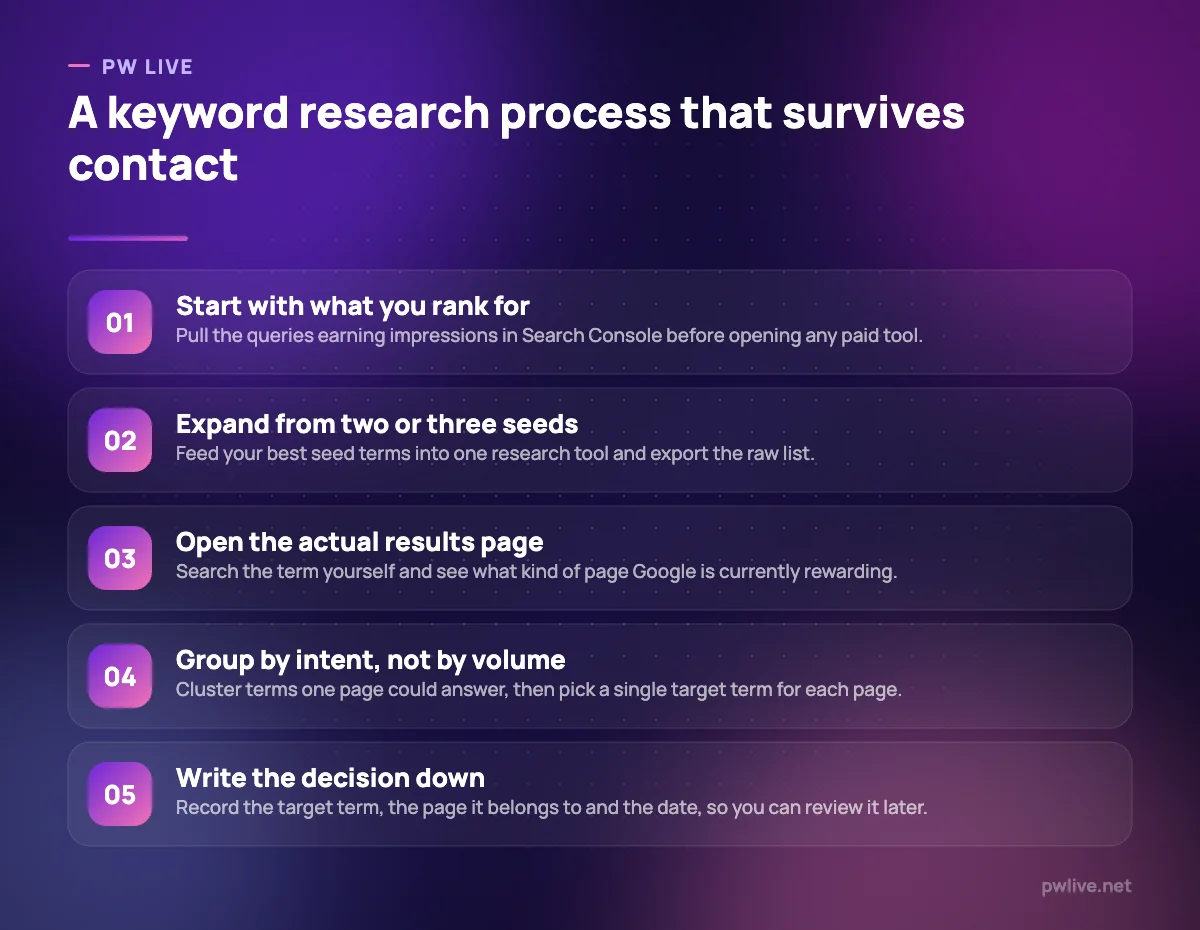
Watch the limits rather than the price. Daily search caps, credit allowances and seat charges are what actually stop work, and every vendor above publishes them. And remember that keyword research is a skill the tool only assists: the digital marketing skill track, our marketing fundamentals guide and the wider marketing section cover the judgement part that no subscription supplies.
Key takeaways
- Every commercial volume figure is an estimate; use it to rank ideas, not to forecast traffic.
- Keyword Planner is free and comes from Google’s own ad system, but needs a Google Ads campaign.
- Ahrefs reporting clicks alongside volume is the most useful single distinction in this category.
- Credit-based pricing suits occasional research better than a monthly platform fee.
- Two vendors here do not render prices in a readable way, so check them yourself before committing.
- Question-discovery tools and volume tools answer different questions and work best together.
Frequently asked questions
Which keyword research tool is most accurate?
None of them is accurate in an absolute sense, because only Google has the real numbers. Google Keyword Planner is closest to source, but it reports ranges for most accounts and says nothing about organic difficulty.
Do I need a paid tool if I already have Search Console?
Not immediately. Search Console shows the queries you already appear for, which is the best starting list anyone has. Paid tools mainly tell you about terms you do not yet rank for and about competitors.
What does keyword difficulty actually measure?
It is each vendor’s own score, usually derived from the link strength of the pages currently ranking. Scores are not comparable across tools, so never mix a difficulty figure from one product with a volume figure from another.
How many keywords should one page target?
One primary term, plus the closely related phrasings that share the same intent. Splitting near-identical terms across separate pages is a common cause of self-competition, and it hurts commercial pages most, as our guide to product descriptions that convert explains.
Pricing checked 2026-09-08. 6 of 8 prices in this article were read from the vendor’s own pricing page on that date; the rest publish no figure, so we describe the model instead. Vendors change prices without notice, so open the linked page before you commit.
Keep learning with PW Live
Browse every tool comparison, or follow the Digital Marketing track to learn the skills these tools support.





Leave a Reply