

Choosing a CRM for startups is mostly an exercise in resisting features. A founder does not need forecasting models or territory management. They need a reliable answer to “who did I promise to get back to, and when”, available on a phone, in under ten seconds.
This list is for solo founders, two-person teams and early startups still working out how they sell. Every tool here is either free at the smallest size or cheap enough for one person to justify, and where a tool has no free plan we say so rather than counting a trial as free.
Read the prices carefully, because three habits catch founders out. The advertised figure is usually per user per month billed annually, and monthly billing costs more, which matters when you cannot commit twelve months of cash. Automation and reporting are often two tiers above the plan you were quoted. And the largest editions are quote-only.
How we chose these tools
Nobody at PW Live ran these tools with a live pipeline, and this article makes no hands-on claims. Every plan, price, seat cap and record limit below was taken from the vendor’s own public pricing page, opened and read on 8 September 2026, with the exact page linked in each entry. Where a vendor publishes no number we write “pricing on request” instead of inventing one, and where a number did not render on the page we say that plainly rather than filling the gap from memory. Startup pricing changes often, so check before you subscribe. No vendor paid to be included and there are no affiliate links here.
1. Bigin by Zoho CRM – best for a founder’s first pipeline
Bigin exists because Zoho recognised that full Zoho CRM is too much software for a two-person company. It is pipeline-first and does not present a configuration screen before you can add a contact. The free plan is narrow but genuine: one user, 500 records, one pipeline. That single-pipeline limit is the one to think about, and conversations with early users of the kind described in talking to users fill 500 records faster than founders expect.
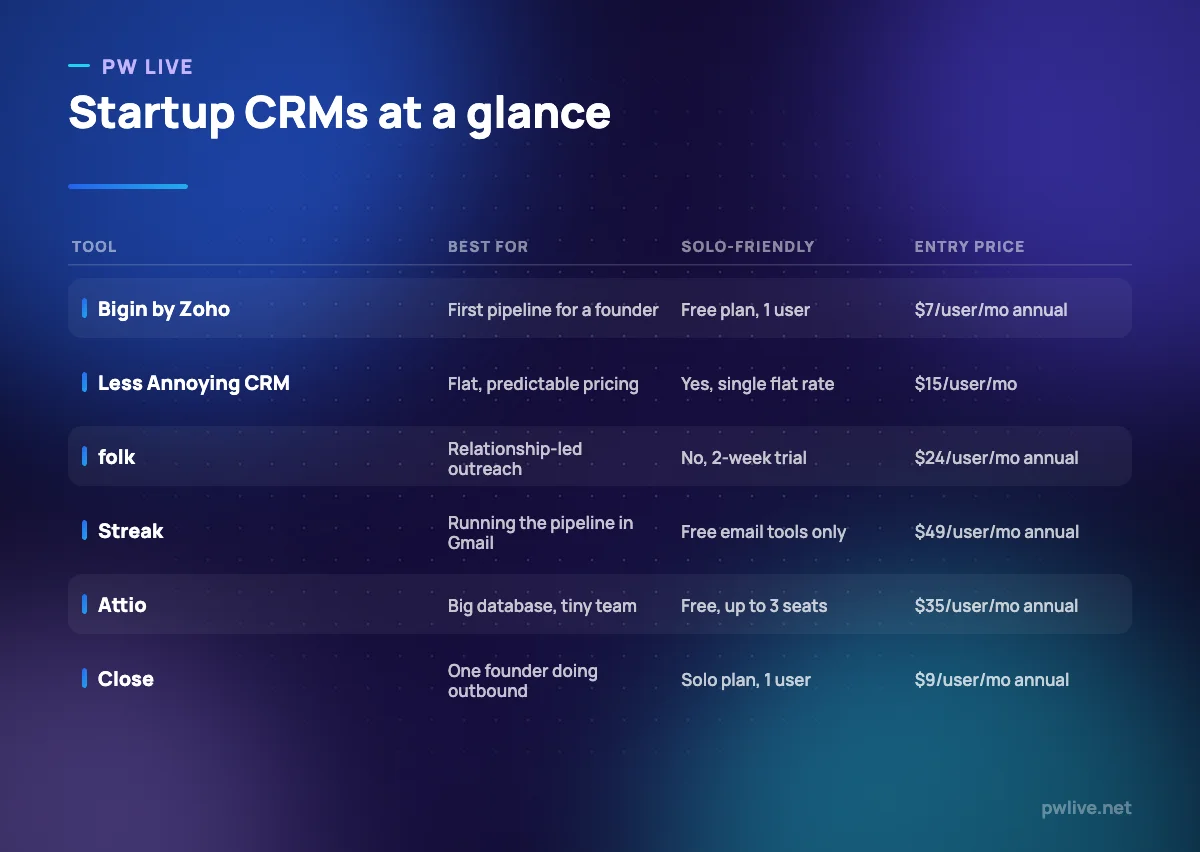
What it does well – Fast setup, with a clear pipeline view rather than empty dashboard widgets. – A permanent free plan, not a trial, with a working pipeline for one user. – The cheapest paid step-up here at $7 per user per month billed annually.
Where it falls short – The free plan is one user only, so there is no shared visibility at all. – 500 free records and one pipeline is a low ceiling for anything with volume. – Deliberately limited: no deep customisation, no advanced reporting.
Pricing: Free plan $0 for 1 user, 500 records and 1 pipeline. Express $7 per user per month billed annually or $9 monthly; Premier $12 or $15; Bigin 360 $18 or $21. Verified on the Bigin pricing page, 8 September 2026.
2. Less Annoying CRM – best for flat, predictable pricing
Less Annoying CRM does something almost nobody else here does: one plan, one price, everything included. There is no Growth tier that unlocks automation and no Enterprise tier that unlocks reporting. The product matches the philosophy, so if you want sequences, a dialler or campaign tooling you will need another tool alongside it.
What it does well – A single plan at $15 per user per month, so there is no feature-gating to decode. – 30-day free trial with no card required and no stated feature limits. – 25 GB file storage per user, generous for a tool at this price. – Pipelines, tasks, custom fields and email logging are included rather than tiered.
Where it falls short – No permanent free plan, only the trial. – No built-in marketing automation, sequences or dialler. – The vendor suggests staying below roughly 50,000 total contacts and companies.
Pricing: $15 per user per month plus applicable tax, one plan only, with a 30-day free trial. Verified on the Less Annoying CRM pricing page, 8 September 2026.
3. folk – best for relationship-led business development
folk is designed for the selling early startups actually do: warm introductions, investor conversations, partnership chats and a long tail of people you met once. It leans on contact capture, grouping and enrichment rather than a rigid deal pipeline. It is also the one tool here most likely to be useful before you have a product to sell, which pairs with the groundwork in what investors look for.
What it does well – Built around people and groups rather than a fixed sales pipeline. – Enrichment is included, with 500 credits a month on Standard and 1,000 on Premium. – Publishes annual and monthly per-user prices plus the annual total per seat.
Where it falls short – No permanent free plan; the trial runs two weeks. – No contact or record limits are published, so you cannot size the plan from the page. – At $24 per user per month billed annually, it is a real cost before revenue.
Pricing: Standard $24 per user per month billed annually ($288 per year) or $30 monthly; Premium $48 annually ($576 per year) or $60 monthly; Enterprise from $80 annually or from $100 monthly. Verified on the folk pricing page, 8 September 2026.
4. Streak – best for running a pipeline inside Gmail
Streak turns the Gmail inbox into a pipeline: threads become boxes, boxes sit in stages, and the whole thing lives in the interface a founder already has open all day. The pricing is where to slow down. Streak’s free offering is a set of email power tools rather than a free CRM plan, and the CRM itself starts at $49 per user per month billed annually, the most expensive entry point in this round-up.
What it does well – The pipeline lives inside Gmail, so there is no separate app to remember. – Free email power tools, including tracking and snippets, are useful on their own. – Shared pipelines and mail merge are included from the Pro plan.
Where it falls short – No free CRM plan is described; the free offer is email tools only. – The free mail merge is capped at 50 sends a day on personal Gmail accounts. – Pro at $49 per user per month billed annually is expensive next to Bigin.
Pricing: Pro $49, Pro+ $69 and Enterprise $129 per user per month billed annually, or $59, $89 and $159 billed monthly, with AI credits of 20, 150 and 500 per user per month. Verified on the Streak pricing page, 8 September 2026.
5. Attio – best for a large database run by a tiny team
Attio suits founders whose problem is data volume rather than deal volume: a market map of several thousand companies, an investor list, a waitlist that needs segmenting. Its free plan allows up to three seats and 50,000 records, far more headroom than anything else here at zero cost. The limitation is that the sales machinery sits on Pro, so it is a database first and an outbound tool second until you pay.
What it does well – Up to 3 seats and 50,000 records free, the largest free allowance in this list. – Custom objects and attributes without an administrator or scripting. – Real-time contact syncing and automatic enrichment listed on the free plan.
Where it falls short – Sequences and call intelligence require Pro at $79 per user per month billed annually. – Plus is capped at 10 seats, so growth means upgrading rather than adding seats. – Enterprise is pricing on request and billed annually only.
Pricing: Free $0 for up to 3 seats and 50,000 records; Plus $35 per user per month billed annually or $44 monthly, up to 10 seats; Pro $79 annually or $99 monthly, unlimited seats and 1,000,000 records; Enterprise on request. Verified on the Attio pricing page, 8 September 2026.
6. Capsule – best for a simple shared contact database for two
Capsule is the quiet option: a neat contact and opportunity database with tags, custom fields and a light pipeline. Its free plan allows two users and 250 contacts, which is the shape of a two-founder company tracking live prospects rather than hoarding leads. One note on transparency: when we fetched its pricing page, the plan structure and contact caps rendered but the per-seat prices did not, so we are not quoting figures we could not see.
What it does well – A free plan with two users, so both founders share the same records. – Contact caps published clearly for each paid tier. – A very short learning curve, which matters more than feature count at this stage.
Where it falls short – 250 free contacts is a tight ceiling for anyone doing the outbound work in finding your first ten customers. – Ultimate is quote-based and aimed at teams of five or more.
Pricing: Free plan $0 for 2 users and 250 contacts. Paid tiers are sold per user per month with contact caps of 30,000, 60,000 and 120,000; Ultimate is pricing on request. The numeric seat prices did not appear in the page text we captured, so we have not stated them. Verified on the Capsule pricing page, 8 September 2026.
7. Close – best for one founder doing serious outbound
Most CRMs treat a single user as a rounding error. Close does not: its Solo plan is explicitly a one-person plan, capped at one user and 10,000 leads, at $9 per user per month billed annually. Treat it as a place to prove that outbound works before investing in machinery, in the same spirit as building an MVP without a developer.
What it does well – A plan designed for exactly one person, priced accordingly. – Calling, emailing and sequencing are core rather than add-ons. – Publishes annual and monthly prices for all four tiers side by side.
Where it falls short – Solo is capped at one user and 10,000 leads, so it does not survive your first hire. – Automated workflows are not included on Solo or Essentials. – The step to Growth, where workflows and the power dialler live, is $99 per user per month billed annually.
Pricing: Solo $9, Essentials $35, Growth $99 and Scale $139 per user per month billed annually, or $19, $49, $109 and $149 billed monthly. Verified on the Close pricing page, 8 September 2026.
How to choose between them
Start with how many people will open the tool this year. One person with a simple pipeline should start free on Bigin. One person doing volume outbound should look at Close Solo. Two founders sharing records should compare Capsule’s free plan with Attio’s, and Attio wins immediately if the database is large.
Then decide whether you are managing deals or managing relationships. A staged pipeline with close dates suits Bigin, Close and Capsule. A network of people you will talk to repeatedly over years suits folk or Attio. Founders whose entire process happens over email should price Streak against the alternatives, because convenience is the only thing it is selling and $49 per user per month is a real number.
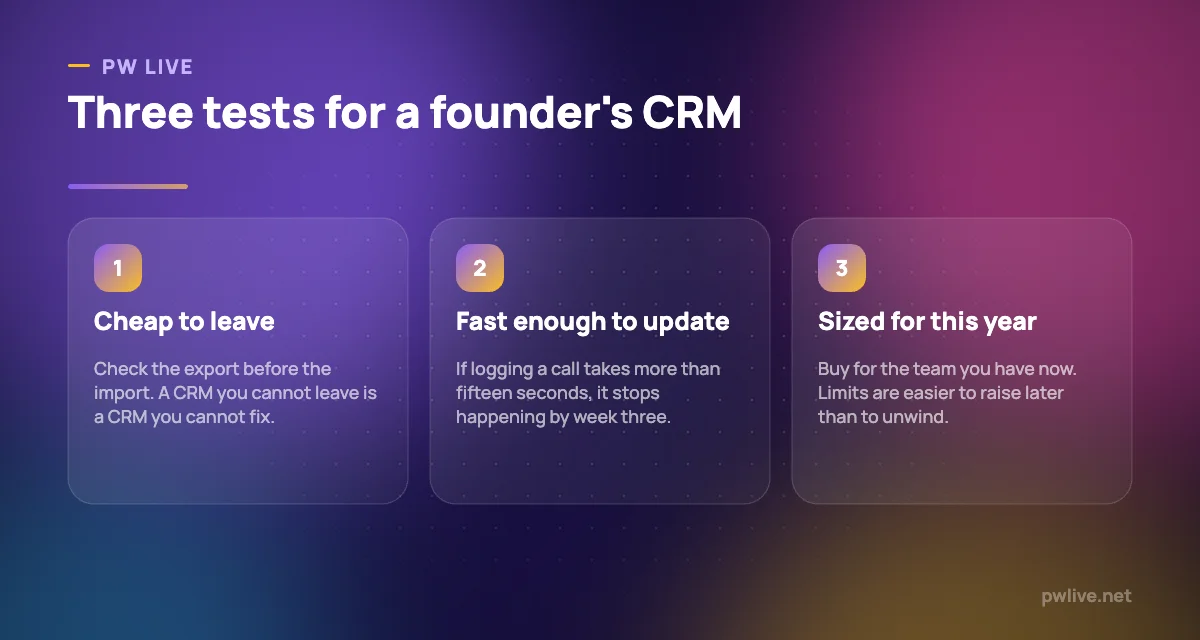
Finally, resist buying for the company you hope to be. Seat limits and record caps are easy to raise later and painful to unwind, and an annual commitment made before you have product-market fit is a bet on an unproven process. Pay monthly until the pipeline is real, then switch to annual for the saving. More tool guides are in our business section, and the outreach side is covered in the digital marketing skill track.
Key takeaways
- Bigin, Attio and Capsule offer permanent free plans; folk, Streak, Close and Less Annoying CRM do not, and their trials should not be counted as free.
- Free-plan limits are the real constraint: Bigin allows 1 user and 500 records, Capsule 2 users and 250 contacts, Attio 3 seats and 50,000 records.
- Close Solo is one of the few plans designed and priced for a single founder, at $9 per user per month billed annually.
- Less Annoying CRM’s single flat plan removes feature-gating entirely.
- Automation is usually the upsell: Close puts workflows on Growth and Attio puts sequences on Pro.
- Pay monthly while you are still proving the process; the annual discount only saves money if you stay a year.
Frequently asked questions
What is the best free CRM for a solo founder?
Bigin’s free plan is the most practical single-user option, with one pipeline and 500 records. If your database is large but your team is small, Attio’s free plan allows up to three seats and 50,000 records.
Do startups actually need a CRM?
Not on day one. A spreadsheet is fine while you can hold every conversation in your head. The moment you forget a promised follow-up, or a second person needs to see the pipeline, a CRM starts paying for itself.
Should I pay annually to get the discount?
Only once you are confident the tool fits. Annual billing is cheaper on almost every platform here, but the monthly rate buys you the option to leave, which is worth more in the first few months.
Which startup CRM is easiest to leave?
Check the export before you commit, not after. All of these vendors document data export, but the practical test is to add ten records, run an export, and see whether the file contains your notes and activity history as well as the contact fields.
Pricing checked 2026-09-08. 6 of 7 prices in this article were read from the vendor’s own pricing page on that date; the rest publish no figure, so we describe the model instead. Vendors change prices without notice, so open the linked page before you commit.
Keep learning with PW Live
Browse every tool comparison, or follow the Digital Marketing track to learn the skills these tools support.




Leave a Reply