

Screen fatigue is what you feel when your eyes are dry and heavy, your head aches slightly, and your attention slides off the page after twenty minutes of a lecture you actually wanted to watch. If most of your studying happens on a laptop or phone, this is a daily tax.
It is not one problem. It is a stack of small ones: how your screen is set up, how long you go without looking away, how you sit, and how many things are competing for your attention at once.
The good news is that the fixes are mostly mechanical, cheap and fast. This guide covers the setup, the habits and the focus side, which is usually the part people ignore.
What screen fatigue actually is
Working at a screen asks your eyes to hold focus at one fixed distance for a long time, in a bright rectangle, often in a room that is dimmer than the screen. Your blink rate tends to drop when you are concentrating, which is why eyes feel dry after a long session.
Add a slightly wrong screen height, a window reflecting behind you and small text, and you get the familiar package: tired eyes, a stiff neck, a dull headache and a mind that keeps wandering.
Attention is part of the same picture. When your body is uncomfortable, focus becomes expensive, and you start reaching for your phone to escape the discomfort without noticing why.
Fix the setup before you fix anything else
Most people can remove a large chunk of screen discomfort in ten minutes without buying anything.
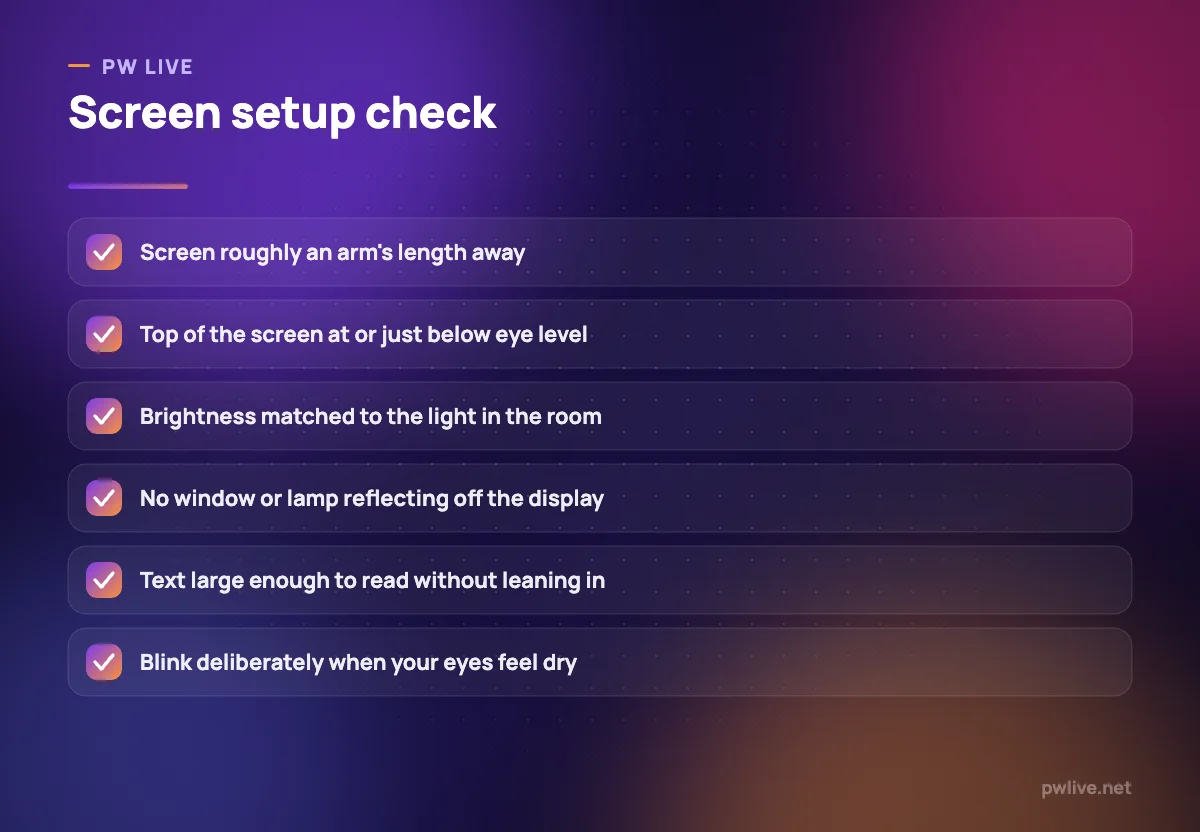
- Put the screen roughly an arm’s length away. Closer than that makes your eyes work harder for no benefit.
- Raise the top of the screen to around eye level. A stack of books under a laptop is a perfectly good stand.
- Match brightness to the room. A screen that glows in a dark room is fatiguing, and so is a dim screen in daylight.
- Kill glare. Turn the desk so windows and lamps are to the side rather than behind you or behind the screen.
- Increase text size and zoom. Squinting at small type is a common and completely avoidable cause of strain.
- Keep the room reasonably lit. Studying in the dark with only a screen on is a habit worth breaking.
If you are choosing a new machine, screen size and comfort matter more for long study days than raw specifications, which our guide on how to choose a laptop covers in more detail.
Build breaks into the session, not around it
The single most useful habit is simple: every so often, look away from the screen at something far across the room for a short while. Many people set a reminder for roughly every twenty minutes at first, until it becomes automatic.
Longer breaks matter too. After a study block, stand up, walk a little, and let your eyes rest on something at a distance. Windows are ideal because they give you both light and depth.
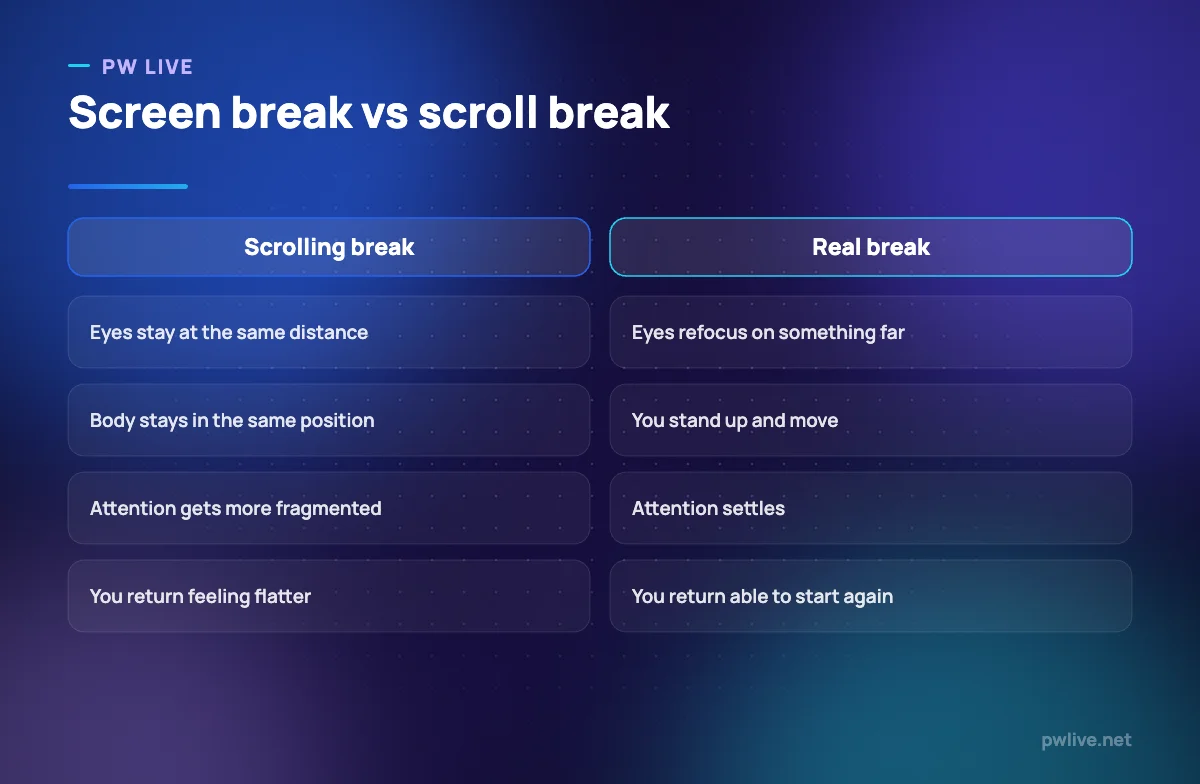
The important distinction is between a real break and a screen swap. Putting down a laptop to pick up a phone changes nothing for your eyes, your posture or your attention. Our comparison below makes that concrete, and our guide to a simple exercise routine for students explains why movement in breaks pays for itself.
Protect focus, not just eyes
Screen fatigue and lost focus feed each other. Tired eyes make hard material feel harder, so you switch tabs, and switching tabs makes the next stretch of concentration even more expensive.
Three things help more than anything else:
- One task per screen. Close every tab that is not part of the current task. Notes, video, notifications and messages together will beat any amount of willpower.
- Decide the block before you start. Know what you are doing and for how long, so the screen is a tool rather than an open-ended place to be.
- Put the phone out of reach. Not face down on the desk, but in a bag or another room.
If you study largely from recorded classes, watching passively is where most hours quietly disappear. Our guide to studying from video lectures without wasting hours covers how to turn watching into work, and the deep work routine for students covers structuring the block itself.
Sitting, screens and the rest of your body
Eye strain rarely arrives alone. A laptop on a bed pushes your head forward and your shoulders round, which produces neck ache that you then blame on the screen.
Raise the screen, bring the keyboard down to a comfortable height, and get your feet flat. If raising the laptop leaves the keyboard too high, a separate keyboard is the cheapest useful upgrade you can make.
Change position regularly regardless of how good your setup is. No posture is comfortable for three unbroken hours. Our guide on studying without back, neck and wrist pain goes through the full desk setup, and our study space setup guide helps if you are working in a small or shared room.
Evenings, phones and winding down
Late-night screen use is a double problem: it strains eyes that are already tired and it makes it harder to settle down afterwards.
A few practical adjustments help. Lower screen brightness in the evening, move to larger text, and set a point in the evening after which the phone stays out of the bedroom. If reading at night is part of your routine, paper or an e-reader is easier on the eyes than a bright phone.
If your phone is the harder habit, treat it separately rather than as a screen-hygiene footnote. Our digital detox guide sets out a realistic reset, and our sleep and study guide explains what late screens cost you the next day.
When to get your eyes checked
Habits and setup solve most everyday discomfort. They do not solve everything, and screen fatigue is sometimes the first sign of an uncorrected vision problem.
Book an eye test if you find yourself squinting, holding things closer, getting frequent headaches, noticing blurred or double vision, or struggling to read the board or a screen that others read easily. This is routine and worth doing even if you think your eyes are fine.
More broadly: if eye discomfort, headaches or trouble concentrating persist despite a sensible setup, or start affecting your daily life, speak to a doctor, a counsellor, or a trusted adult or friend rather than assuming it is just study fatigue. For more on the health side of studying, browse the health and wellness archive, and for the focus side, the productivity skill track.
Key takeaways
- Screen fatigue is a stack of small problems: distance, height, glare, text size, blink rate and unbroken time.
- Fixing the setup takes ten minutes and no money, and removes most everyday discomfort.
- Look at something far away regularly, and treat phone scrolling as a screen swap rather than a break.
- Focus and eye comfort are linked. One task per screen, a planned block, and the phone out of reach.
- Raise the screen and lower the keyboard so your neck and wrists are not paying for your eyes.
- Get an eye test if strain persists, and speak to a doctor or someone you trust if it affects daily life.
Frequently asked questions
Do blue light glasses help with screen fatigue?
Evidence for them is mixed, and most people get a bigger improvement from screen distance, brightness, glare and regular breaks. Fix those first before spending money on accessories.
Is dark mode better for my eyes?
It suits some people and not others. What matters more is that the screen brightness roughly matches the light in the room, so you are not staring at a bright rectangle in a dark space.
How long can I study at a screen in one go?
Long enough to get real work done, short enough that you are not sitting rigid for hours. Most students do well with focused blocks separated by short breaks where they stand up and look into the distance.
Why do I feel more tired after online classes than in-person ones?
You are sitting still, holding focus at one distance, and often multitasking with messages or other tabs at the same time. Watching actively with notes and pauses, as covered in our guide to taking notes you will actually revise, tends to feel less draining than passive watching.
Keep learning with PW Live
Browse every guide in Health & Wellness, or pick a skill track and follow the roadmap step by step.





Leave a Reply