
Cloud computing basics are worth understanding whether you are a student storing coursework or a small business owner deciding where your billing system should live. The word “cloud” gets used as marketing dust, but the underlying idea is unglamorous and easy to grasp.
The cloud is somebody else’s computer, in somebody else’s building, that you rent by the hour or the month over the internet. That is genuinely the whole concept. Everything else is detail about how much of the machine you rent and how much of the maintenance you hand over.
This guide covers what you are actually buying, what it costs, who is responsible when something breaks, and how to start without creating a bill or a security problem you did not expect.
What the cloud replaced
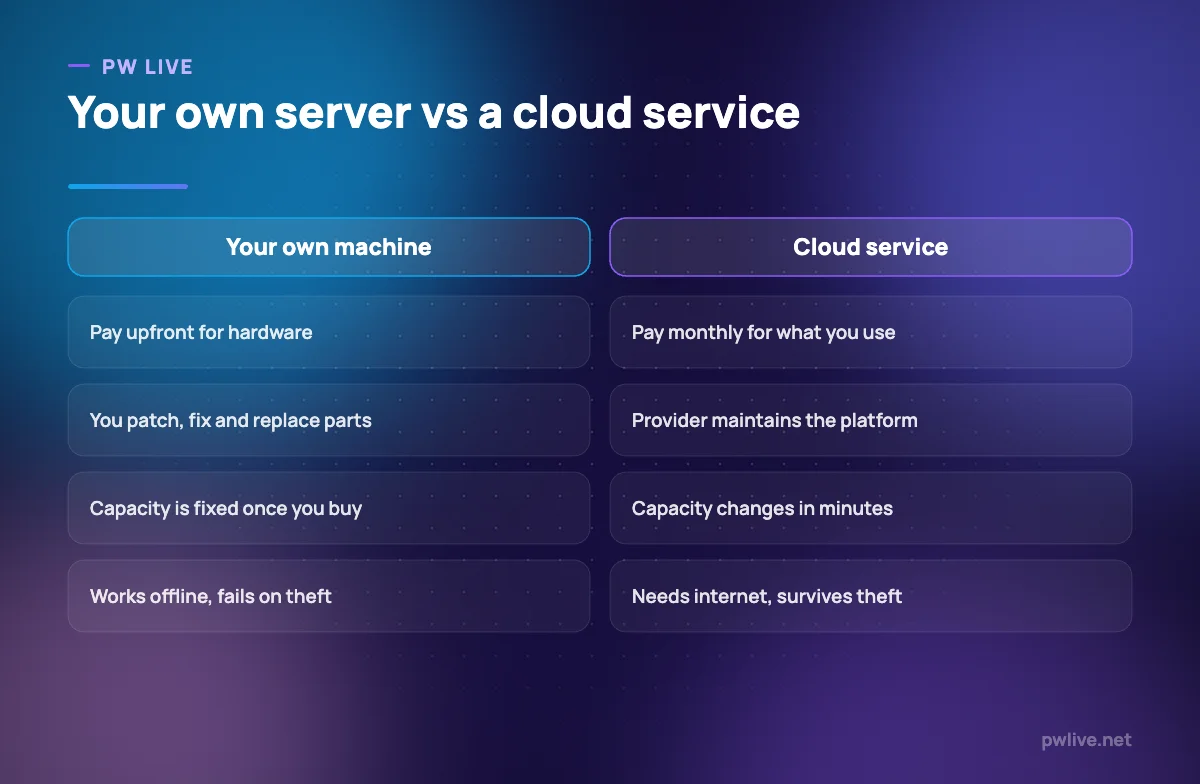
Before cloud services, running any software for other people meant buying a physical server, putting it somewhere with power and cooling, installing an operating system, keeping it patched, and buying a second one in case the first died.
That model has three painful properties. You pay for capacity before you know if you need it. You cannot grow quickly. And you are the one awake at 2am when a disk fails.
Cloud providers bought the hardware at enormous scale and rent slices of it out. You get capacity on demand, you stop paying when you stop using it, and the hardware failures become someone else’s job.
The trade is real, though. You are now dependent on an internet connection, on a provider’s pricing decisions, and on their outages becoming your outages.
The three service models, without the acronym soup
Almost every cloud product falls into one of three layers. The difference is how much you manage yourself.
- Infrastructure as a service (IaaS) rents you raw building blocks: virtual machines, storage, networking. You install and manage everything above that. Most control, most work.
- Platform as a service (PaaS) rents you a place to run your application. You hand over your code; the provider handles the operating system, scaling and patching. Less control, far less maintenance.
- Software as a service (SaaS) rents you a finished application. Your email, your accounting tool, your document editor. You manage nothing but your data and your users.
A useful way to remember it: IaaS is renting an empty kitchen, PaaS is renting a kitchen with the equipment installed, SaaS is ordering the meal.
Most students and small businesses live almost entirely in SaaS and occasionally touch PaaS. You rarely need to start at the infrastructure layer, and starting there is the most common way to waste money.
Public, private and hybrid: where your data sits
Public cloud means shared infrastructure operated by a large provider, isolated logically rather than physically. It is what almost everyone means by “the cloud”.
Private cloud means infrastructure dedicated to one organisation, either self-hosted or ring-fenced by a provider. Usually chosen for regulatory reasons rather than technical ones.
Hybrid keeps some systems in-house and some in a public cloud, connected together. Common in businesses that have existing systems they cannot easily move.
For a small business in India, one extra question matters: where physically is the data stored? Some sectors and some client contracts require data to stay within the country. Providers let you choose a region when you create a resource, and changing it later is painful. Decide before you start.
What it actually costs, and how bills escape
Cloud pricing is usage-based, which is wonderful until it is not. You are typically billed for compute time, storage volume, data transferred out, and per-request charges on some services.
The bills that shock people almost always come from the same few places:
- Machines left running. A test server you spun up in March and forgot bills every hour until December.
- Data transfer out. Getting data in is usually cheap or free. Getting it out is not.
- Storage that only grows. Backups, logs and old snapshots accumulate silently.
- Free tiers expiring. Trial credits end and the meter starts.
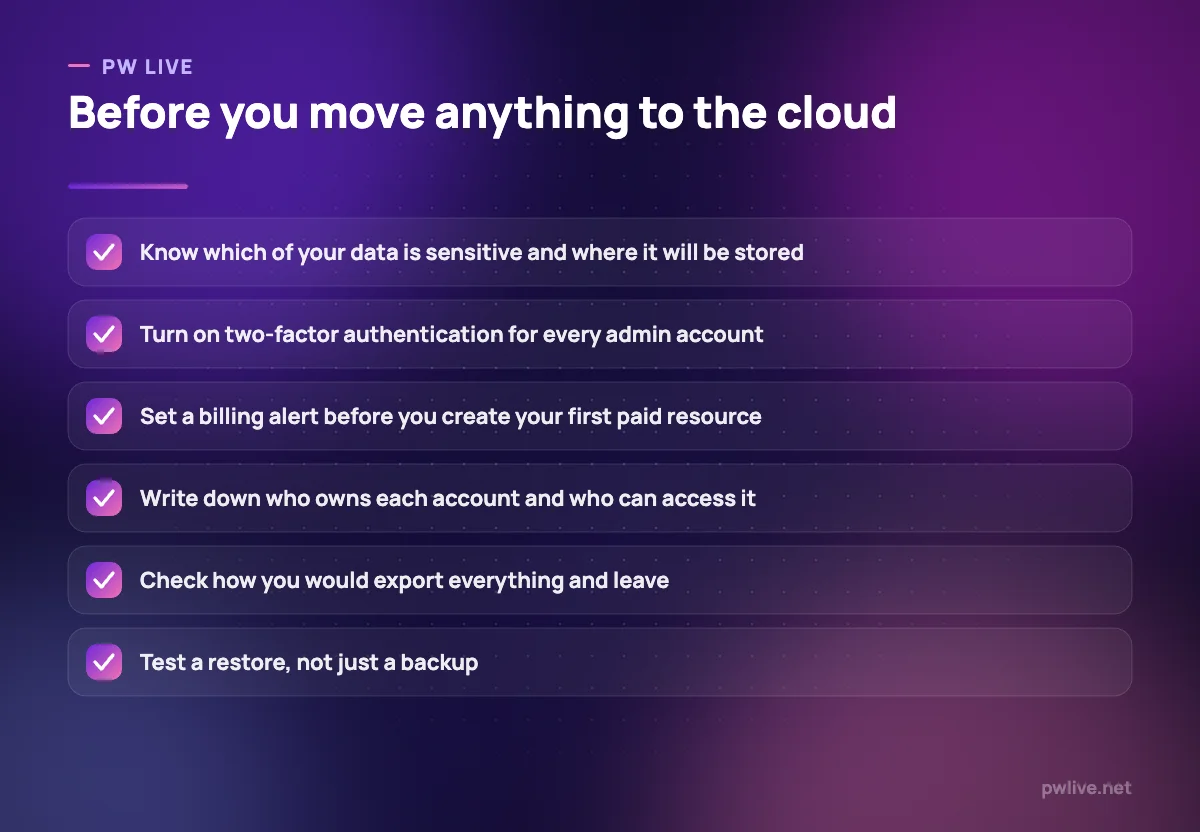
Three defences cover most of it: set a billing alert on day one, tag every resource with what it is for, and review the bill line by line once a month. That review fits neatly into the same slot as the weekly review habit, just at a monthly cadence.
If you are running a business, treat cloud spend as a recurring operating cost in your projections, not an occasional expense. Our guide to cash flow basics explains why quiet monthly outflows are the ones that catch people out.
Security: who is responsible for what
This is the point most beginners get wrong. Cloud providers operate on a shared responsibility model. They secure the building, the hardware and the platform. You secure your accounts, your access settings, your configuration and your data.
Almost every widely reported cloud data leak has been a customer configuration problem: a storage bucket left open to the public internet, an admin account without two-factor authentication, or credentials committed into a public code repository.
Your side of the deal comes down to a short list:
- Turn on two-factor authentication for every account with administrative rights.
- Give each person the minimum access they need, and remove it when they leave.
- Never put passwords or API keys in code, documents or chat messages.
- Default new storage to private and only open what must be public.
- Keep an offline or separate-provider copy of anything you cannot afford to lose.
If any of that feels unfamiliar, start with how to keep your accounts safe and a proper password manager before you create a single cloud resource.
What students actually get from the cloud
For a student, the practical wins are ordinary and immediate. Your notes sync across phone and laptop, so a broken device costs you a device and not a semester. Group projects live in one shared document instead of six conflicting attachments. Version history means an accidental deletion is a two-click recovery.
Beyond storage, cloud platforms let you run code, host a project and share a working link without owning a server. That is how a college assignment becomes something you can put in front of a recruiter. Our guide to building a portfolio when you have no work experience leans heavily on exactly this.
Two habits make the difference: understand that syncing is not the same as backing up, and keep a second copy somewhere independent. How to back up your notes and never lose work again walks through a setup that survives a lost laptop.
What small businesses actually get
The honest benefit is that you can run a serious operation without an IT department. Email, files, accounting, invoicing, customer records and a website can all be rented services with a monthly bill and no hardware.
Sensible order of adoption:
- Files and email first. Shared, backed up, accessible from anywhere.
- Then the tools tied to money. Invoicing and accounting, where audit trails matter.
- Then customer records. One place, with access controls.
- Only then anything custom. Build once you know the workflow works.
Two rules keep you out of trouble. Check your exit route before you commit: if you cannot export your customer list and invoices in a usable format, you do not own your data in any practical sense. And keep a written list of every service, who pays for it, and who has the admin login. Businesses lose access to their own systems surprisingly often when one person leaves.
For the wider picture of setting up properly, see how to register a small business in India, and browse the technology section for related tooling guides. If you want to build the underlying skills, the coding and programming track is the right place to go deeper.
Key takeaways
- The cloud is rented computing. The real question is how much of the stack you rent.
- IaaS, PaaS and SaaS differ only in how much maintenance you keep. Start at SaaS.
- Choose your data region deliberately, especially if clients or regulations care.
- Usage-based billing rewards discipline. Set alerts, tag resources, review monthly.
- Providers secure the platform; you secure your accounts, access and configuration.
- Syncing is not backup. Keep an independent copy of anything you cannot lose.
Frequently asked questions
Is cloud storage the same as a backup?
No. Sync services copy your changes, including deletions and corruption, to every device. A backup is a separate copy that you can restore from a point in time, ideally held somewhere other than your main provider.
Do I need to learn a cloud platform to get a job?
For many technical roles, some familiarity helps, because most companies run on rented infrastructure. Start by deploying one small project end to end rather than collecting certificates you cannot demonstrate.
What happens to my data if the provider goes down?
Large providers have outages, and during one you may be unable to reach your data even though it is intact. This is exactly why an independent second copy of critical files matters, regardless of how reliable your provider usually is.
Is the cloud cheaper than buying my own hardware?
Often at small scale and when usage varies, because you avoid paying upfront for capacity you may not need. At very large and very steady scale the maths can flip, which is why some established companies move workloads back in-house.
Keep learning with PW Live
Browse every guide in Technology & Software, or pick a skill track and follow the roadmap step by step.





Leave a Reply